
Large organizations usually adopt the “subscription democratization” principle to organize their cloud resources, since that allows for a cleaner billing structure and an easier way to manage Azure Policy assignments and Role-Based Access Control. The indirect consequence of having many subscriptions is having many virtual networks (VNet) too, which need to be provided with connectivity.
The most common pattern to interconnect a large number of Azure virtual networks with each other is the hub-and-spoke pattern, where common services such as network appliances are deployed into a hub VNet, and spoke VNets are then peered to this central VNet (and optionally also to each other). Firewall and connectivity (VPN, ExpressRoute, SDWAN) are the most popular common services that are deployed in this central or hub VNet, either provided by managed-services such as Azure Firewall or Azure VPN Gateways or by Network Virtual Appliances (NVAs).
There are two options in which you can deploy the hub-and-spoke pattern in Azure: self-managed or Microsoft-managed. The latter is called Virtual WAN, and Microsoft takes care of maintaining the hub VNets and the infrastructure inside of them. As such, there is not much you can do to influence its scalability, since it is outside of your administrative scope. However, in the self-managed hub-and-spoke architecture you are free to configure all of its aspects to increase its efficiency and effectiveness, and that is what we are going to explore in this article. More concretely, we are going to focus on increasing its scalability in terms of the number of spoke VNets that can be aggregated into a single hub VNet, since the more spokes you can connect to a hub, the more cost-effective its central services become.
We will explore how the new “Disable Peering Routes” feature can be used to greatly simplify configuration and maintenance of self-managed hub-and-spoke environments and work around the limit of routes per route table, and how you can reduce the number of routes advertised to ExpressRoute with the “Advertised Gateway Prefixes”. I will also do a short digression on whether the “Allow Gateway Transit” and “Use Remote Gateways” are technically still required. Spoiler alert: in pure ExpressRoute scenarios they are, otherwise they are not.
TL;DR: this is the maximum number of spokes per hub depending on the WAN protocol that you use:
| VPN | SDWAN | ExpressRoute | VPN over ExpressRoute | |
| Max spokes with AVNM | 5,000 | 5,000 | 1,000 | 5,000 |
| Max spokes without AVNM | 650 | 650 | 650 | 650 |
The test bed
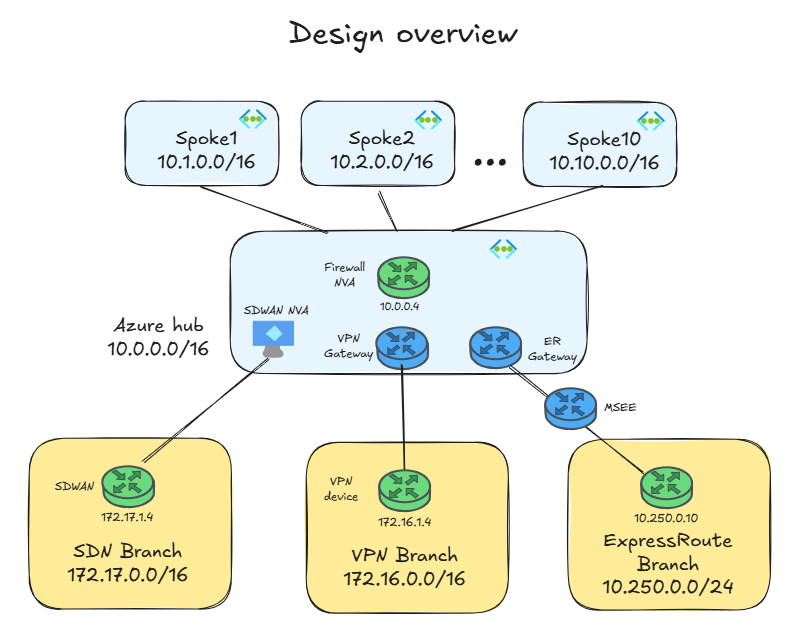
To test different aspects of the hub and spoke architecture, I have deployed this architecture in Azure, consisting of 10 spokes and one hub VNet with two network services (firewalling and site-to-site VPN connectivity):
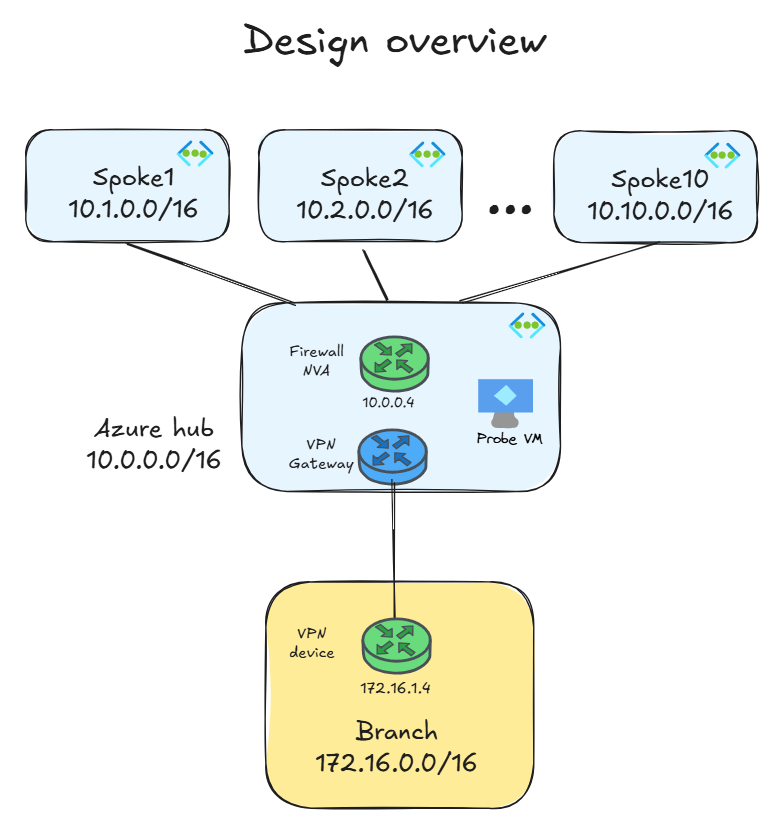
This is a very common architecture, and later in the post I will introduce some variations such as ExpressRoute and SDWAN.
What is the maximum number of spokes I can attach to the hub?
To this question you will get my favorite answer: it depends. There are three limits at play here, and the first one you hit will determine the maximum number of spokes you can connect to any given hub:
- Maximum number of peerings per VNet: as per the documented VNet limits in October 2026, this is 650. This means that in the hub you can have a maximum of 650 peerings, including peerings to spokes and to other hubs. This limit used to be 500 for a long time, and it was raised to 650 last September.
- Maximum numbers of routes per route table: this one is not trivial and might catch you off guard, since it depends on the chosen architecture. If you need to send traffic from your WAN devices (SDWAN appliances, site-to-site VPN gateways or ExpressRoute gateways), you need to configure a route table where you override every single VNet prefix. This limit used to be 400, and it was raised to 600 in April 2026 and later on to 1,000.
- Maximum number of advertisements to ExpressRoute: one of the most dangerous limits in Azure. Per default, every prefix that you configure in your VNets will be advertised to ExpressRoute. If you send SDWAN prefixes to ExpressRoute over Azure Route Server, those will also add to the count. Once you exceed this limit, your ExpressRoute will stop working. Yes, you read correctly, your ExpressRoute circuit will stop: you don’t want to hit this one. This limit was 200 IPv4 routes many moons ago, but it was raised to 1,000 a while back. For IPv6 it is 100 routes.
If you are curious about when these and other limits have been changed, the change history for the relevant documents is publicly available in GitHub: History for includes/azure-virtual-network-limits.md and History for includes/expressroute-limits.md.
The route table limit
Let’s look at the second limit in the previous section, since it is possibly the most obscure one. Let’s assume you have the scenario described in my test lab above, and you need to configure the route table in the gateway subnet so that traffic addressed to the spokes is delivered to the firewall. Your first intuition would probably be configuring a single route that encompasses all of the spoke prefixes, for example like this:
❯ az network route-table route list --route-table-name $rt_name -g $rg -o table
AddressPrefix    HasBgpOverride    Name               NextHopIpAddress    NextHopType       ProvisioningState    ResourceGroup
---------------  ----------------  -----------------  ------------------  ----------------  -------------------  -----------------------------
10.0.0.0/8       False             to-spokes-summary  10.0.1.4            VirtualAppliance  Succeeded            rg-disable-peering-routes-lab
The next step would be looking into the effective routes of the VPN gateway, but Microsoft doesn’t allow you to do that. So you might just assume that it works and carry on with your life, unsuspecting that you made a mistake. If you deploy an auxiliary VM in the hub and apply the same route table as you put in the GatewaySubnet, you would be able to inspect its effective routes, and you would see something like this:
❯ az network nic show-effective-route-table -n $nic -g $rg -o table
Source                 State    Address Prefix    Next Hop Type          Next Hop IP
---------------------  -------  ----------------  ---------------------  -----------------------
Default                Active   10.0.0.0/16       VnetLocal
Default                Active   10.1.0.0/16       VNetPeering
Default                Active   10.2.0.0/16       VNetPeering
Default                Active   10.3.0.0/16       VNetPeering
Default                Active   10.4.0.0/16       VNetPeering
Default                Active   10.5.0.0/16       VNetPeering
Default                Active   10.6.0.0/16       VNetPeering
Default                Active   10.7.0.0/16       VNetPeering
Default                Active   10.8.0.0/16       VNetPeering
Default                Active   10.9.0.0/16       VNetPeering
Default                Active   10.10.0.0/16      VNetPeering
VirtualNetworkGateway  Active   172.16.0.0/16     VirtualNetworkGateway  20.240.221.177
VirtualNetworkGateway  Active   172.18.0.0/16     VirtualNetworkGateway  10.2.146.34 10.2.146.35
VirtualNetworkGateway  Active   172.18.1.0/30     VirtualNetworkGateway  10.2.146.35
Default                Active   0.0.0.0/0         Internet
[...]
User                   Active   10.0.0.0/8        VirtualAppliance       10.0.1.4
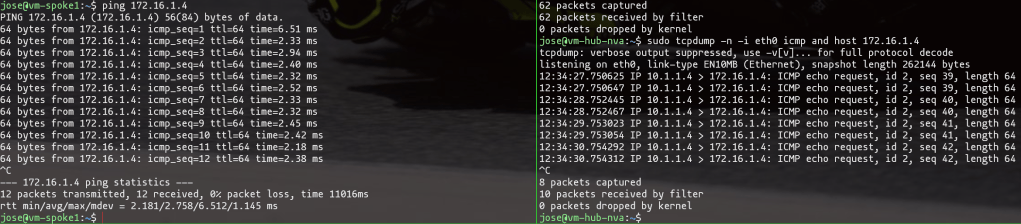
This means that Azure injects into the gateway subnet system routes for every spoke VNet. Since these system routes are more specific than our 10.0.0.0/8 summary that we configured in the route table, Azure will prefer them according to the universal Longest Prefix Match (LPM) rule, and bypass the firewall. The consequence is asymmetric traffic, that I verified by inspecting the packets that the NVA can see (on the right of the following picture) when a virtual machine in a spoke sends and receives traffic from on-premises (on the left of the picture). As you can see, traffic from the spoke to on-premises is captured by tcpdump in the NVA, but traffic back from on-premises to Azure is not there, which means that it is bypassing the firewall:
The workaround that we had to do (until now)
You probably already know this workaround, since chances are that you are using it: instead of that 10.0.0.0/8 summary, you need to configure static routes that match exactly the prefixes configured in each of the spoke VNets, as the following figure shows:
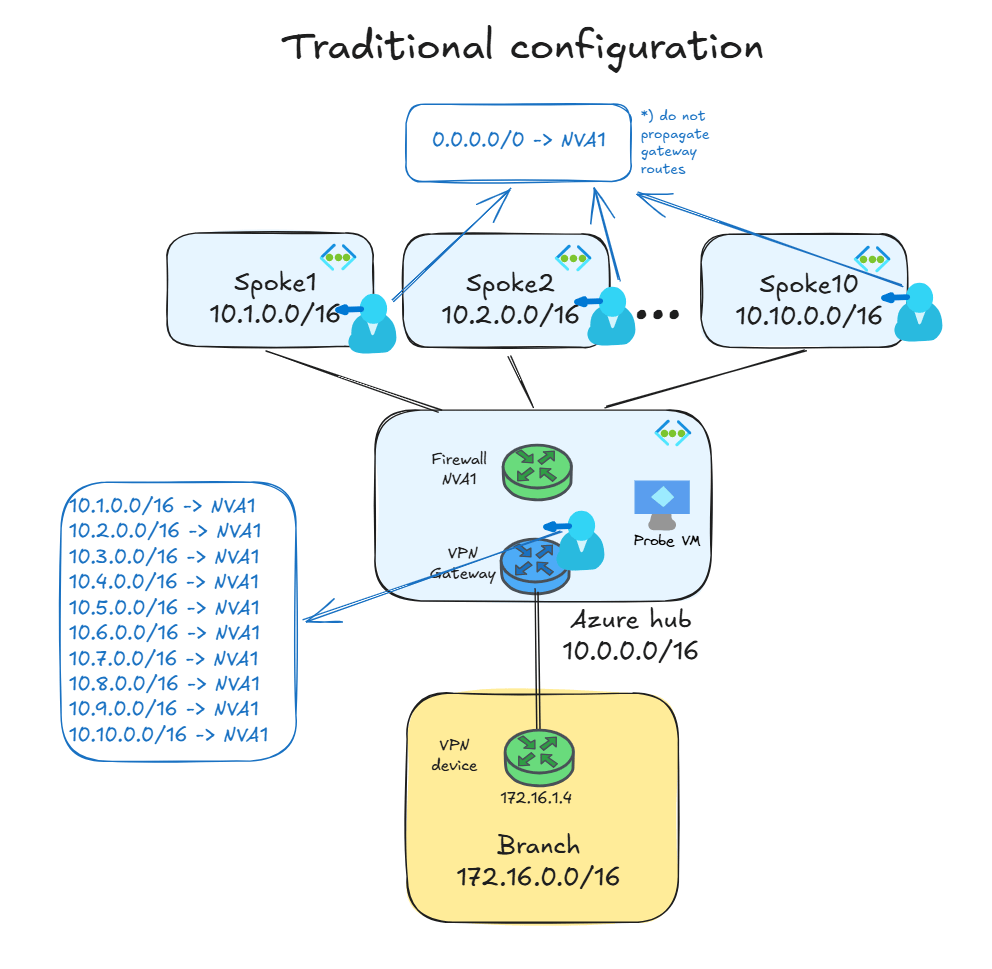
Consequently, this is how the route table looks like now:
❯ az network route-table route list --route-table-name $rt_name -g $rg -o table
AddressPrefix    HasBgpOverride    Name     NextHopIpAddress    NextHopType       ProvisioningState    ResourceGroup
---------------  ----------------  -------  ------------------  ----------------  -------------------  -----------------------------
10.1.0.0/16      False             spoke01  10.0.1.4            VirtualAppliance  Succeeded            rg-disable-peering-routes-lab
10.2.0.0/16      False             spoke02  10.0.1.4            VirtualAppliance  Succeeded            rg-disable-peering-routes-lab
10.3.0.0/16      False             spoke03  10.0.1.4            VirtualAppliance  Succeeded            rg-disable-peering-routes-lab
10.4.0.0/16      False             spoke04  10.0.1.4            VirtualAppliance  Succeeded            rg-disable-peering-routes-lab
10.5.0.0/16      False             spoke05  10.0.1.4            VirtualAppliance  Succeeded            rg-disable-peering-routes-lab
10.6.0.0/16      False             spoke06  10.0.1.4            VirtualAppliance  Succeeded            rg-disable-peering-routes-lab
10.7.0.0/16      False             spoke07  10.0.1.4            VirtualAppliance  Succeeded            rg-disable-peering-routes-lab
10.8.0.0/16      False             spoke08  10.0.1.4            VirtualAppliance  Succeeded            rg-disable-peering-routes-lab
10.9.0.0/16      False             spoke09  10.0.1.4            VirtualAppliance  Succeeded            rg-disable-peering-routes-lab
10.10.0.0/16     False             spoke10  10.0.1.4            VirtualAppliance  Succeeded            rg-disable-peering-routes-lab
And this is what effectives routes are, showing the peering routes (at the top) being now correctly invalidated by the user-defined routes (at the bottom):
❯ az network nic show-effective-route-table -n $nic -g $rg -o table                                                                                                        14:28:33 [41/468]
Source                 State    Address Prefix    Next Hop Type          Next Hop IP
---------------------  -------  ----------------  ---------------------  -----------------------
Default                Active   10.0.0.0/16       VnetLocal
Default                Invalid  10.10.0.0/16      VNetPeering
Default                Invalid  10.1.0.0/16       VNetPeering
Default                Invalid  10.2.0.0/16       VNetPeering
Default                Invalid  10.3.0.0/16       VNetPeering
Default                Invalid  10.4.0.0/16       VNetPeering
Default                Invalid  10.5.0.0/16       VNetPeering
Default                Invalid  10.6.0.0/16       VNetPeering
Default                Invalid  10.7.0.0/16       VNetPeering
Default                Invalid  10.8.0.0/16       VNetPeering
Default                Invalid  10.9.0.0/16       VNetPeering
VirtualNetworkGateway  Active   172.16.0.0/16     VirtualNetworkGateway  20.240.221.177
VirtualNetworkGateway  Active   172.18.0.0/16     VirtualNetworkGateway  10.2.146.34 10.2.146.35
VirtualNetworkGateway  Active   172.18.1.0/30     VirtualNetworkGateway  10.2.146.35
Default                Active   0.0.0.0/0         Internet
User                   Active   10.1.0.0/16       VirtualAppliance       10.0.1.4
User                   Active   10.2.0.0/16       VirtualAppliance       10.0.1.4
User                   Active   10.3.0.0/16       VirtualAppliance       10.0.1.4
User                   Active   10.4.0.0/16       VirtualAppliance       10.0.1.4
User                   Active   10.5.0.0/16       VirtualAppliance       10.0.1.4
User                   Active   10.6.0.0/16       VirtualAppliance       10.0.1.4
User                   Active   10.7.0.0/16       VirtualAppliance       10.0.1.4
User                   Active   10.8.0.0/16       VirtualAppliance       10.0.1.4
User                   Active   10.9.0.0/16       VirtualAppliance       10.0.1.4
User                   Active   10.10.0.0/16      VirtualAppliance       10.0.1.4
The traffic asymmetry is now fixed:

However, this approach has two major inconveniences that have been a pain in the neck for countless Azure network administrators:
- For every new spoke you add or remove, or whose VNet prefixes you modify, you need to also change the route table assigned to the gateway subnet or the SDWAN NVA subnet. This can be a pretty severe headache, especially for environments where the provisioning of new subscriptions and their corresponding VNets is automated.
- For every prefix defined in your spoke VNets (at the VNet level, not at the subnet level) you will need a route. If you remember, the limit of routes used to be 400, so you can imagine the surprise of countless Azure network administrators when they found out that they were not able to provision their spoke number 401, even if they were well below the 500 peering limit (as described above, note that these limits are now 1,000 routes per route table and 650 peerings respectively).
This limitation even drove many Azure administrators to introduce alternative, suboptimal designs. For example, it is quite common deploying SDWAN appliances not in the hub VNet, but in a dedicated spoke. This way, it will not inherit the peering system routes, but traffic between the SDWAN appliances and the workloads in the spokes will traverse two VNet peerings instead of one, effectively doubling the VNet peering costs.
Finally: DisablePeeringRoute
Microsoft has made available a feature to disable peering routes (DPR) in a given subnet. This is configured at the route table level, and it will affect all subnets that are associated to that route table. You can verify whether this setting is active by inspecting the disablePeeringRoute attribute of the route table:
❯ az network route-table update -n $rt_name -g $rg --disable-peering-route All -o none
❯ az network route-table show -n $rt_name -g $rg --query disablePeeringRoute -o tsv
All
The configuration of the route table applied at the gateway subnet is much simpler now, and we can go back to our original idea with just a single summary route for 10.0.0.0/8:
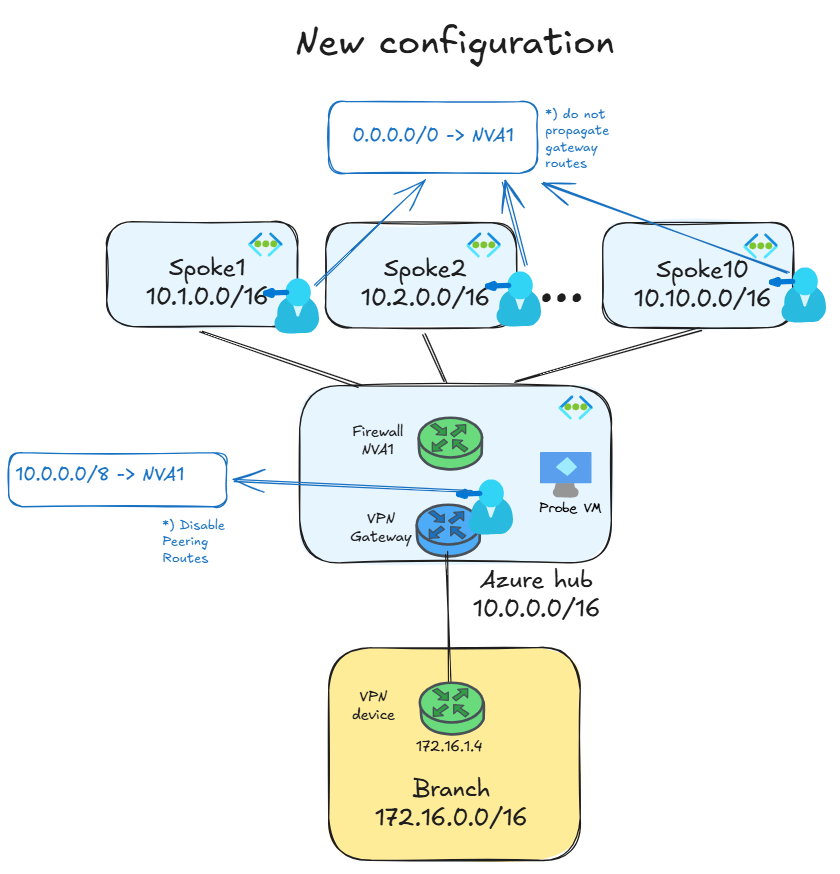
If we inspect the effective routes of the probe VM (where I have the same route table as in the GatewaySubnet), the peering routes have now vanished:
❯ az network nic show-effective-route-table -n $nic -g $rg -o table
Source                 State    Address Prefix    Next Hop Type          Next Hop IP
---------------------  -------  ----------------  ---------------------  -----------------------
Default                Active   10.0.0.0/16       VnetLocal
VirtualNetworkGateway  Active   172.16.0.0/16     VirtualNetworkGateway  20.240.221.177
VirtualNetworkGateway  Active   172.18.0.0/16     VirtualNetworkGateway  10.2.146.34 10.2.146.35
VirtualNetworkGateway  Active   172.18.1.0/30     VirtualNetworkGateway  10.2.146.35
Default                Active   0.0.0.0/0         Internet
[...]
User                   Active   10.0.0.0/8        VirtualAppliance       10.0.1.4
The mechanism is reminiscent of the private endpoint routes being invalidated by an UDR, but the impacted routes (the peering routes) just don’t show up in this case, instead of being displayed as Invalid. This setting will only eliminate VNet peering routes, but it won’t affect other system routes such as the Local VNet route or private endpoint routes. And sure enough, traffic is still symmetric and both directions go through the NVA:

The nasty limit: ExpressRoute advertised routes
Let’s change gears and move on to another one of the limits discussed earlier in the article. To that purpose, I have expanded the design with ExpressRoute. The lab looks now like this:
To explain more concretely what the problem is, let’s have a look at the routes learned by the ExpressRoute circuit:
❯ az network express-route list-route-tables -n $circuit_name -g $rg --path primary --peering-name AzurePrivatePeering --query value -o table
This command is in preview and under development. Reference and support levels: https://aka.ms/CLI_refstatus
LocPrf    Network        NextHop         Path     Weight
--------  -------------  --------------  -------  --------
100       10.0.0.0/16    10.0.0.12*      65515    0
100       10.0.0.0/16    10.0.0.13       65515    0
100       10.1.0.0/16    10.0.0.12*      65515    0
100       10.1.0.0/16    10.0.0.13       65515    0
100       10.2.0.0/16    10.0.0.12*      65515    0
100       10.2.0.0/16    10.0.0.13       65515    0
100       10.3.0.0/16    10.0.0.12*      65515    0
100       10.3.0.0/16    10.0.0.13       65515    0
100       10.4.0.0/16    10.0.0.12*      65515    0
100       10.4.0.0/16    10.0.0.13       65515    0
100       10.5.0.0/16    10.0.0.12*      65515    0
100       10.5.0.0/16    10.0.0.13       65515    0
100       10.6.0.0/16    10.0.0.12*      65515    0
100       10.6.0.0/16    10.0.0.13       65515    0
100       10.7.0.0/16    10.0.0.12*      65515    0
100       10.7.0.0/16    10.0.0.13       65515    0
100       10.8.0.0/16    10.0.0.12*      65515    0
100       10.8.0.0/16    10.0.0.13       65515    0
100       10.9.0.0/16    10.0.0.12*      65515    0
100       10.9.0.0/16    10.0.0.13       65515    0
100       10.10.0.0/16   10.0.0.12*      65515    0
100       10.10.0.0/16   10.0.0.13       65515    0
This is a BGP table taken from one of the two routers usually called Microsoft Enterprise Edge (MSEE), which are the routers where ExpressRoute network providers connect their devices. These routes would count as 10, even if each route is advertised from both ExpressRoute gateway instances, since the MSEE will just select one of the two (the route marked with the * in the command output).
If you happen to configure more than one prefix per VNet (maybe because your initial IP assignment was very aggressive and you have been adding prefixes as they were needed), or if you are injecting additional routes into ExpressRoute by means of Azure Route Server, you could reach the 1,000-route limit. If this happens, the BGP adjacency will be torn down as a protection mechanism. You could argue that interrupting BGP is exaggerated, but this is a behavior inherited from BGP configurations for Internet routing, where you want to isolate Internet Service Providers that do not behave, and by sending too many routes they become a threat. Most BGP devices behave like this, with the notable exception of Juniper routers, who do offer the possibility of dropping excess routes without tearing down BGP.
Another situation where this limit is dangerous is IPv6, since 100 prefixes is not a lot.
Prefix summarization at the ExpressRoute Gateway
Adertised Gateway Prefixes is another extremely useful feature about which I have already blogged (An unexpected friendship: subnet peering and advertised gateway prefixes) that can help us reduce the number of routes sent to the MSEE, especially if your IP address schema allows to advertise a single summary. This feature is configured as a VNet property for advertised summaries, as the following command shows:
❯ az network vnet update -n $vnet_name -g $rg -o none \
    --summarized-gateway-prefixes address-prefixes="[10.0.0.0/8]"
After this change, you can see that the MSEE now only learns a single route:
❯ az network express-route list-route-tables -n $circuit_name -g $rg --path primary --peering-name AzurePrivatePeering --query value -o table
This command is in preview and under development. Reference and support levels: https://aka.ms/CLI_refstatus
LocPrf    Network        NextHop         Path     Weight
--------  -------------  --------------  -------  --------
100       10.0.0.0/8     10.0.0.12*      65515    0
100       10.0.0.0/8     10.0.0.13       65515    0
If you configure your site-to-site VPN tunnel using BGP, this feature will also influence the BGP routes advertised to on-premises.
Can we go over 1,000 spokes?
This section is going to be a technical digression that might not applicable to your design if you use ExpressRoute. I explored this concept a while back in Azure Hub And Spoke 2.0, and I thought that this would be a good time to test it again. If you are happy with the fact that the AllowGatewayTransit and UseRemoteGateways settings are still needed and the 650 (or 1,000 with AVNM) limit of spokes is enough for you, you can move on to the conclusion of this post, since you already did a great job reading down to here. If you still have a bit of an (unhealthy) curiosity about how Azure networking works or the desire to go over 1,000 spokes, please bear with me just a little longer.
As the previous sections have shown, with these two new features (Disable Peering Routes and Summarized Gateway Prefixes) you can now work around the limits impacting route tables and ExpressRoute gateways. Hence, the only remaining limit is the obvious one, the number of VNet peerings. In self-managed hub-and-spoke networks, there are different designs with different limits, depending on whether Azure Virtual Network Manager (AVNM) is being used or not. As per October 2026:
- VNet peerings without using AVNM: 650
- VNet peerings in hub-and-spoke topologies with AVNM: 1,000
- VNet peerings in mesh topologies with AVNM: 5,000
Technically, using the two features above (Disable Peering Routes and Advertised Gateway Prefixes) wouldn’t be required to achieve 650 spokes without AVNM or even the 1,000 spokes with AVNM, which would already be quite a decent number, but I keep wondering whether we could go even further.
You see, the difference between the hub-and-spoke and the mesh topologies in AVNM is that in hub-and-spoke, the spoke VNets are peered with the central hub using two flags called AllowGatewayTransit and UseRemoteGateways, which among other things, enable the advertisement of the spoke routes over BGP in ExpressRoute. But since we have now the Advertised Gateway Prefixes feature that controls prefix advertisement, do we still need the hub-and-spoke topology? Or could we use mesh topologies to go up to 5,000 spokes?
To test this scenario, I decided to remove the AllowGatewayTransit and UseRemoteGateways from my VNet peerings. Before removing these settings, my ExpressRoute endpoint is reachable, proving that routing is correct.
                                 My traceroute  [v0.95]
vm-spoke1 (10.1.1.4) -> 10.250.0.10 (10.250.0.10)               2026-10-24T21:41:00+0000
Keys:  Help   Display mode   Restart statistics   Order of fields   quit
                                                Packets               Pings
 Host                                         Loss%   Snt   Last   Avg  Best  Wrst StDev
 1. 10.0.1.4                                   0.0%    15    1.0   1.7   1.0   3.7   0.9
 2. (waiting for reply)
 3. (waiting for reply)
 4. (waiting for reply)
 5. (waiting for reply)
 6. 10.250.0.10                                0.0%    14   33.4  28.8  25.5  33.4   2.1
Now I removed the AllowGatewayTransit flag from the hub’s peering side and UseRemoteGateways from the spoke’s peering side, so that they are set to False on both:
❯ vnet_name=vnet-hub
❯ az network vnet peering list --vnet-name $vnet_name -g $rg -o table --query '[].{Name:name, AllowGatewayTransit:allowGatewayTransit}'
Name                 AllowGatewayTransit
-------------------  ---------------------
peer-hub-to-spoke1   False
peer-hub-to-spoke2   False
peer-hub-to-spoke3   False
peer-hub-to-spoke4   False
peer-hub-to-spoke5   False
peer-hub-to-spoke6   False
peer-hub-to-spoke7   False
peer-hub-to-spoke8   False
peer-hub-to-spoke9   False
peer-hub-to-spoke10  False
❯ vnet_name=vnet-spoke1
❯ az network vnet peering list --vnet-name $vnet_name -g $rg -o table --query '[].{Name:name, UseRemoteGateways:useRemoteGateways}'
Name                UseRemoteGateways
------------------  -------------------
peer-spoke1-to-hub  False
Traffic to the on-premises branch over VPN site-to-site using BGP and SDWAN still works, which makes sense since nothing changed from the routing perspective. Here the traceroute for the VPN workload (10.0.1.4 is the firewall NVA in the hub, VPN and ExpressRoute gateways never show up in traceroutes):
                                 My traceroute  [v0.95]
vm-spoke1 (10.1.1.4) -> 172.16.1.4 (172.16.1.4)                 2026-10-24T21:10:00+0000
Keys:  Help   Display mode   Restart statistics   Order of fields   quit
                                                Packets               Pings
 Host                                         Loss%   Snt   Last   Avg  Best  Wrst StDev
1. 10.0.1.4                                   0.0%    37    1.3   1.8   0.6  10.7   1.9
2. 172.16.1.4                                 0.0%    37    3.2   4.6   2.9  14.3   2.4
In ExpressRoute we can verify that the summary prefix for the spokes (10.0.0.0/8) is still advertised:
❯ az network express-route list-route-tables -n $circuit_name -g $rg --path primary --peering-name AzurePrivatePeering --query value -o table
This command is in preview and under development. Reference and support levels: https://aka.ms/CLI_refstatus
LocPrf    Network        NextHop         Path     Weight
--------  -------------  --------------  -------  --------
100       10.0.0.0/16    10.0.0.12*      65515    0
100       10.0.0.0/16    10.0.0.13       65515    0
However, traffic to ExpressRoute breaks. This probably means that the settings AllowGatewayTransit and UseRemoteGateway in the peerings are still needed in ExpressRoute, probably to program some routing in the MSEE. This finding is interesting, since it seems to contradict what I observed with subnet peering in my post An unexpected friendship: subnet peering and advertised gateway prefixes.
Whatever the reason, the bottom line is that if you have VPN or SDWAN, you could get to 5,000 spokes per hub using AVNM’s mesh topology and the two features discussed in this blog (Disable Peering Routes and Advertised Gateway Prefixes). If you use ExpressRoute, you could still leverage the mesh topologies if you create site-to-site VPN tunnels over ExpressRoute, since in that case ExpressRoute acts as an underlay and it doesn’t need to know the IP addresses of the spokes. Otherwise, your limit for the maximum number of spokes per hub still stay pretty high: 650 without AVNM and 1,000 with AVNM hub-and-spoke.
Conclusion
This was a long post, but hopefully you learnt something new about how Azure networking works, and specifically about those two very useful new features: Disable Peering Routes, which greatly simplifies configuration of self-managed hub-and-spoke environments, and Advertised Gateway Prefixes, that can be used to tune ExpressRoute BGP advertisements without the need of Azure Route Server.
All in all, you can now comfortably go up to 650 spokes per hub in self-managed hub-and-spoke environments (or 1,000 if you use AVNM), which is way more than the previous 400 spokes that could be achieved not so long ago if using a firewall, due to the route table limit. At this point, I wonder whether you would even want more than this, since we are approaching numbers that would make me question whether having so many eggs in the same basket (so many spokes depending on the same clusters of shared network devices) is something desirable or not. If you really wanted to push it, you could get to 5,000 spokes with SDWAN or VPN.
Do you have any specific use case for any of these features? Please let me know in the comments!

