
You might have read my previous blogs about subnet peering, like this introduction to subnet peering when it was launched and the effect of subnet peering on ExpressRoute routing a bit later. Subnet peering is a technique used in today a number of designs, one of them being the Firewall-as-a-Service (FWaaS) topology in SAP RISE. To put it bluntly, the existing documentation will not help you if you implement this in an ExpressRoute environment. The goal of this post is helping you to stop banging your head on the wall if you are deploying this, but also to show you an interesting feature combination that could also be helpful in other environments.
Why subnet peering?
The architecture proposed by the FWaaS option of SAP RISE in Azure replaces the VNet peering between the SAP and the customer’s VNet with subnet peering:
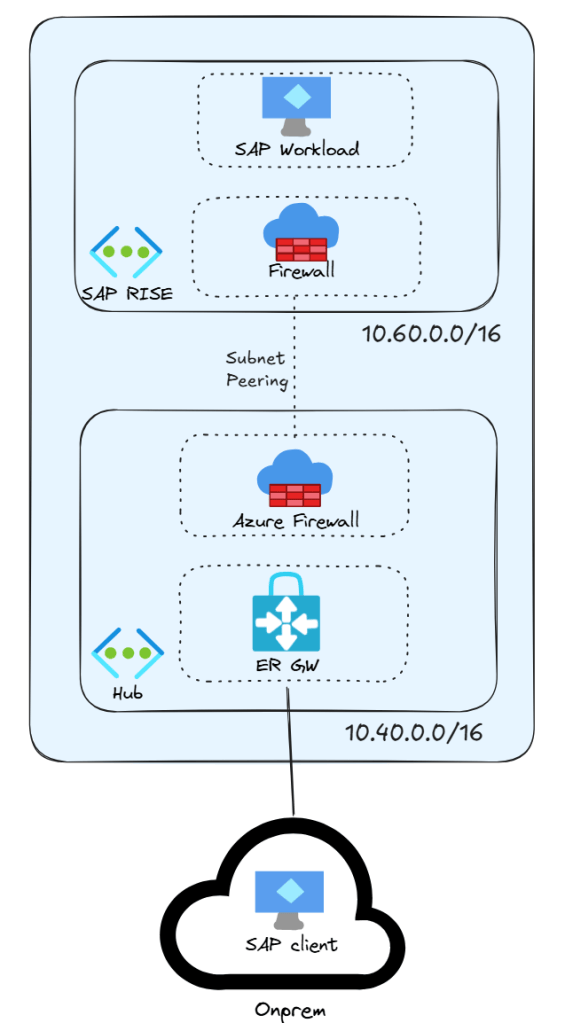
The goal is preventing traffic from bypassing the firewalls: by only peering the two firewall subnets between each other you can make sure that traffic between the two VNets always traverses both firewalls. In other words, subnet peering gives you a very clean way of implementing that no traffic can bypass the firewalls.
What is the problem?
The problem is that when you only peer the SAP RISE firewall subnet with your hub, that is the only prefix that will be advertised towards on-premises, as I described in my post Subnet peering and ExpressRoute. The on-premises SAP clients will try to reach the IP addresses of the SAP workloads, but those addresses will not be routable by the network.
With site-to-site VPN you can work around this limitation with static routing, but ExpressRoute needs to propagate all routes via BGP to the intermediate routers. Hence, there is no UDR or static route that can help you there, and you will not have connectivity between your on-premises SAP clients and your SAP RISE workloads.
After deploying the setup in the picture in my lab, my ExpressRoute circuit could only see the hub VNet’s prefix (see my post CLI-based analysis of an ExpressRoute private peering for information about how to get this information with Azure CLI):
| Path | Prefix | Next hop | AS path | What it means |
|---|---|---|---|---|
| Primary | 10.40.0.0/16 | 10.40.0.12* | 65515 | Hub summary via gateway instance 1 |
| Primary | 10.40.0.0/16 | 10.40.0.13 | 65515 | Hub summary via gateway instance 2 |
| Secondary | 10.40.0.0/16 | 10.40.0.12* | 65515 | Hub summary via gateway instance 1 |
| Secondary | 10.40.0.0/16 | 10.40.0.13 | 65515 | Hub summary via gateway instance 2 |
Both paths of the ExpressRoute circuit don’t know about the 10.60.0.0/16 prefix: when SAP clients send traffic to the SAP RISE servers, this traffic will be dropped.
You might be surprised of not even seeing the SAP RISE firewall’s subnet in the BGP table. To make things more complicated, I configured the subnet peering to not use the UseRemoteGateways and AllowGatewayTransit settings (see VNet peering settings, those familiar strangers for a deep dive on VNet peering options).
The brute-force fix with Azure Route Server
You might say: “Wait a minute, you have already posted about this problem, and the answer is Azure Route Server”, and you would be partially right. To inject prefixes into ExpressRoute, you can advertise them over BGP to Azure Route Server (see for example Azure Hub And Spoke 2.0).
But wait a second, Azure Firewall doesn’t support BGP! Worry not, I have you covered: you could deploy Linux-based machines that do the BGP heavy-lifting for the Azure Firewall. These BGP-enabled machines would only carry the BGP control plane but not the data plane, so they can be sized to be very spartan (and cheap), as described in Azure Firewall’s sidekick to join the BGP superheroes. The architecture would look like this:
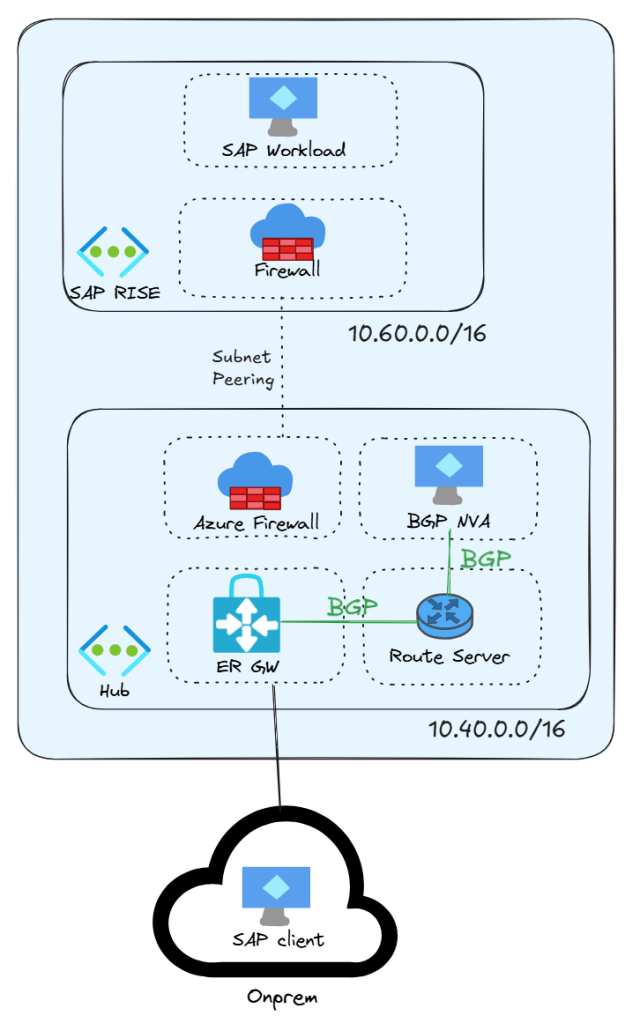
After deploying the Linux NVA with BGP (configured with Autonomous System Number of 65001) and advertising the 10.60.0.0/16 to ARS, the ExpressRoute circuit learnt the SAP RISE range and connectivity could be established between the on-premises SAP clients and the SAP RISE servers, as the routes in the circuits show:
| Path | Prefix | Next hop | AS path | What it means |
|---|---|---|---|---|
| Primary | 10.40.0.0/16 | 10.40.0.12* | 65515 | Hub summary via gateway instance 1 |
| Primary | 10.40.0.0/16 | 10.40.0.13 | 65515 | Hub summary via gateway instance 2 |
| Primary | 10.60.0.0/16 | 10.40.0.12* | 65515 65001 | Spoke prefix via gateway instance 1, redistributed from ARS |
| Primary | 10.60.0.0/16 | 10.40.0.13 | 65515 65001 | Spoke prefix via gateway instance 2, redistributed from ARS |
| Secondary | 10.40.0.0/16 | 10.40.0.12* | 65515 | Hub summary via gateway instance 1 |
| Secondary | 10.40.0.0/16 | 10.40.0.13 | 65515 | Hub summary via gateway instance 2 |
| Secondary | 10.60.0.0/16 | 10.40.0.12* | 65515 65001 | Spoke prefix via gateway instance 1, redistributed from ARS |
| Secondary | 10.60.0.0/16 | 10.40.0.13 | 65515 65001 | Spoke prefix via gateway instance 2, redistributed from ARS |
However, this design is not free: you need to deploy an Azure Route Server, which brings additional costs, as well as the Linux BGP virtual machines, which bring along a certain complexity with them. Isn’t there an easier way to do this? Well, it turns out that there is now.
VNet’s Advertised Gateway Prefixes
Let’s do the same in a significantly simpler and cheaper way, with an interesting little feature that has recently been announced: Advertised gateway prefixes in Azure virtual networks. This feature entered Public Preview in April 2026 and General Availability in August 2026. Long story short, it allows you to summarize prefixes when advertising them over ExpressRoute or site-to-site VPNs, and it even supports adding new prefixes.
The documentation is not particularly easy to find, because it is not a gateway feature, but a VNet feature. So don’t look for it in the ExpressRoute documentation (where it is most useful). The implementation can be counterintuitive also, since you don’t configure it with gateway commands but with vnet commands, as described here for the portal, here for Azure CLI, or here for PowerShell.
I configured the VNet to advertise two prefixes: the hub and the spoke, as the following figure shows:
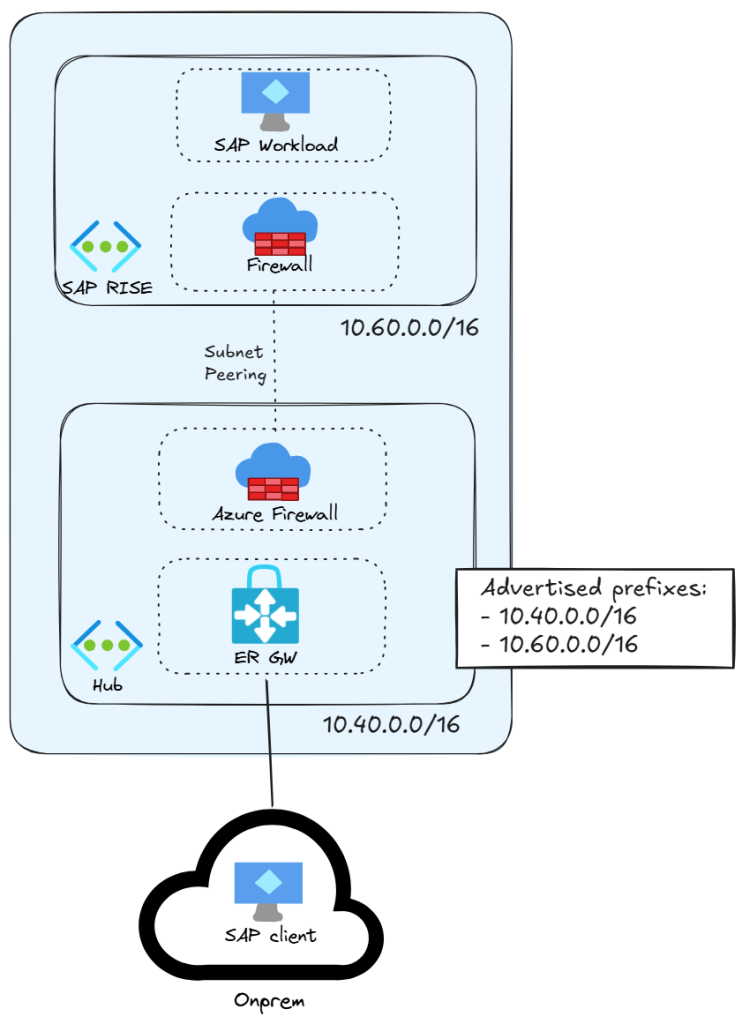
After that, magically, the desired routes appeared in ExpressRoute, and connectivity was established without the need for Route Servers or Linux appliances to maintain:
| Path | Prefix | Next hop | AS path | What it means |
|---|---|---|---|---|
| Primary | 10.40.0.0/16 | 10.40.0.12* | 65515 | Hub summary via gateway instance 1 |
| Primary | 10.40.0.0/16 | 10.40.0.13 | 65515 | Hub summary via gateway instance 2 |
| Primary | 10.60.0.0/16 | 10.40.0.12* | 65515 | Summary route advertisement via gateway instance 1 |
| Primary | 10.60.0.0/16 | 10.40.0.13 | 65515 | Summary route advertisement via gateway instance 2 |
| Secondary | 10.40.0.0/16 | 10.40.0.12* | 65515 | Hub summary via gateway instance 1 |
| Secondary | 10.40.0.0/16 | 10.40.0.13 | 65515 | Hub summary via gateway instance 2 |
| Secondary | 10.60.0.0/16 | 10.40.0.12* | 65515 | Summary route advertisement via gateway instance 1 |
| Secondary | 10.60.0.0/16 | 10.40.0.13 | 65515 | Summary route advertisement via gateway instance 2 |
Note that all routes come from the ASN 65515, meaning that they are natively advertised by the ExpressRoute gateway and not by any external BGP speaker.
What have I learned?
This exercise taught me that subnet peering can be effectively used as a security feature between two VNets, to enforce that traffic goes through the firewall. And that when one of those two VNets is a hub with ExpressRoute, the VNet ‘Advertised Gateway Prefixes’ feature can be used to generate the correct routing, much simpler than the alternative with ARS.
The downside of the design with Advertised Gateway Prefixes is that you need to make sure to update this property if you add new spokes, to make sure that they are also advertised, so it might not be the best thing for dynamic environments that frequently add and remove spoke VNets that cannot be easily summarized.
Do you have similar setups? Can you also remove complexity by leveraging the ‘Advertised Gateway Prefixes’ feature? Let me know in the comments!


I love how you highlighted the UI placement trap for Advertised Gateway Prefixes. Looking for this setting under the VNet properties rather than ExpressRoute Gateway properties is totally counterintuitive, so thanks for saving us hours of hunting!
LikeLike
Happy it helped!
LikeLike