

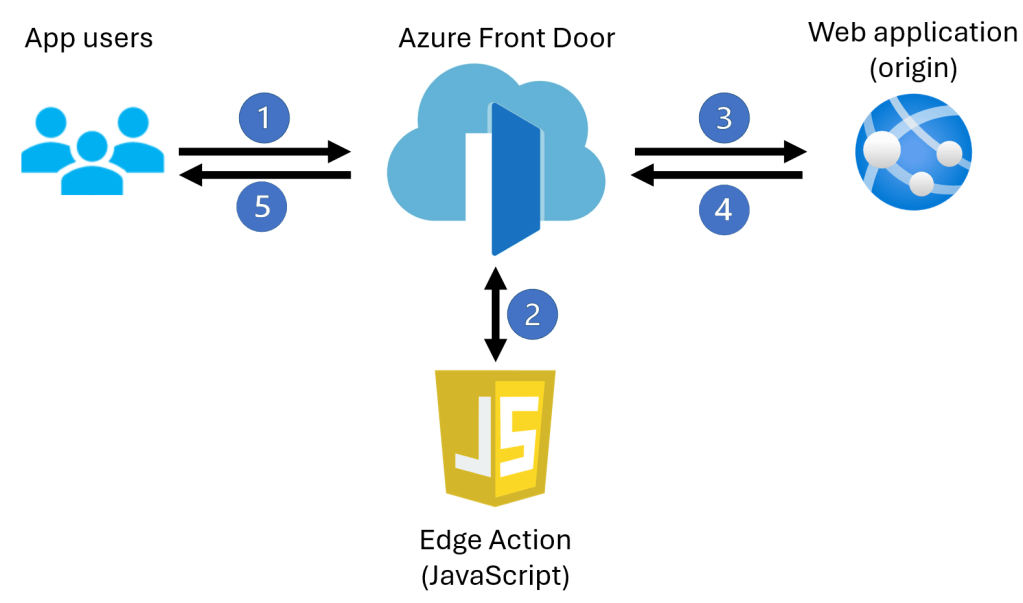
You might have noticed that a very interesting new feature has been published in the Azure Front Door documentation: Edge Actions. I am not going to reproduce the documentation here, suffice to say as a quick (and probably oversimplified) intro that it is JavaScript code that you can run on web requests sent to an application. This JavaScript code can perform multiple tasks such as additional verification on the requests, advanced manipulation of the request HTTP headers, or extended logic to override the specific origin selected by the rule. The JavaScript code is run before sending the request to the origin, as this figure shows:
I was specifically interested in JSON Web Token (JWT) validation, listed out in the documentation page as one of the use cases for Edge Actions, so I put GitHub Copilot to work on it. TL;DR: Edge Actions can help you to validate the presence of claims in the JWT, but since the runtime is kept intentionally small and synchronous, you should still perform critical security controls at the origin or somewhere else.
The configuration
You can find plenty of useful information in the documentation page, so I am not going to bore you to death with redundant details, just a couple of things that I found interesting. First of all, there is Azure portal, REST and PowerShell support, no Azure CLI (as you know if you have been reading my blogs, my favorite way of interacting with Azure). For PowerShell, you will probably need to install a new module:
Install-Module Az.EdgeAction
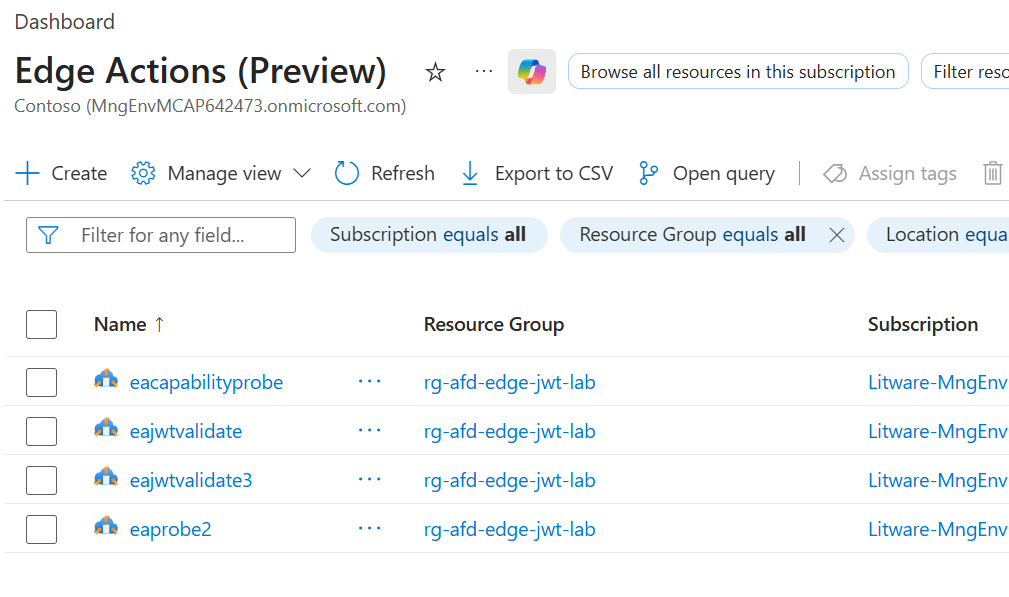
This module will allow you to, among other things, show existing Edge Actions, which are first-class Azure resources outside of Azure Front Door:
> Get-AzEdgeAction -ResourceGroupName $rg | ftLocation Name ResourceGroupName-------- ---- -----------------global eacapabilityprobe rg-afd-edge-jwt-labglobal eaprobe2 rg-afd-edge-jwt-labglobal eajwtvalidate rg-afd-edge-jwt-labglobal eajwtvalidate3 rg-afd-edge-jwt-lab
Here is what they look like in the portal:
In the portal you are offered the option to download the actual JavaScript code in a ZIP file, or alternatively you can also do that using the REST API, for which first you need to base64-decode the code and then unzip the result:
# Set some variables$api_version='2025-12-01-preview'$ea_name='eajwtvalidate3'# Get ARM ID for the version$versions = Get-AzEdgeActionVersion -EdgeActionName $ea_name -ResourceGroupName $rg$version_id = $versions[0].id# Call REST API and base64 decode$url = "${version_id}/getVersionCode?api-version=${api_version}"$ea_content = $(az rest --method POST --url "$url" --query content -o tsv)$ea_bytes = [Convert]::FromBase64String($ea_content)[IO.File]::WriteAllBytes("$HOME\Downloads\edge-action.zip", $ea_bytes)Expand-Archive "${HOME}\Downloads\edge-action.zip" -DestinationPath "${HOME}\Downloads\edge-action-code" -ForceGet-Content "${HOME}\Downloads\edge-action-code\edge_action.js"
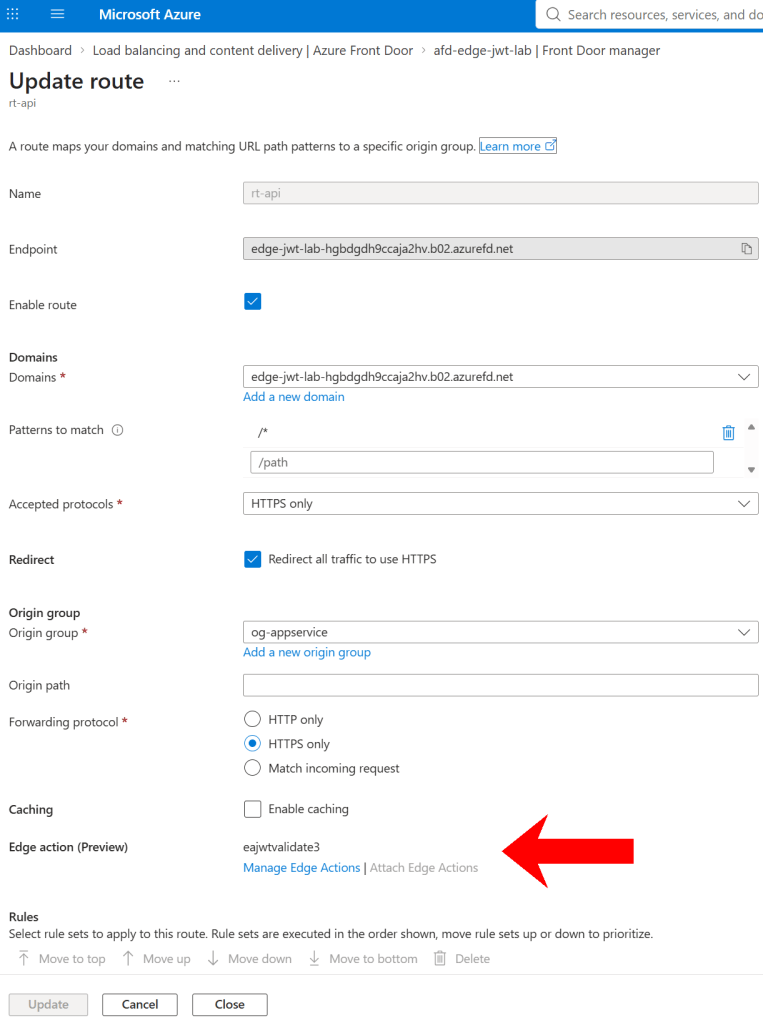
The edge action is configured in the AFD rule. This means that AFD first selects a specific rule based on the domains and the patterns, and then it runs the edge actions associated with that rule.
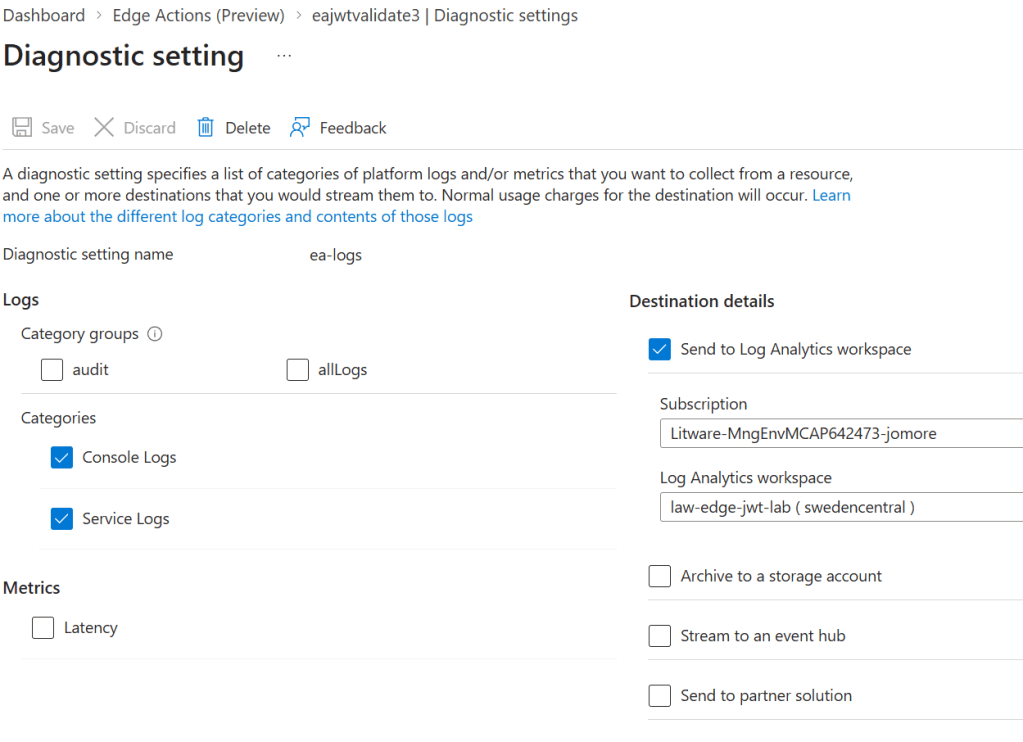
Logging is also described in the documentation page. It is configured through the Diagnostic Settings in the Edge Action resource itself. That set me off at the beginning, since I was expecting additional log categories in the actual AFD profile, which is not the case:
The code
Here the JavaScript code I tried (using %%API_APP_ID%% and %%TENANT_ID%% as placeholders). As you can see, the main entry point is the handler function that includes the event parameter, over which most of the operations will be performed:
// Claims prefilter only. This code does not verify the JWT signature.// The origin must perform cryptographic JWT validation.const CONFIG = { audience: '%%API_APP_ID%%', issuer: 'https://login.microsoftonline.com/%%TENANT_ID%%/v2.0', adminRole: 'Lab.Admin',};// The runtime lacks atob, so the action needs a tiny dependency-free decoder // just to inspect JWT JSON.function decodeBase64Url(value) { var chars = 'ABCDEFGHIJKLMNOPQRSTUVWXYZabcdefghijklmnopqrstuvwxyz0123456789+/'; var input = value.replace(/-/g, '+').replace(/_/g, '/'); var out = '', buf = 0, bits = 0; for (var i = 0; i < input.length; i++) { var c = chars.indexOf(input[i]); if (c < 0) continue; buf = (buf << 6) | c; bits += 6; if (bits >= 8) { bits -= 8; out += String.fromCharCode((buf >> bits) & 255); } } return out;}function parseJson(value) { try { return JSON.parse(decodeBase64Url(value)); } catch (e) { return null; }}function deny(event, status, reason) { console.log('EA_REJECT reason=' + reason); event.response.response_code = status; return event;}// This is the Edge Action entry point.// event is the mutable request-processing object supplied by Edge Actions.function handler(event) { var headers = event.request.headers; // Remove client-supplied copies of trusted headers. // This prevents a client from supplying headers that appear to have been generated by // the Edge Action. // The action removes them before adding its own values. delete headers['x-validated-claims']; delete headers['x-edge-jwt-status']; delete headers['x-test-fail']; // Parsing the authorization header (using Bearer auth in this lab) // The message provided to the deny method will be visible in the EA's console logs var authorization = headers['authorization'] || ''; if (authorization.indexOf('Bearer ') !== 0) return deny(event, 401, 'MISSING_TOKEN'); var parts = authorization.slice(7).split('.'); if (parts.length !== 3 || !parseJson(parts[0])) return deny(event, 401, 'MALFORMED_HEADER'); var claims = parseJson(parts[1]); if (!claims) return deny(event, 401, 'MALFORMED_PAYLOAD'); var now = Math.floor(Date.now() / 1000); //Exact matching avoids loose issuer/audience acceptance. if (!claims.exp || claims.exp < now) return deny(event, 401, 'EXPIRED'); if (claims.nbf && claims.nbf > now + 60) return deny(event, 401, 'NOT_YET_VALID'); if (claims.aud !== CONFIG.audience) return deny(event, 401, 'AUD_FAIL'); if (claims.iss !== CONFIG.issuer) return deny(event, 401, 'ISS_FAIL'); // You can include additional logic so that specific claims are enforced for // specific endpoints. var roles = claims.roles || []; if ((event.request.uri || '').indexOf('/admin') === 0 && roles.indexOf(CONFIG.adminRole) < 0) return deny(event, 403, 'ROLE_FAIL'); headers['x-validated-claims'] = JSON.stringify({ roles: roles, exp: claims.exp, mode: 'claims_only', }); headers['x-edge-jwt-status'] = 'VALIDATED'; console.log('EA_ACCEPT'); return event;}
The test
Alright, let’s go! I obtained a valid token using an Entra application that I had previously defined:
TOKEN=$(curl -sS -X POST \ "https://login.microsoftonline.com/${TENANT_ID}/oauth2/v2.0/token" \ -d "grant_type=client_credentials" \ -d "client_id=${CLIENT_ID}" \ -d "client_secret=${CLIENT_SECRET}" \ -d "scope=api://${API_APP_ID}/.default" | jq -r '.access_token')
Then I started testing the different endpoints of a simple API. Firstly, a control endpoint that doesn’t require the presence of any JWT (/public), which as expected works just fine:
jose@vm-edge-jwt-management:~$ curl -i "$BASE/public"
HTTP/2 200
date: Wed, 19 Aug 2026 13:12:51 GMT
content-type: application/json; charset=utf-8
content-length: 89
etag: W/"59-dsb+lKE1Dz/1w2C/oA8linoyzTI"
set-cookie: ARRAffinity=16c367d3cffdba92c731dd16701d005948978ae17cd8bb7b02835e0fe2f9a234;
Path=/;HttpOnly;Secure;Domain=app-edge-jwt-lab.azurewebsites.net
set-cookie: ARRAffinitySameSite=16c367d3cffdba92c731dd16701d005948978ae17cd8bb7b02835e0fe
2f9a234;Path=/;HttpOnly;SameSite=None;Secure;Domain=app-edge-jwt-lab.azurewebsites.net
x-powered-by: Express
x-azure-ref: 20260819T131251Z-1696dbb579cqf2p5hC1GVX3y0g0000000zz0000000001vrn
x-cache: CONFIG_NOCACHE
accept-ranges: bytes

{"route":"public","message":"No authentication required","ts":"2026-08-19T13:12:51.828Z"}
My test API has another endpoint called /protected, which is routed to the AFD rule that has the Edge Action attached. Since the edge action cannot find any JWT in the request, it will return a 401 error.
jose@vm-edge-jwt-management:~$ curl -i "$BASE/protected"
HTTP/2 401
date: Wed, 19 Aug 2026 13:13:04 GMT
content-type: text/html
content-length: 2013
cache-control: no-store
x-azure-ref: 20260819T131304Z-1696dbb579cqf2p5hC1GVX3y0g0000000ztg000000002210
x-cache: CONFIG_NOCACHE
When adding the token (with the curl option --oauth2-bearer), the Edge Action finds it and all required claims inside, so that the request will be forwarded to the origin and an HTTP 200 return code along the application response will be returned to the client:
jose@vm-edge-jwt-management:~$ curl -i --oauth2-bearer "$TOKEN" "$BASE/protected"
HTTP/2 200
date: Wed, 19 Aug 2026 13:13:36 GMT
content-type: application/json; charset=utf-8
content-length: 150
etag: W/"96-TuXnihnlJs3rqUALdH63ayZnfbQ"
set-cookie: ARRAffinity=16c367d3cffdba92c731dd16701d005948978ae17cd8bb7b02835e0fe2f9a234;
Path=/;HttpOnly;Secure;Domain=app-edge-jwt-lab.azurewebsites.net
set-cookie: ARRAffinitySameSite=16c367d3cffdba92c731dd16701d005948978ae17cd8bb7b02835e0fe
2f9a234;Path=/;HttpOnly;SameSite=None;Secure;Domain=app-edge-jwt-lab.azurewebsites.net
x-powered-by: Express
x-azure-ref: 20260819T131335Z-1696dbb579cf52mthC1GVXp1m40000000bng0000000021qx
x-cache: CONFIG_NOCACHE
accept-ranges: bytes

{"route":"protected","sub":"cf2ff0a3-cf5a-42f8-b93e-784cf51fff41","roles":["Lab.Admin"],"
edge_jwt_status":"VALIDATED","ts":"2026-08-19T13:13:36.484Z"}
The presence of specific claims can also be verified. The JavaScript code adds the requirement of the admin role when the request is sent to the API endpoint /admin. My application has that role, so the call to the /admin endpoint also results in a 200 response code:
jose@vm-edge-jwt-management:~$ curl -i --oauth2-bearer "$TOKEN" "$BASE/admin"
HTTP/2 200
date: Wed, 19 Aug 2026 13:14:29 GMT
content-type: application/json; charset=utf-8
content-length: 146
etag: W/"92-oAAAsSFwK1DFeZQ63cQdcos8zKg"
set-cookie: ARRAffinity=16c367d3cffdba92c731dd16701d005948978ae17cd8bb7b02835e0fe2f9a234;
Path=/;HttpOnly;Secure;Domain=app-edge-jwt-lab.azurewebsites.net
set-cookie: ARRAffinitySameSite=16c367d3cffdba92c731dd16701d005948978ae17cd8bb7b02835e0fe
2f9a234;Path=/;HttpOnly;SameSite=None;Secure;Domain=app-edge-jwt-lab.azurewebsites.net
x-powered-by: Express
x-azure-ref: 20260819T131429Z-18696ddd6785qdthhC1GVXuzts0000000vk00000000033rx
x-cache: CONFIG_NOCACHE
accept-ranges: bytes

{"route":"admin","sub":"cf2ff0a3-cf5a-42f8-b93e-784cf51fff41","roles":["Lab.Admin"],"edge
_jwt_status":"VALIDATED","ts":"2026-08-19T13:14:29.409Z"}
The logs
You have two types of logs: service and console logs. The service logs only tell you whether the edge actions are run successfully or not, and the console logs give you additional details such as the response and the log messages of every run and whether the request was accepted or not:
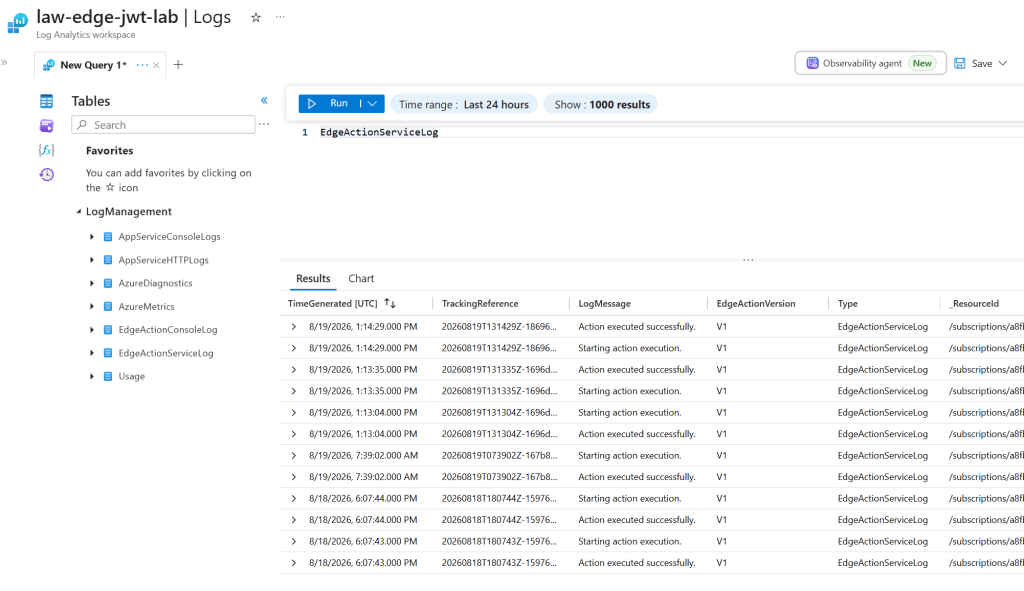
The console codes will include the message provided to the deny message from inside the JavaScript code, to make troubleshooting easier.
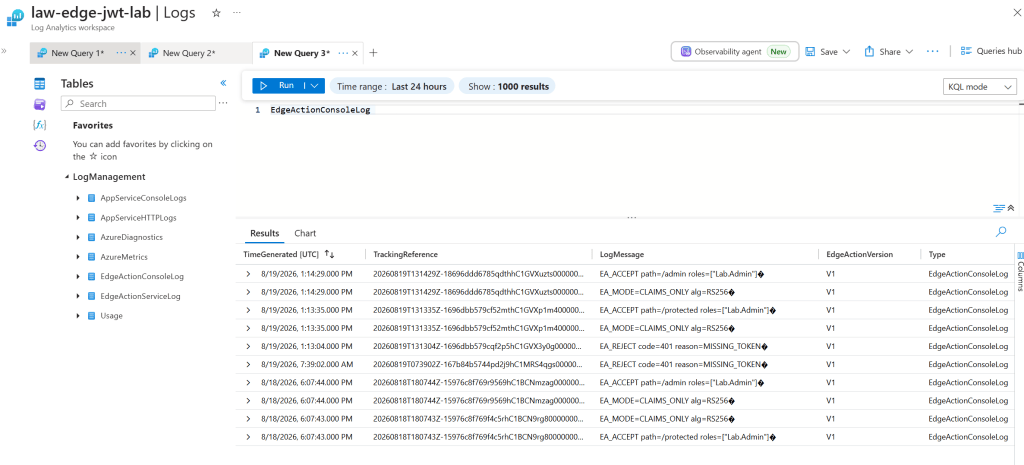
Both service and console logs include a TrackingReference that you can also find in the Front Door access logs and the actual response (in the x-azure-ref HTTP header), so that you can correlate logs from different tables together and troubleshoot specific requests.
The caveat
Coming back to the statement in the introduction of this post about the requirement to perform important security checks in the actual application (the origin) and not leave everything to the Edge Action: dge Actions have fail-open behavior. If execution throws an error or exceeds the 10-millisecond limit, Azure Front Door terminates the Edge Action and forwards the request without its processing.
Edge Actions public preview also does not provide supported outbound network access or cryptographic APIs. Consequently, an action cannot retrieve remote JWKS keys or cryptographically verify a JWT signature. The origin or another trusted gateway must therefore authenticate the token independently.
Conclusion
Edge Actions are an extremely useful addition to Azure Front Door, and they significantly increases the flexibility of the platform.
Specifically about the use case of JWT processing and validation, Edge Actions can parse the token and pre-screen untrusted claims such as exp, nbf, aud, iss and roles, allowing obviously unsuitable requests to be rejected early. However, claims-only processing does not establish token authenticity: an attacker can fabricate those claims. Cryptographic signature verification and final authorization must still occur at a trusted origin or gateway.
What use cases do you have in mind for Edge Actions? Please let me know in the comments!

