
If you have been following the Azure Networking space lately, you will probably have noticed the global preview of a new feature: route maps for Azure Route Server. Others have already blogged about this; for example, make sure to read Simon Painter’s blog post about it here.
I finally had some time to try it, and the first thing I noticed is that route maps might break some of the existing functionality of Azure Route Server. The use cases that are broken might not be relevant for you (VNet-to-VNet IPsec and NVA peers in remote hubs), and there are workarounds for these scenarios, but still something to take into consideration when testing this feature.
In order to play with ARS route maps I decided to go for one of the toughest architectures in Azure networking: the square design:
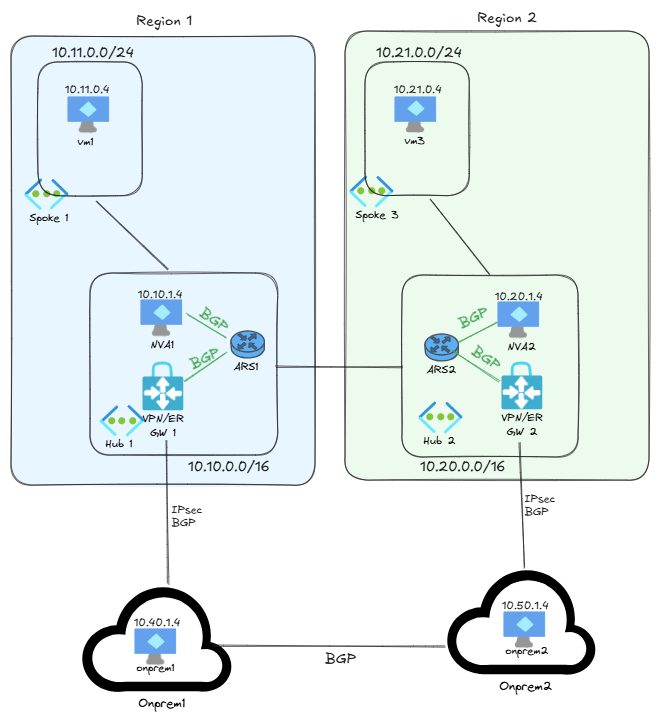
This architecture does not necessarily follow best practices, since the recommendation is connecting every onprem location center with all (or at least two) Azure regions, but it is one of the possibilities to optimize costs by using ExpressRoute Local circuits. This ExpressRoute SKU allows you to connect a given ExpressRoute circuit with the Azure gateways deployed in a single, predefined region, so either you don’t create the cross-connect links, or you create them but configure routing to use them only in a disaster scenario. The square design is straight forward to implement in Virtual WAN, since Microsoft provides the required any-to-any connectivity, but not as easy to implement in self-managed hub and spoke scenarios using Azure Route Server. Long story short: this might be a theoretical exercise without practical applications, but it is a hard scenario that will create interesting routing challenges. Will I be able to use route maps to solve them? Let’s see.
The difficulty of the square design is not making it work under normal circumstances, but hardening the routing topology so that it survives every possible outage scenario: an Azure region, an ExpressRoute location or Internet provider (I am initially using VPNs to test, extending testing to ExpressRoute might be interesting for a follow-up post), or a complete onprem location. And at the same time, to prevent asymmetric routing, since firewalls will be probably deployed somewhere (in the NVAs or on-premises).
What do you mean with “more than a feature”?
Yes, I was saying that “route maps are more than a feature” in the post title, let’s go straight to the point. If you remember when route maps were brought to Virtual WAN, it was a matter of enabling the feature and testing. When you created the first route map in a virtual hub the virtual hub software got upgraded, but I don’t remember that this upgrade broke anything.
Well, this is not the case with ARS: when you create the first route map, you will also get a new software for your ARS instances, but that software upgrade makes much more than including route map support: it changes the fundamental way in which ARS works.
You see, route maps is mostly a feature that was ported from VWAN to ARS. ARS was also ported from VWAN, and even today, some API calls for ARS still refer to it as “virtual hub” and not as “route server”, an echo of its genealogy. However, when ARS was initially introduced, one critical VWAN element was left out: connections. In VWAN everything is modeled as a connection: you have VNet connections, site-to-site connections, ExpressRoute connections, etc. For simplicity reasons, the initial implementation of ARS didn’t include this part of the Virtual WAN data model.
However, route maps in VWAN are applied to connections, so to port this feature to ARS, connections also needed to be brought into the picture. There is a problem though: ARS supports some scenarios that VWAN doesn’t, and whatever doesn’t fall into the predefined VWAN connection model will not work any more.
Let me give you an example: in my test lab I used Azure Virtual Network Gateways (VNG) to simulate onprem locations, it is just convenient. To connect two VNGs with each other over IPsec, you have two options: either you use Local Network Gateways to represent your onprem VPN devices, or you use so called VNet-to-VNet connection, much easier to implement. My ARS lab was working just fine with these VNet-to-VNet connections: the onprem VNGs spoke BGP to the Azure VNGs, and I could injecting prefixes from NVAs over BGP via ARS. After creating the first route map in ARS, this stopped working.
The route map software update introduced the connection concept in ARS, so every BGP neighbor must be now modeled with such a “connection”. However, VWAN doesn’t support VNet-to-VNet connections (there is no need in VWAN for that), which means that the ARS code doesn’t either. The BGP peerings between my “onprem” VNGs and my Azure VNGs still worked after enabling route maps, but no route was being received. The reason is that ARS couldn’t figure out how to model the VNet-to-VNet link. Consequently, onprem stopped receiving any BGP update from Azure whatsoever, without any error message or BGP failure that I could see (I have to admit though I didn’t configure logging in this lab). In a production environment using VNet-to-VNet connections, this lack of backwards compatibility could have been a major issue.
For my lab, it means that I should go back to the Local Network Gateway (LNG) model. However, LNGs do not support a remote gateway with ASN 65515, so my only possibility will be testing with an NVA. I will use a Linux Ubuntu with StrongSwan (you can find how to do that in my Github repo here), but more details about it in future posts.
BGP from NVAs in a different VNet
There is also a pretty important caveat when you have NVAs connecting to ARS from a different VNet. If you add a BGP peer to an ARS with route maps enabled in the Azure portal, you might notice that there is a new field at the bottom to specify a VNet connection:
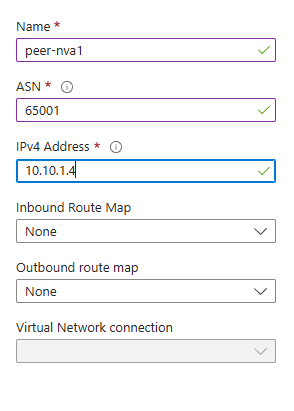
So now you need BGP peers to be associated to a connection. In the previous screenshot I was adding NVA1 as peer to ARS1, where both are in the same VNet. The portal recognized this, and grayed out the VNet connection dropdown box at the bottom. However, when I try to add NVA2 as a peer to ARS1, I get the following:
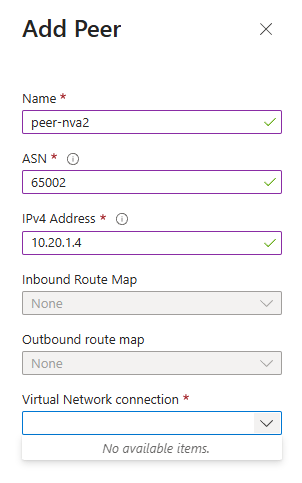
What’s happening? The portal recognizes that NVA2 is now in a different VNet (hub2). It tries to find a corresponding VNet connection, but it can’t. The reason is because ARS assumes (as VWAN does) that all VNet connections have the “Use Remote Gateways” and “Allow Gateway Transit” options enabled. In other words, that the NVA is deployed in a spoke. In this case however, I cannot do that, because NVA2 is deployed in another hub, which already has an existing VNG inside, preventing me from configuring those VNet peering features.
These deployments with NVA-ARS BGP neighborships across hub VNet peerings appear in some advanced designs, for example the dual-hub scenario documented here:
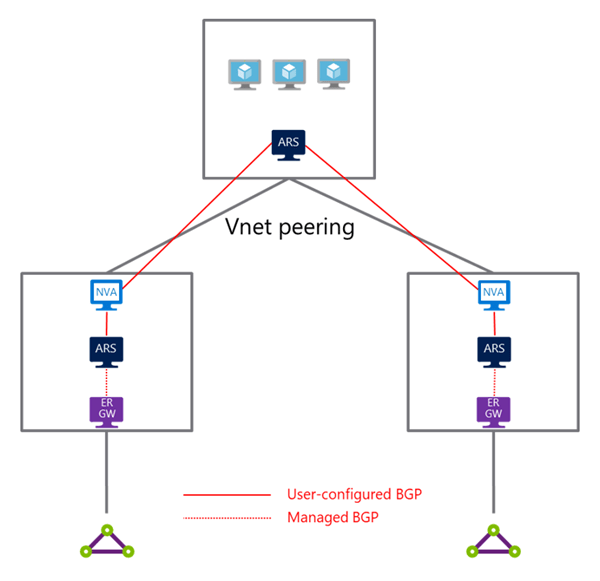
As you can see in the previous diagram, there are ARS instances in all VNets, so you cannot configure the “Use Remote Gateways” and “Allow Gateway Transit” in any of the VNet peerings.
Another scenario where you come across these cross-VNet BGP peerings is one of the variants of the AVS-gen1 connectivity to onprem via Azure firewalls, documented here. This architecture is quite complex, just look at the BGP peering between the BGP NVA in the transit VNet and the ARS in the hub VNet:
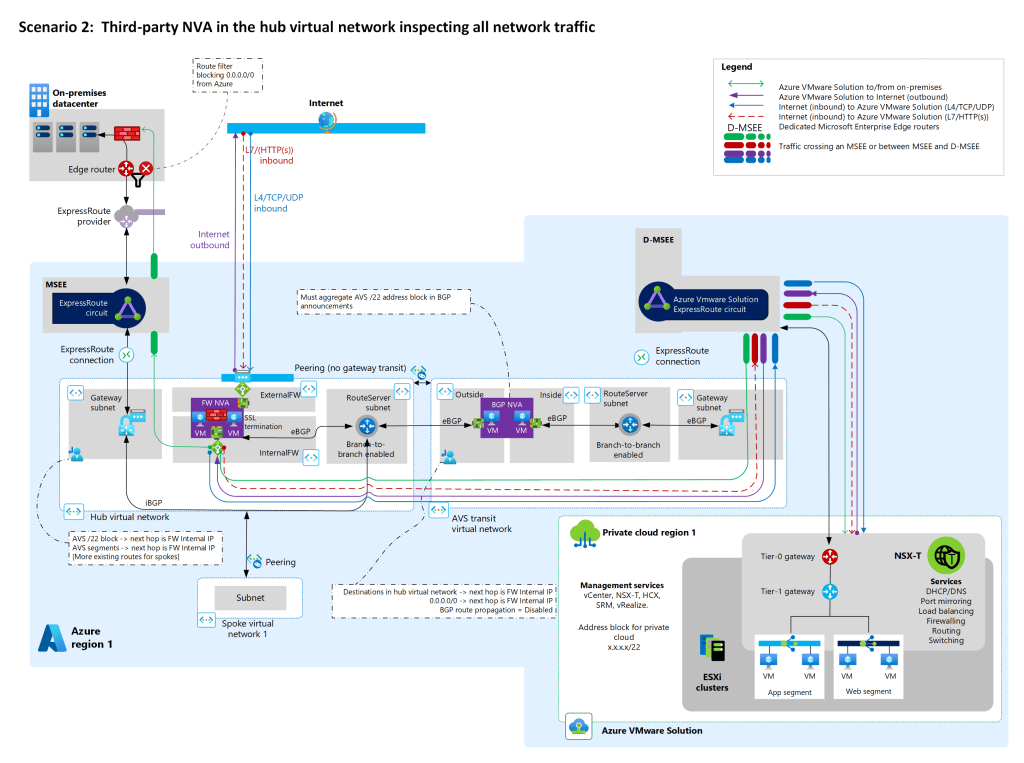
This scenario is a concrete example of the more generic hub-to-hub connectivity pattern where you have VNGs in both hubs, exactly as in the square design I described earlier in this post. This scenario doesn’t exist in VWAN, since the hub-to-hub routing is already taken care of, which explains why ARS with route maps doesn’t support it. If you are using this pattern there is a workaround that might help you.
The hub-to-hub fix
For the hub-to-hub scenario there are some possible workarounds. You can of course use UDRs, but that wouldn’t be dynamic, meaning that it wouldn’t react to outage scenarios. The solution I found (other than encapsulating, but that is cheating, isn’t it?) is having the cross-hub BGP peering going between the NVAs, instead of between NVA and ARS with some route engineering:
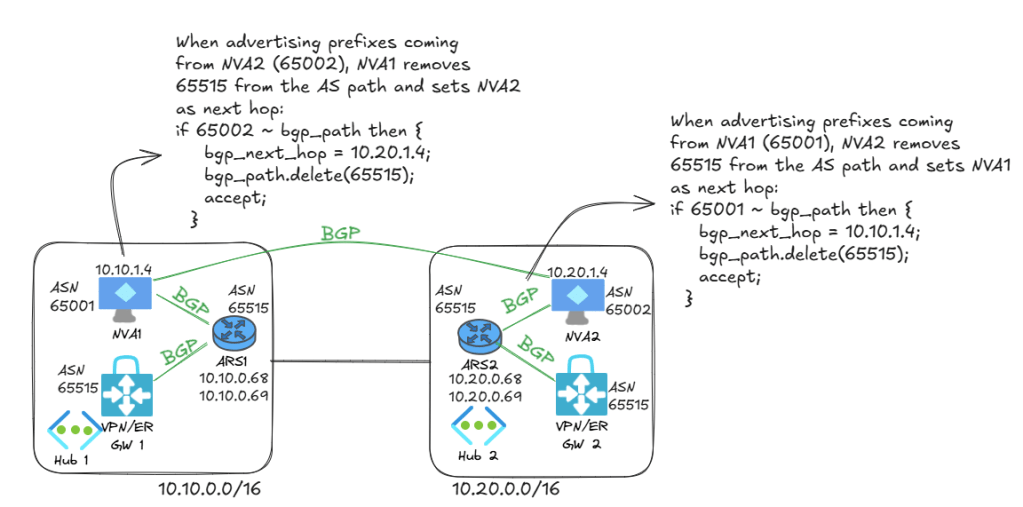
Let’s take one example to show what is going on here: we want to have cross-hub reachability between the spokes. The spoke connected to hub1 is 10.11.0.0/24, but hub2 will not have routing for it. So we want NVA1 to learn it from ARS1 and then advertise it to NVA2. NVA2 will forward it to ARS2 so that it is programmed in NVA2’s subnet.
If NVA2 advertised the 10.11.0.0/24 it learns from NVA1 directly to ARS2, two things would happen:
- Since NVA1 learnt this route from ARS1, the route already has 65515 in its AS path. If ARS2 saw 65515, it would throw it away according to BGP route prevention mechanism. So NVA2 needs to remove 65515 before advertising the route to ARS2.
- Secondly, we want ARS2 to program a route in NVA2’s subnet with the next hop being NVA1. If we don’t change anything, ARS would by default set NVA2 (the router advertising the route) as next hop, but that would create a routing loop (NVA2 would try to send a packet to
10.11.0.0/24, but the NIC would give it back since NVA2 is the next hop). So NVA2 advertises the routes that are coming from NVA1 with NVA1 as next hop.
And now it works, we have an effective route in NVA2’s subnet with NVA1 as next hop:
❯ az network nic show-effective-route-table -n nic-vm-nva2 -g $rg -o table

Source                 State    Address Prefix    Next Hop Type          Next Hop IP
---------------------  -------  ----------------  ---------------------  -------------------
Default                Active   10.20.0.0/16      VnetLocal
Default                Active   10.21.0.0/24      VNetPeering
VirtualNetworkGateway  Active   10.11.0.0/24      VirtualNetworkGateway  10.10.1.4
VirtualNetworkGateway  Active   10.20.0.0/15      VirtualNetworkGateway  10.20.1.4
VirtualNetworkGateway  Active   10.40.0.0/16      VirtualNetworkGateway  10.20.0.4 10.20.0.5
VirtualNetworkGateway  Active   10.10.0.0/15      VirtualNetworkGateway  10.10.1.4
VirtualNetworkGateway  Active   10.50.0.0/16      VirtualNetworkGateway  10.20.0.4 10.20.0.5
Default                Active   0.0.0.0/0         Internet
Default                Active   10.10.0.0/16      VNetGlobalPeering
And sure enough, we have cross-hub traffic between the spokes that goes over both NVAs (10.10.1.4 and 10.20.1.4), no overlay or UDRs needed:
                             My traceroute  [v0.95]
vm-hub1-ep (10.11.0.4) -> 10.21.0.4 (10.21.0.4)        2026-08-10T13:53:31+0000
Keys:  Help   Display mode   Restart statistics   Order of fields   quit
                                       Packets               Pings
 Host                                Loss%   Snt   Last   Avg  Best  Wrst StDev
 1. 10.10.1.4                         0.0%     5    4.5   1.5   0.6   4.5   1.7
 2. 10.20.1.4                         0.0%     4   31.8  32.7  29.6  35.0   2.4
 3. 10.21.0.4                         0.0%     4   34.2  34.4  31.2  39.8   3.8
If you don’t want to bother about getting the correct routes in the Azure NVA’s subnet, you can use an overlay protocol between the NVAs such as IPsec or VXLAN, which is the workaround I discussed in previous blog posts such as Azure Route Server: to encap or not to encap, that is the question – Cloudtrooper.
Conclusion
Are you using VNet-to-VNet IPsec connections or ARS BGP peers in another hub? If so, be careful when testing Azure Route Server route maps, since it might break some of the more advanced scenarios where Azure Route Server without route maps works today.


[…] is a continuation from my previous post Azure Route Server route maps: more than a feature, where I discussed some of the patterns not supported by route maps in Azure Route Server (ARS), […]
LikeLike