
This is a continuation from my previous post Azure Route Server route maps: more than a feature, where I discussed some of the patterns not supported by route maps in Azure Route Server (ARS), such as VNet-to-VNet VPN connections and BGP peers in another hub (although these ones might be addressed by the time route maps become Generally Available). In this post, I will look deep into the square design, one of the toughest to implement in Azure self-managed hub-and-spoke environments. We will see how to implement a resilient network that will survive different failure scenarios, and we will use new ARS tools such as effective routes and the route map dashboard for troubleshooting.
Why the square design? Because it is a cost optimization in certain ExpressRoute environments, where an organization can decide to attach a given circuit to a single Azure region instead of using the “bow-tie” pattern where each circuit is connected to two or more regions. The advantage of the square design is that under certain circumstances you can use the ExpressRoute Local SKU, which allows for interesting cost savings by eliminating the cost of bandwidth. Its disadvantages are mostly a higher complexity and a longer network latency in certain failure scenarios. And because it is a tricky one to get right.
This blog post is not going to be an easy one, so brace yourself. You have been warned!
Lab baseline
So back to our lab it is. Since VNet-to-VNet connections are not supported by ARS with route maps, and you cannot use connections based on Local Network Gateways (LNG) between VNGs when one of them has ASN=65515, and you need ASN=65515 for a VNG to interact with ARS, we need to replace the onprem VNG with something else. I decided go for a StrongSwan+BIRD Linux NVA (I have documented in detail how to do that here, if you happen to be curious).
To provide redundancy, all routes need to be advertised over all possible paths. Since you have a square in the design, routes will arrive from two different places. For example, let’s look at the connectivity between onprem1 and Azure spoke2. Here the detailed lab topology:
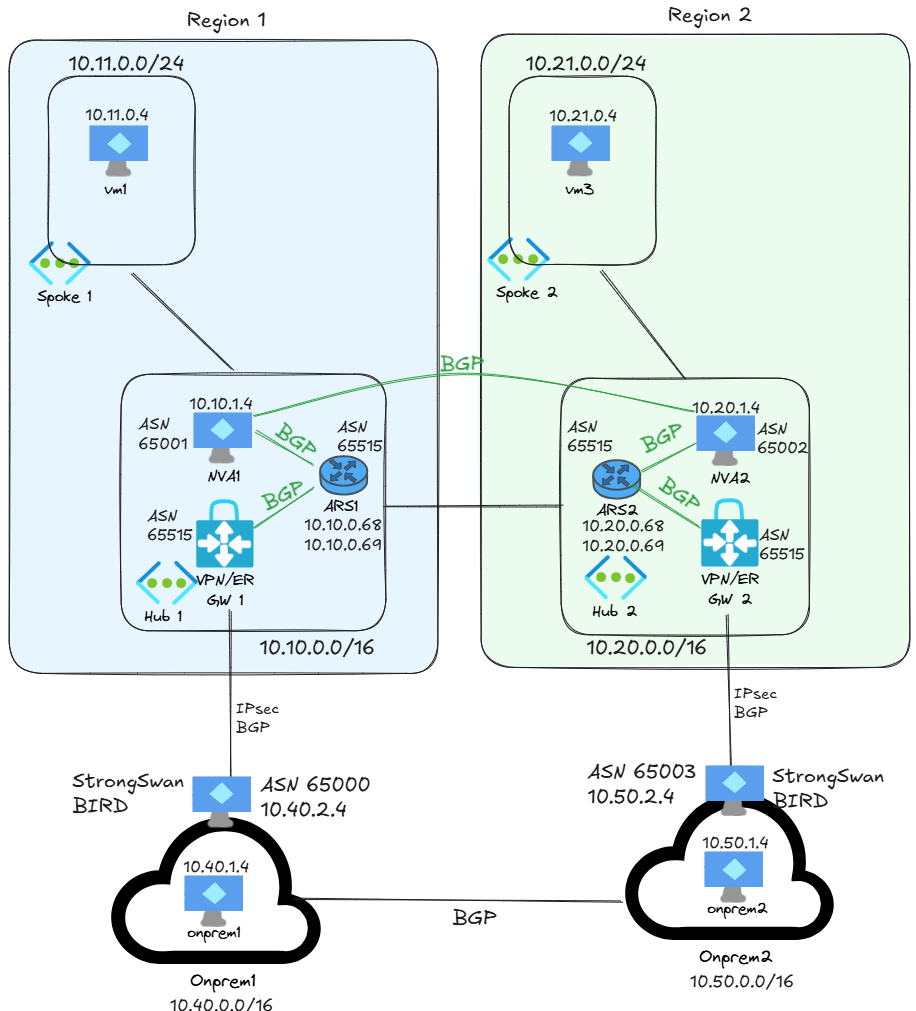
The BGP design between the hubs responds to a current limitation of the route map feature in ARS, as we saw in my previous post Azure Route Server route maps: more than a feature: you cannot peer two ARS with each other, and you cannot peer an ARS with an NVA sitting in another hub VNet, so I implemented this design as workaround:
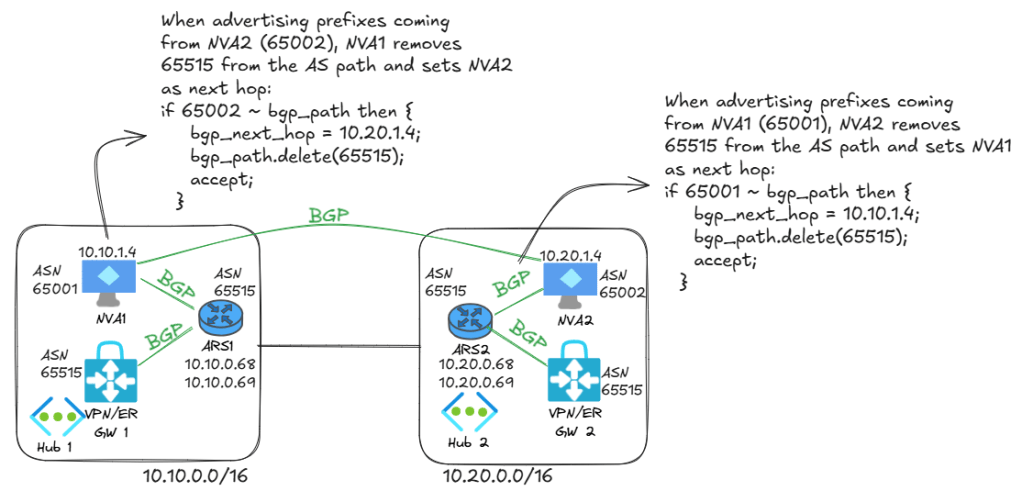
The BGP manipulations serve to two objectives: making sure that ARS doesn’t drop routes because it sees its own ASN in incoming routes, and installing the right next hop (the remote NVA) in the NVAs’ subnets for the prefixes in the other hub.
Cross-hub traffic
If we focus on the flow onprem1-to-spoke2, in the onprem1 appliance I can see two types routes for 10.21.0.0/0: the preferred one with the shortest AS path are coming from 65003 (the other onprem location), and the other ones are coming from hub1:
root@router-dc1:~# birdc show route 10.21.0.0/24 all | grep -E '^10|as_path'
10.21.0.0/24         unicast [dci 12:07:47.060] ! (100/?) [AS65515i]
        BGP.as_path: 65003 65515
        BGP.as_path: 65515 65001 65002
        BGP.as_path: 65515 65001 65002
Which means that the onprem1 location per default prefers the Data Center Interconnect (DCI) link between onprem1 and onprem2 to reach hub2. If we wanted to prefer the direct VPN to Azure, we could prepend the routes somewhere along the non-preferred path, as we will see later. The opposite direction will be decided by ARS2. You can look at the effective routes in ARS to see the complete BGP table:
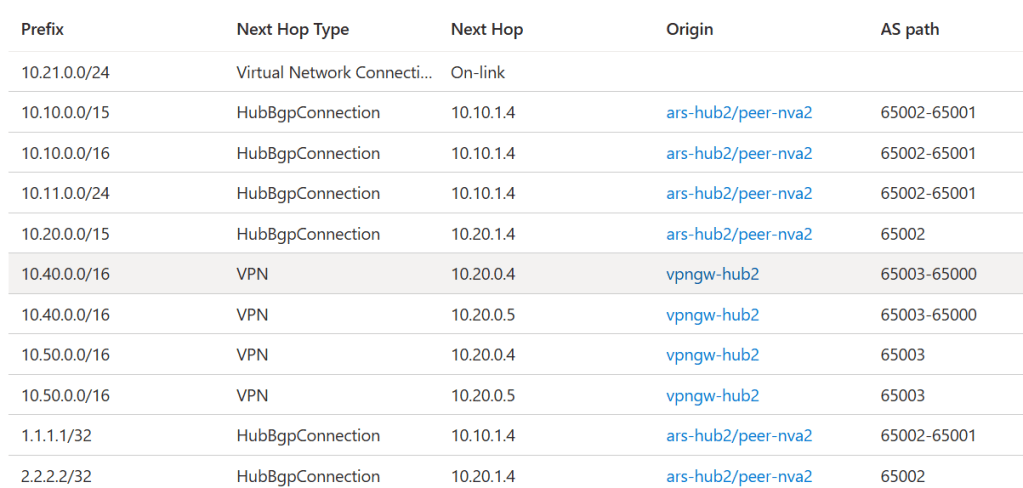
Note that these are the effective routes, you don’t see the discarded ones. But the routes to 10.40.0.0/16 both have the VNG as next hop. You can also inspect the BGP routes in NVA2 to verify how long the other routes were:
root@vm-nva2:~# birdc show route 10.40.0.0/16 all | grep -E '^10|as_path'
10.40.0.0/16         unicast [nva1 12:46:39.113 from 10.10.1.4] * (100/?) [AS65000i]
        BGP.as_path: 65001 65515 65000
        BGP.as_path: 65515 65003 65000
        BGP.as_path: 65515 65003 65000
This shows two sources, routes through the neighboring hub1 (ASN 65001) that didn’t make into the ARS effective routes, and routes from ARS via onprem2 (ASN 65003), which is the one that made it into the ARS effective route table. The effective route that we saw in the ARS effective route table (via onprem2) is the one that is going to be used is the next hop in the NVA2 subnet:
❯ az network nic show-effective-route-table -n nic-vm-nva2 -g $rg -o table

Source                 State    Address Prefix    Next Hop Type          Next Hop IP
---------------------  -------  ----------------  ---------------------  -------------------
Default                Active   10.20.0.0/16      VnetLocal
Default                Active   10.21.0.0/24      VNetPeering
VirtualNetworkGateway  Active   10.11.0.0/24      VirtualNetworkGateway  10.10.1.4
VirtualNetworkGateway  Active   1.1.1.1/32        VirtualNetworkGateway  10.10.1.4
VirtualNetworkGateway  Active   2.2.2.2/32        VirtualNetworkGateway  10.20.1.4
VirtualNetworkGateway  Active   10.20.0.0/15      VirtualNetworkGateway  10.20.1.4
VirtualNetworkGateway  Active   10.40.0.0/16      VirtualNetworkGateway  10.20.0.4 10.20.0.5
VirtualNetworkGateway  Active   10.10.0.0/15      VirtualNetworkGateway  10.10.1.4
VirtualNetworkGateway  Active   10.50.0.0/16      VirtualNetworkGateway  10.20.0.4 10.20.0.5
Default                Active   0.0.0.0/0         Internet
Default                Active   10.10.0.0/16      VNetGlobalPeering
The next hop type VirtualNetworkGateway indicates that the route has been injected by ARS. Looking at the next hop, you can distinguish between routes that are going to NVA1 (10.10.1.4) or the VPN gateway (10.20.0.4 and 10.20.0.5). As you can see, the next hops for onprem1 (10.40.0.0/16) are the VPN gateways.
Routing manipulation
Let’s go step by step: the preference to send traffic over Microsoft’s backbone instead of the network connecting both onprem locations has to be implemented in both directions, as the next diagram shows:
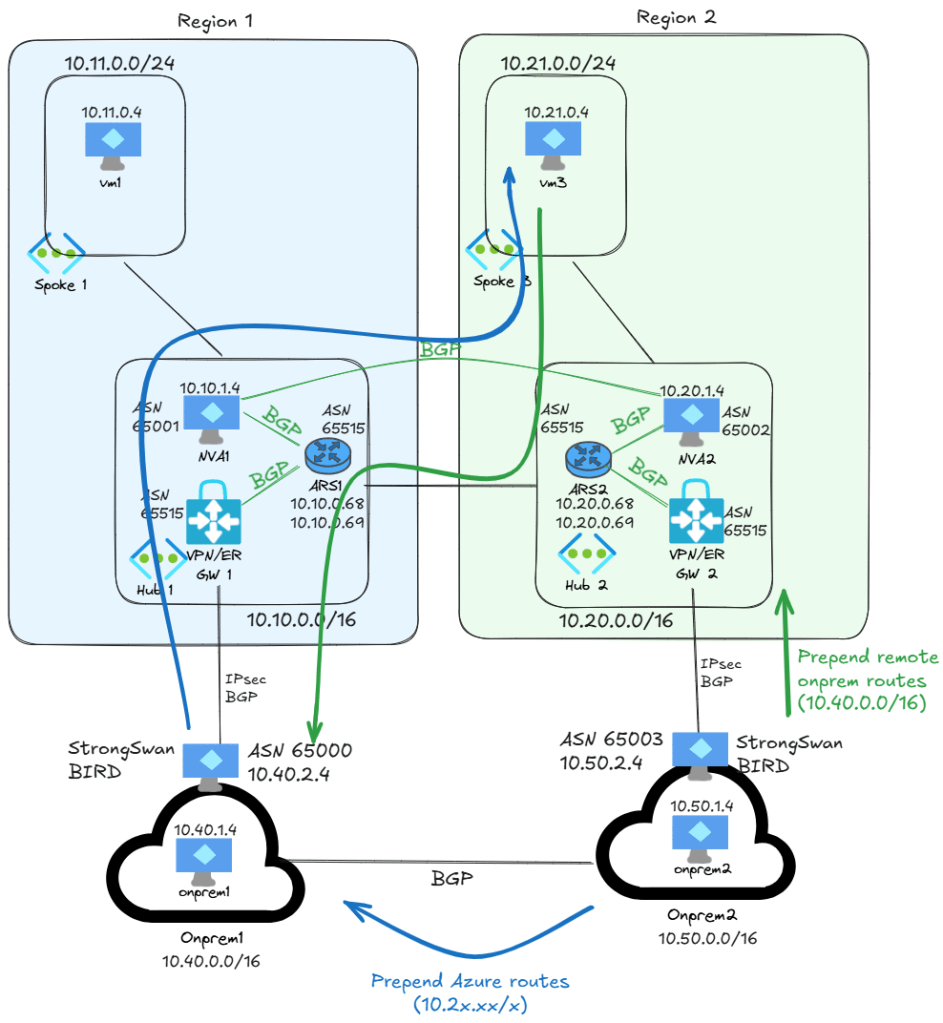
The previous diagram focuses on the flows between onprem1 and hub2 for simplicity, but the same can be applied to the flows between onprem2 and hub1. Note that all traffic goes through the NVAs, the ARS are just control plane. The blue arrows (onprem to Azure) are easy, these changes are purely restricted to the onprem network infrastructure, and I will implement it in BIRD. For example, in onprem2 with this configuration so that all prefixes that are learned from the hub gateways are forwarded over the DCI link with three prepends:
filter export_to_dci {
  if source = RTS_STATIC then accept;
  if (proto = "hub0") || (proto = "hub1") then {
    bgp_path.prepend(65003);
    bgp_path.prepend(65003);
    bgp_path.prepend(65003);
    accept;
  }
  reject;
}
And sure enough, now NVA1 will prefer the connection to Azure instead of the DCI link to reach hub2:
root@router-dc1:~# birdc show route 10.21.0.0/24 all | grep -E '^10|as_path'
10.21.0.0/24         unicast [hub1 08:15:53.387] ! (100/?) [AS65002i]
        BGP.as_path: 65515 65001 65002
        BGP.as_path: 65515 65001 65002
        BGP.as_path: 65003 65003 65003 65003 65515
For the Azure-to-onprem flow, let’s try first with a route map on ARS, which according to the docs, it should not work. I configured this route map rule on ARS2 as inbound from the connection to onprem2:
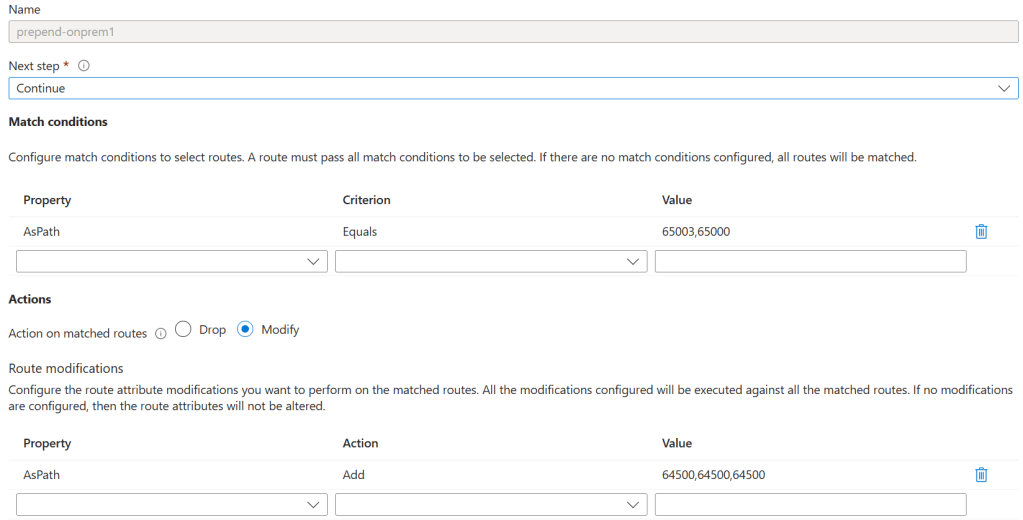
As you can see, I am matching on the AS path, not on the exact route. This is a flexible configuration that allows for further routes to be advertised from on-premises without having to modify the route maps.
If you are wondering why I am using ASN 64500, it is because in the public preview 65515 is restricted, and you can use it in prepending. I could use anything else, but I decided to go for an ASN the range reserved for documentation (see RFC 5398 – Autonomous System (AS) Number Reservation for Documentation Use for more details).
I created two route maps, one for inbound (with the rule above) and one for outbound (empty, since we don’t need it in this lab, and a route map without rules has no effect) , and applied both of them to the VPN connection:

The best way to test the new route map is in the route map dashboard, where you can see prepending taking place:
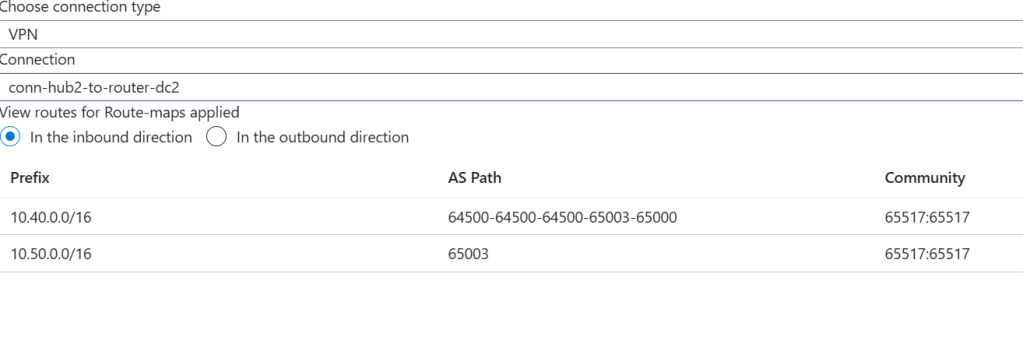
The route map dashboard is better than looking at the VPN gateway routing, since the incoming routes at the gateway do not show the prepending, not having gone through ARS yet:
❯ az network vnet-gateway list-learned-routes -n vpngw-hub2 -g $rg -o table | grep -E '^Network|---|^10.40'
Network       NextHop     Origin    SourcePeer    AsPath             Weight
------------  ----------  --------  ------------  -----------------  --------
10.40.0.0/16  10.50.2.4   EBgp      10.50.2.4     65003-65000        32768
10.40.0.0/16  10.20.0.4   IBgp      10.20.0.69                       0
10.40.0.0/16  10.10.1.4   EBgp      10.20.0.69    65002-65001-65000  32768
10.40.0.0/16  10.20.0.4   IBgp      10.20.0.68                       0
10.40.0.0/16  10.10.1.4   EBgp      10.20.0.68    65002-65001-65000  32768
The effective routes section in the ARS portal doesn’t show the prepending either, but we can use it to confirm that the cross-hub route is now preferred:
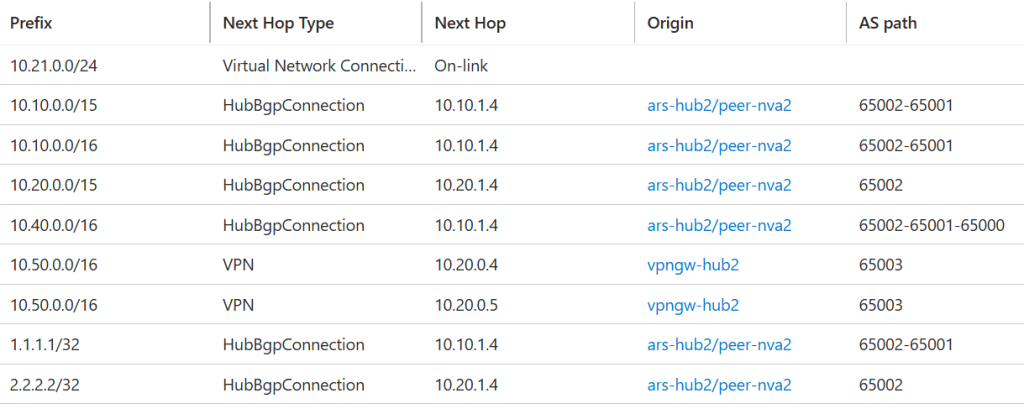
The definitive proof is that the effective route in the NVA’s subnet is now pointing to NVA1 (10.10.1.4) and not to the VPN gateway:
❯ az network nic show-effective-route-table -n nic-vm-nva2 -g $rg -o table

Source                 State    Address Prefix    Next Hop Type          Next Hop IP
---------------------  -------  ----------------  ---------------------  -------------------
Default                Active   10.20.0.0/16      VnetLocal
Default                Active   10.21.0.0/24      VNetPeering
VirtualNetworkGateway  Active   10.50.0.0/16      VirtualNetworkGateway  10.20.0.4 10.20.0.5
VirtualNetworkGateway  Active   1.1.1.1/32        VirtualNetworkGateway  10.10.1.4
VirtualNetworkGateway  Active   2.2.2.2/32        VirtualNetworkGateway  10.20.1.4
VirtualNetworkGateway  Active   10.20.0.0/15      VirtualNetworkGateway  10.20.1.4
VirtualNetworkGateway  Active   10.10.0.0/15      VirtualNetworkGateway  10.10.1.4
VirtualNetworkGateway  Active   10.40.0.0/16      VirtualNetworkGateway  10.10.1.4
Default                Active   0.0.0.0/0         Internet
Default                Active   10.10.0.0/16      VNetGlobalPeering
Verifying the flows before breaking things
Let’s see if all flows work at this point before starting to introduce faults in the design. I will pick the VM in hub1 as source for my tests. First Azure-to-Azure cross-hub, although we already saw that this was working and going through both NVAs:
                             My traceroute  [v0.95]
vm-hub1-ep (10.11.0.4) -> 10.21.0.4 (10.21.0.4)        2026-08-11T10:16:55+0000
Keys:  Help   Display mode   Restart statistics   Order of fields   quit
                                       Packets               Pings
 Host                                Loss%   Snt   Last   Avg  Best  Wrst StDev
 1. 10.10.1.4                         0.0%    10    0.7   1.9   0.6   7.2   2.2
 2. 10.20.1.4                         0.0%    10   32.3  31.0  29.4  34.3   1.4
 3. 10.21.0.4                         0.0%     9   31.2  31.1  30.0  37.0   2.2
Now VM1 to onprem1, which should also work without problems:
                             My traceroute  [v0.95]
vm-hub1-ep (10.11.0.4) -> 10.40.1.4 (10.40.1.4)        2026-08-11T10:18:49+0000
Keys:  Help   Display mode   Restart statistics   Order of fields   quit
                                       Packets               Pings
 Host                                Loss%   Snt   Last   Avg  Best  Wrst StDev
 1. 10.10.1.4                         0.0%    18    1.6   0.9   0.7   1.6   0.3
 2. 10.40.2.4                         0.0%    18   10.0  10.9   9.7  14.5   1.4
 3. 10.40.1.4                         0.0%    17   12.8  12.2  11.3  13.8   0.7
And finally, the cross-hub Azure-onprem test, from VM1 to onprem2, showing that the traffic is going through hub2 and not through onprem1:
                             My traceroute  [v0.95]
vm-hub1-ep (10.11.0.4) -> 10.50.1.4 (10.50.1.4)        2026-08-11T10:36:00+0000
Keys:  Help   Display mode   Restart statistics   Order of fields   quit
                                       Packets               Pings
 Host                                Loss%   Snt   Last   Avg  Best  Wrst StDev
 1. 10.10.1.4                         0.0%    10    0.9   1.4   0.7   4.2   1.1
 2. 10.20.1.4                         0.0%    10   29.5  30.4  29.4  36.8   2.3
 3. 10.50.2.4                         0.0%    10   55.8  57.2  55.4  66.3   3.5
 4. 10.50.1.4                         0.0%    10   58.2  60.1  57.4  73.1   4.7
Since the current routing configuration doesn’t use onprem locations as transit networks, the most interesting failures are the outage of an Azure region and the outage of both VPN tunnels between a hub and its corresponding onprem VPN device, which we will look at now.
Breaking Azure
To simulate a regional Azure outage, we can shutdown NVA2, which forces VM1-onprem2 traffic to go through onprem, but the flow still works:
                             My traceroute  [v0.95]
vm-hub1-ep (10.11.0.4) -> 10.50.1.4 (10.50.1.4)        2026-08-11T10:40:31+0000
Keys:  Help   Display mode   Restart statistics   Order of fields   quit
                                       Packets               Pings
 Host                                Loss%   Snt   Last   Avg  Best  Wrst StDev
 1. 10.10.1.4                         0.0%    11    5.3   1.3   0.7   5.3   1.3
 2. 10.40.2.4                         0.0%    11   10.1  10.2   9.7  11.1   0.5
 3. 10.50.2.4                         0.0%    11   35.8  36.1  35.2  40.2   1.4
 4. 10.50.1.4                         0.0%    10   36.1  39.0  36.1  47.0   3.8
And restarting the VM will bring the traffic back to NVA2:
                             My traceroute  [v0.95]
vm-hub1-ep (10.11.0.4) -> 10.50.1.4 (10.50.1.4)        2026-08-11T10:43:47+0000
Keys:  Help   Display mode   Restart statistics   Order of fields   quit
                                       Packets               Pings
 Host                                Loss%   Snt   Last   Avg  Best  Wrst StDev
 1. 10.10.1.4                         0.0%     9    0.7   1.5   0.7   4.3   1.1
 2. 10.20.1.4                         0.0%     8   31.8  31.8  29.6  35.6   1.8
 3. 10.50.2.4                         0.0%     8   55.3  56.2  55.2  61.1   2.0
 4. 10.50.1.4                         0.0%     8   57.3  62.8  57.3  67.6   3.7
Breaking ISP1
Another potential failure that can happen is the connectivity between onprem1 and hub1. In the case of a VPN, this could be because of an ISP failure, or in an ExpressRoute scenario because of an ExpressRoute location outage. In this case, to see whether our routing configuration can work around the failure, I will break the connection between hub1 and DC1, and test the flows between VM1 and onprem1, which now goes over hub2 and onprem2:
                             My traceroute  [v0.95]
vm-hub1-ep (10.11.0.4) -> 10.40.1.4 (10.40.1.4)        2026-08-11T10:56:10+0000
Keys:  Help   Display mode   Restart statistics   Order of fields   quit
                                       Packets               Pings
 Host                                Loss%   Snt   Last   Avg  Best  Wrst StDev
 1. 10.10.1.4                         0.0%    11    0.8   0.8   0.7   1.2   0.1
 2. 10.20.1.4                         0.0%    11   29.5  29.9  29.4  30.6   0.4
 3. 10.50.2.4                         0.0%    10   55.5  56.1  54.9  58.3   1.1
 4. 10.40.2.4                         0.0%    10   83.1  82.3  81.8  83.1   0.5
 5. 10.40.1.4                         0.0%    10   82.7  84.1  81.9  87.6   2.0
Restoring the VPN tunnel brings connectivity back through it:
                             My traceroute  [v0.95]
vm-hub1-ep (10.11.0.4) -> 10.40.1.4 (10.40.1.4)        2026-08-11T10:58:35+0000
Keys:  Help   Display mode   Restart statistics   Order of fields   quit
                                       Packets               Pings
 Host                                Loss%   Snt   Last   Avg  Best  Wrst StDev
 1. 10.10.1.4                         0.0%    51    0.9   1.3   0.7   7.5   1.2
 2. 10.40.2.4                         0.0%    50   47.4  46.9  45.7  50.1   1.2
 3. 10.40.1.4                         0.0%    50   46.5  48.1  45.7  57.5   2.9
Can we inject routes to Azure spokes via ARS?
Something else that we could try to do in this lab is getting rid of the UDRs in the spokes, to make the addition of new spokes seamless. However, this is not going to be possible, since the routes in ARS are too heterogeneous. This is the effective route table in ARS1, for example:
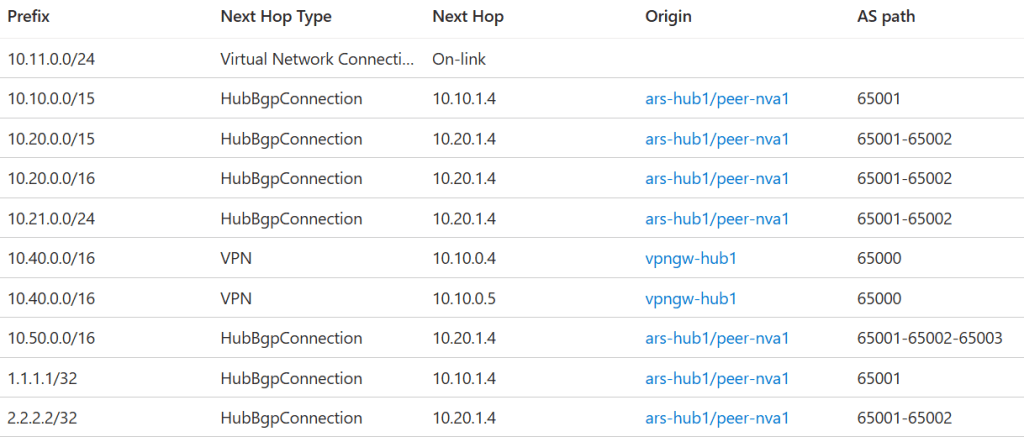
As you can see, there are three types of routes:
- Routes that have as next hop NVA1: these routes wouldn’t be a problem if pushed to the spoke VNets, but they are a problem if they are programmed in the NVA’s subnet, since they create a routing loop. In my lab, the only two routes I have like this are a summary
10.10.0.0/15which we are not using, since we are propagating the more specific routes everywhere, and a test route. - Routes that have as next hop NVA2: these routes are extremely important for NVA1, since they configure the correct routing in NVA1’s subnet and allow to avoid the need for an overlay between NVA1 and NVA2.
- Lastly, the routes with the VPN gateway instances as next hop. Again, these routes provide connectivity to onprem for NVA1, but they would be a problem if programmed in the spoke VNets, since they would go straight to the VNG bypassing the NVA.
At this stage of the public preview I have not been able to find how to apply route maps to spoke VNet connections, which could help to program just some of the routes in ARS in the spokes. When that feature becomes available, testing again my setup would probably be warranted.
An alternative to using route maps for spoke route injection is having another ARS in a separate VNet, and use it exclusively for this purpose (without route maps, otherwise you couldn’t speak to it over BGP from the NVA). I used to have this scenario documented in Route injection in spoke virtual networks – Azure Route Server, but the product group removed it to keep documentation simple. Please do let me know if you would like to see it readded. That being said, many organizations decide to go for the UDRs, since it is not such a nuisance, and it can also be automated with tools such as Azure Virtual Network Manager.
Conclusion
We have seen how you can use route maps to do traffic engineering in Azure and prefer certain routes over other ones. In this case we used the less common inbound route maps to prepend with ASNs incoming routes, as opposed to the more common approach of prepending outbound routes. We have also seen how to troubleshoot these route maps with new tools such as the Azure Route Server effective routes panel and the route map dashboard.
The result was a relatively complex topology with redundant routes for all destinations, able to withstand outages impacting Azure regions or Internet connectivity to on-premises.
I tested with single NVAs, so you might ask what about using redundant NVAs? In that case you would typically put an Azure Load Balancer (ALB) in front of them, and advertise the ALB’s frontend IP as the next hop. This way you prevent asymmetric routing from happening.
Did I miss anything? Please let me know!

