
This probably one of the least enticing blog post titles I have ever had. I will try to explain in a few paragraphs what this is going to be about, so that you can decide whether reading further or carrying on with your life.
Reliability is one of the most important non-functional requirements for any application, right after security. Single-region deployments with availability zones are often good enough for non-business-critical applications, but sometimes you want to be able to survive the unlikely scenario of a full Azure regional outage without too much impact (“too much” should be interpreted in the context of your SLO, RTO and RPO). Azure has a rich set of global load balancers that help you distribute your application across many regions: Azure Front Door for web apps, Azure Traffic Manager as a DNS-based global load balancer for any IP-based application, and the Global Load Balancer, which doesn’t rely on DNS. Others have created decision charts that help you choose the right global load balancer, and in those decision charts the first question is (or should be) always “is your application exposed to the public Internet?”.
The reason is because those three global load balancers share the same scope: they are all for applications that are accessed over the Internet. Otherwise, if your application is internal your options in Azure are meager. I published an article in Azure Docs about how to use anycast with Azure Route Server for internal load balancing, inspired on a great post by Adam Stuart, and my colleague Alban Fetahi recently posted about using BGP in Infoblox to advertise anycast addresses to Azure Virtual WAN. However, some customers might not wish to cope with the complexity of using Azure Route Server or BGP on a Network Virtual Appliance (NVA), so I wondered whether we could build an anycast design without Azure Route Server in Azure. Welcome to the rabbit hole!
What is this anycast thing anyway?
Glad you ask. First things first, anycast load balancing works very differently than other load balancing mechanisms. When you think about load balancing, the first image that comes to mind is probably similar to this canonical load balancer picture:
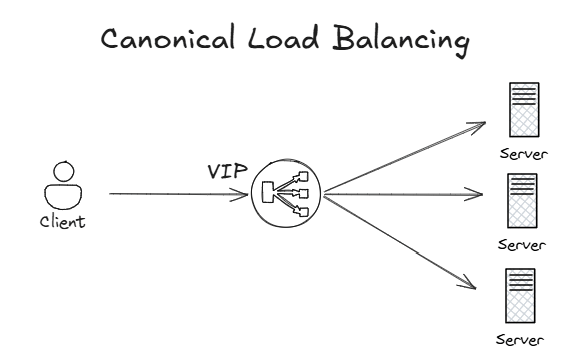
A virtual IP (VIP) address is defined in the load balancer, which attracts the traffic to it. The load balancer will typically proxy the connections and create another backend connection to one of the application servers.
However, this implies that the load balancer will be located in a specific region. When your load balancer needs to be distributed across multiple locations, DNS is often used as an alternative technology:
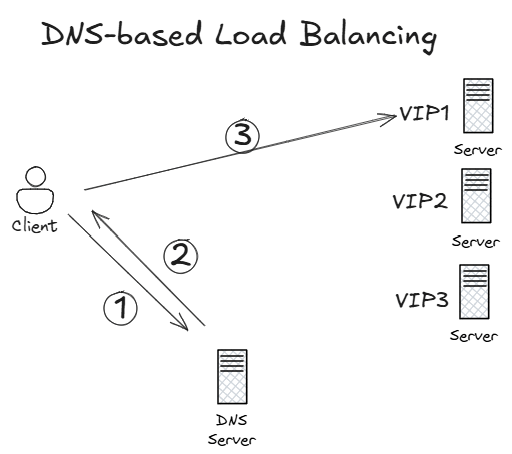
This approach is completely different to the canonical load balancing concept: the client can reach all application servers, each having a different IP address. The selected IP address will be decided by the DNS servers (also spread over multiple regions) when the client tries to resolve the application name, for example yourapplication.com. The DNS servers also have some intelligence to detect whether any of the application servers is down, so that it will take it out of rotation and not return its IP address to clients any more. DNS-based load balancing is very flexible and allows to configure sophisticated load balancing algorithms (very useful for migrations), but it also has some drawbacks such as the caching of DNS answers in clients and intermediate DNS servers which turns into slower convergence times (usually acceptable in disaster events).
Azure Traffic Manager is Microsoft’s offer for DNS-based load balancing, but unfortunately it only supports public applications at the time of writing this article. You can also deploy your own Network Virtual Appliance (NVA) in your VNets that have support for DNS-based load balancing, such as F5 BigIP GTM.
There is a third approach for global load balancing, and that is leaving the load balancing decision entirely to the network, as the following image shows:
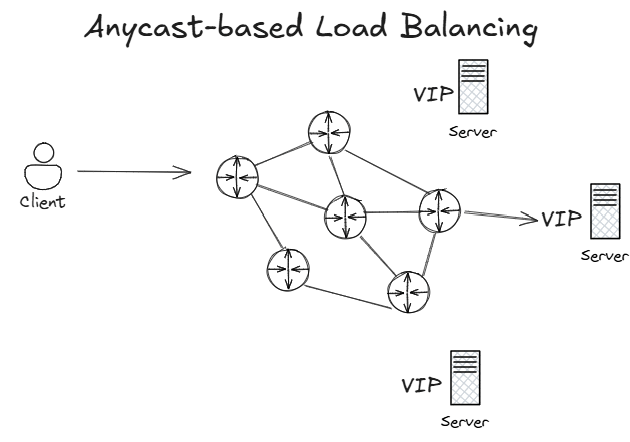
The same application virtual IP address is advertised from different regions into the routing protocol. When a request enters the network with the application’s IP address as the destination, this routing protocol will decide which of the three regions is closest, and will send the client to that destination server. Some people struggle with this concept, since traditionally you don’t want overlapping IP addresses in your network. However, we are talking here about virtual IP addresses for applications that are not going to generate any outbound traffic, but only absorb inbound application traffic. The application servers would typically have further NICs with unique IP addresses to connect to other systems.
Since the destination server is entirely decided by the network, anycast does not offer as many load balancing controls as DNS-based global load balancing, but it has the advantage of being completely distributed with no single point of failure. From a resiliency standpoint, this is extremely important. That is the reason why Azure Front Door and the Global Load Balancer also use anycast under the hood, and why some of the largest web applications out there such as LinkedIn also use anycast.
Anycast load balancing and session persistence
Most load balancers offer some kind of persistence, also called stickiness. In essence, this means that certain set of TCP sessions should always be sent to the same destination application server. For anycast load balancing it is the routing protocol running in your network that decides where to send packets, and different routing protocols behave differently:
- Some routing protocols such as eBGP (which is used in Azure) per default do not perform equal-cost multipathing or ECMP (this behavior can be overridden in most BGP implementations), so that a given router will always send application traffic to the same destination server. This means that all sessions that transit over that router are “sticky”, meaning that they “stick” to the same target.
- Another important aspect is what happens in failback situations, when a network failure gets repaired. This depends on how the routing protocol selects the best route. As we will see later in this post, ExpressRoute’s implementation of BGP predictably reverts to the original best next hop.
- Other protocols such as iBGP, OSPF or IS-IS support ECMP. Even if they are not relevant for Azure internals, in certain situations when the load balancing decision happens in your on-premises network it could be up to one of these protocols. In these cases you need to be careful with stateful applications, since it could happen that different TCP connections that belong to the same application session are sent to different target servers.
Anycast in self-managed hub and spoke
Let’s roll up our sleeves and take a stab at it. We want to expose our application with the same IP address from two different regions, without using Azure Route Server or NVAs (our self-imposed constraint) and only with Azure-managed components. I am going to use DNS as the application to load balance (nothing to do here with DNS-based load balancing): I want to offer a DNS service to on-premises with the same IP address across different regions, and failover to another region if one of my Azure DNS servers failed. I will use Azure DNS Private Resolver as DNS server. To that purpose, I will deploy my DNS private resolvers in a spoke VNet in each region with exactly the same IP range, so that my private resolvers receive the same IP address:
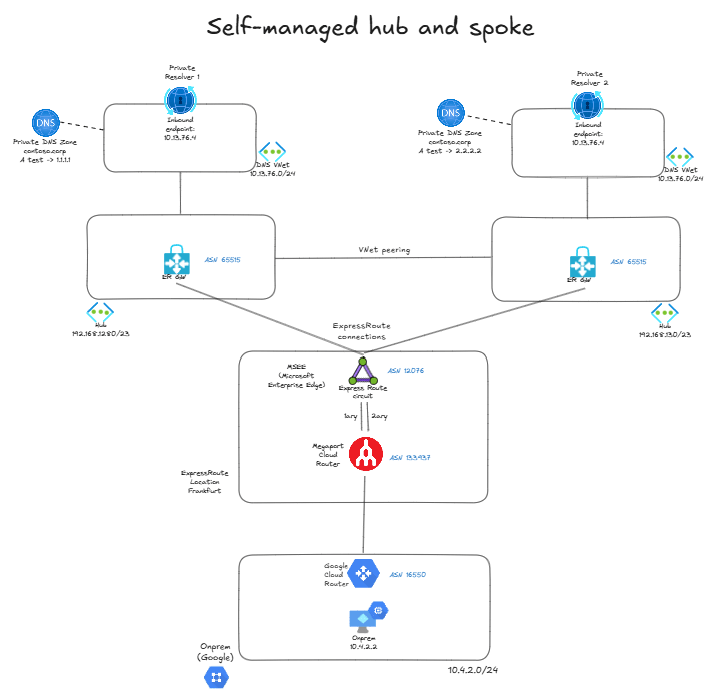
As you can see, I am simulating on-premises with Google Cloud, and connecting it to Azure with ExpressRoute. I have two regions, each with a hub VNet. In each region I have a shared services VNet, and I have defined it with the same prefix in both, 10.13.76.0/24. So the private resolvers’ inbound endpoints in both regions have the same IP address, 10.13.76.4. Each resolver is able to resolve the FQDN test.contoso.corp, but one will resolve it to 1.1.1.1 and the other to 2.2.2.2, so that we know which one is the selected one. In production you would of course want your zones to be consistent across regions, I have this inconsistency only for the sake of convenience.
Each hub VNet has a spoke with the same prefix, and they are connected to the ExpressRoute circuit. Consequently, the ExpressRoute routers will see the same prefix from both hubs:
❯ az network express-route list-route-tables -g $rg -n $er_circuit_name --path primary --peering-name AzurePrivatePeering --query value -o table
LocPrf    Network            NextHop          Path          Weight
--------  -----------------  ---------------  ------------  --------
100       10.13.76.0/24      192.168.128.12*  65515         0
100       10.13.76.0/24      192.168.128.13   65515         0
100       10.13.76.0/24      192.168.130.12   65515         0
100       10.13.76.0/24      192.168.130.13   65515         0
100       169.254.41.168/30  169.254.41.169   133937        0
100       169.254.41.172/30  169.254.41.169   133937        0
100       169.254.97.168/29  169.254.41.169   133937        0
100       192.168.128.0/23   192.168.128.12*  65515         0
100       192.168.128.0/23   192.168.128.13   65515         0
100       192.168.128.0/23   169.254.41.169   133937 12076  0
100       192.168.130.0/23   192.168.130.12*  65515         0
100       192.168.130.0/23   192.168.130.13   65515         0
100       192.168.130.0/23   169.254.41.169   133937 12076  0
There are actually four routes for 10.13.76.0/24: two are coming from the first hub (that has the range 192.168.128.0/23) and two from the second hub (with 192.168.130.0/23), because there are two ExpressRoute gateway instances in each hub. The asterisk next to the next hop shows the route that will be preferred by the ExpressRoute router: not sure what is the route selection logic here, but it seems to favor the lowest next hop IP address (you will see further examples next).
When the client machine on-premises (in Google Cloud) sends a DNS request to 10.13.76.4, it will send it over ExpressRoute, and the router representing the circuit will look into its BGP table to decide to which is the next-hop for this destination IP address. Since the next hop is the first hub, the request will end up in Private Resolver 1 and the client should get 1.1.1.1 as the resolved IP. Let’s verify it:
jose@vm:~$ nslookup test.contoso.corp
Server:         10.13.76.4
Address:        10.13.76.4#53
Non-authoritative answer:
Name:   test.contoso.corp
Address: 1.1.1.1
As you could see from the BGP output above, ExpressRoute selected a single route out of the possible four, this is the standard behavior for eBGP. Consequently, there is not going to be any multipathing: all requests to the DNS application arriving at this router will be forwarded to the private resolver in the first hub.
Let’s see if things work under a failure scenario: if we remove the peerings from the VNet where the first private resolver is deployed, the only remaining routes will be those coming from the second hub (it still picks the route with the lowest next hop, this time 192.168.130.12):
❯ az network express-route list-route-tables -g $rg -n $er_circuit_name --path primary --peering-name AzurePrivatePeering --query value -o table
LocPrf    Network            NextHop          Path          Weight
--------  -----------------  ---------------  ------------  --------
100       10.13.76.0/24      192.168.130.12*  65515         0
100       10.13.76.0/24      192.168.130.13   65515         0
100       169.254.41.168/30  169.254.41.169   133937        0
100       169.254.41.172/30  169.254.41.169   133937        0
100       169.254.97.168/29  169.254.41.169   133937        0
100       192.168.128.0/23   192.168.128.12*  65515         0
100       192.168.128.0/23   192.168.128.13   65515         0
100       192.168.128.0/23   169.254.41.169   133937 12076  0
100       192.168.130.0/23   192.168.130.12*  65515         0
100       192.168.130.0/23   192.168.130.13   65515         0
100       192.168.130.0/23   169.254.41.169   133937 12076  0
The DNS service is still available to the client, but this time the name resolved but to 2.2.2.2, showing that requests end up now in the second private resolver. I ran a continuous loop to measure the convergence time, and it was very fast (1-2 seconds):
jose@vm:~$ while true; do echo -n "$(date) - "; nslookup test.contoso.corp | grep Address | grep -v '#53'; sleep 1; done
Wed Apr 15 07:39:56 UTC 2026 - Address: 1.1.1.1
Wed Apr 15 07:39:57 UTC 2026 - Address: 1.1.1.1
Wed Apr 15 07:39:58 UTC 2026 - Address: 1.1.1.1
Wed Apr 15 07:39:59 UTC 2026 -
Wed Apr 15 07:40:15 UTC 2026 - Address: 2.2.2.2
Wed Apr 15 07:40:17 UTC 2026 - Address: 2.2.2.2
Wed Apr 15 07:40:18 UTC 2026 - Address: 2.2.2.2
Restoring the VNet peerings will bring all four routes back to the ExpressRoute router, which will reconverge to the first hub (the route from 192.168.128.12). This tells us that the eBGP implementation in this ExpressRoute router doesn’t use the route age in the route selection algorithm.
Virtual WAN
There is a challenge with the previous architecture: what if you wanted to make the second private resolver the preferred one? You would need to somehow make the routes coming from 192.168.130.12 and 192.168.130.13 better, but there is a problem: you cannot do any AS path prepending outside of Virtual WAN. Can we do the same with Virtual WAN? Let’s try to build this scenario:
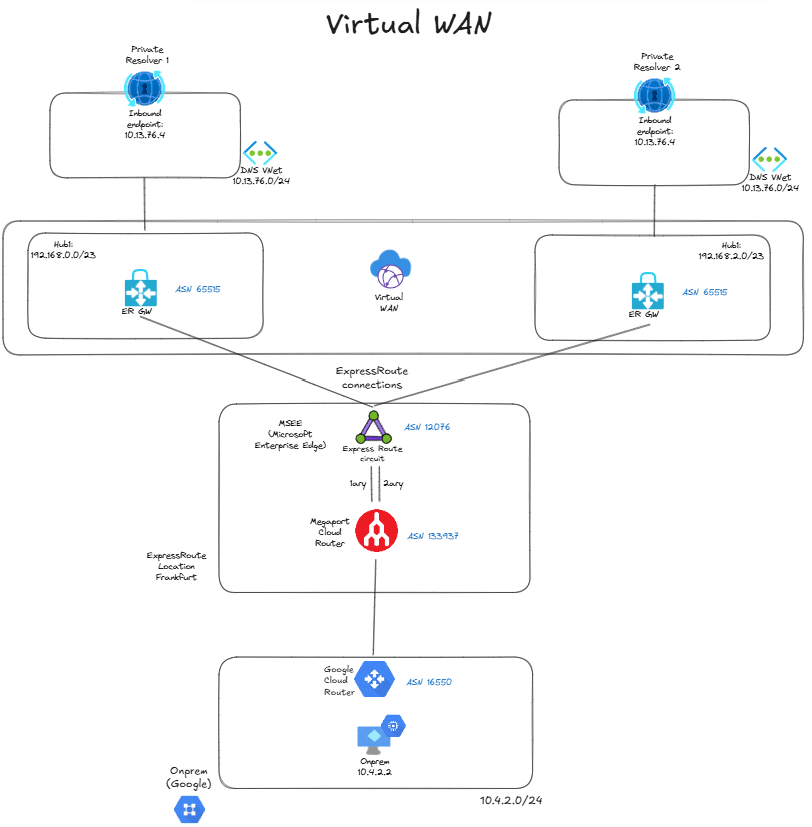
Unfortunately, Virtual WAN has a pre-flight safety check that prevents you from connecting spokes with overlapping IP addresses to the same Virtual WAN, even across different virtual hubs. When you try to build the topology above, you get this error message:
Message: Virtual network connection 'dns-01' from hub
'hub21' to virtual network 'dns-01' is not allowed.
It overlaps with address space: 10.13.76.0/24
Virtual WAN with indirect spokes
To overcome that control, we can put our business-critical application (the DNS resolvers) in an indirect spoke, because this way Virtual WAN will not be directly attached to it. We will have a transit VNet with a forwarding device, in my case I deployed an Azure Firewall since we said we were only going to use Azure-managed services and not NVAs, but any forwarding virtual machine would do, or even the new Virtual Network Routing Appliance:
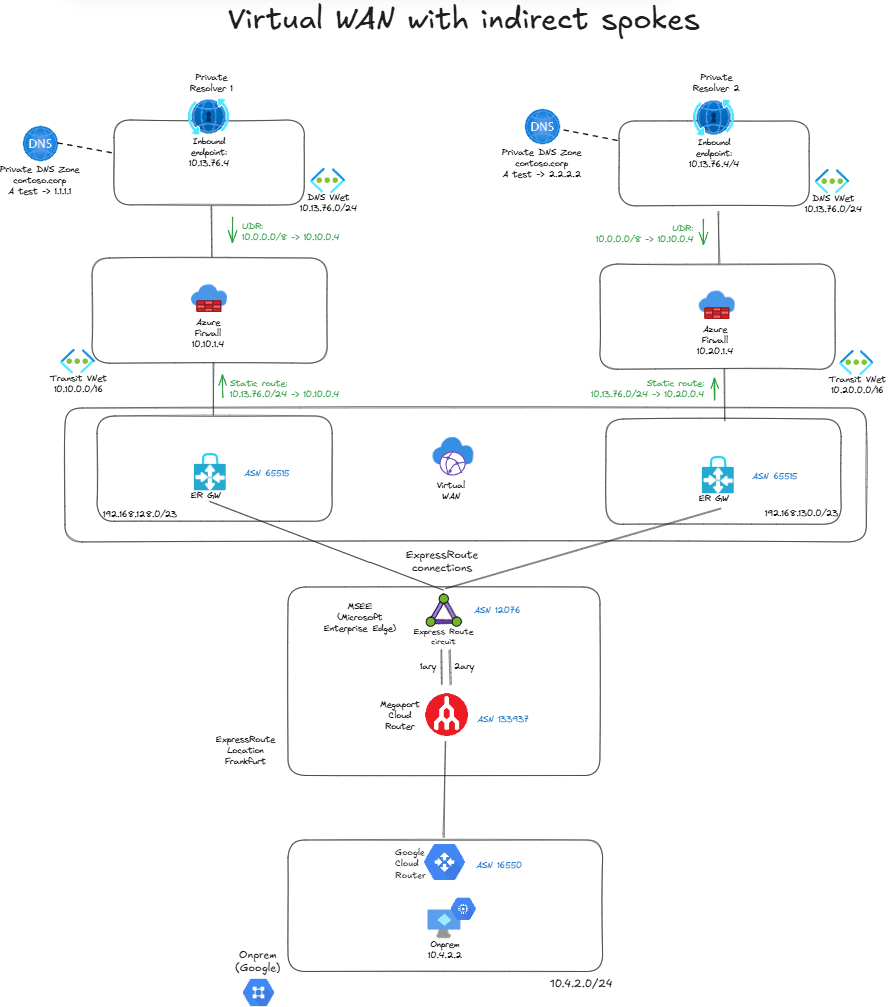
You need two static routes to make the indirect spoke setup work:
- User Defined Routes in the inbound endpoint subnets in the indirect spokes for the on-premises ranges, with the next hop being the Azure Firewall.
- Static routes defined at the connection level in Virtual WAN for the service VNet (
10.13.76.0/24) and next hop also the Azure Firewall with route propagation enabled, so that they are redistributed into BGP.
This is a perfectly valid scenario in Virtual WAN, so now we can go back to the ExpressRoute circuit and inspect that we see the expected four routes in the route table:
❯ az network express-route list-route-tables -n $circuit_name -g $rg --path primary --peering-name AzurePrivatePeering --query value -o table
This command is in preview and under development. Reference and support levels: https://aka.ms/CLI_refstatus
LocPrf    Network        NextHop          Path    Weight
--------  -------------  ----------       ------  --------
100       10.13.76.0/24  192.168.128.12*  65515   0
100       10.13.76.0/24  192.168.128.13   65515   0
100       10.13.76.0/24  192.168.130.12   65515   0
100       10.13.76.0/24  192.168.130.13   65515   0
[...]
But now we can use Azure Virtual WAN route maps to influence routing. For example, we can prepend the routes in the first hub with the AS number 11111 to make it less preferred:
❯ az network express-route list-route-tables -n $circuit_name -g $rg --path primary --peering-name AzurePrivatePeering --query value -o table
This command is in preview and under development. Reference and support levels: https://aka.ms/CLI_refstatus
LocPrf    Network        NextHop          Path          Weight
--------  -------------  ----------       ------        --------
100       10.13.76.0/24  192.168.130.12*  65515         0
100       10.13.76.0/24  192.168.130.13   65515         0
100       10.13.76.0/24  192.168.128.12   65515 11111   0
100       10.13.76.0/24  192.168.128.13   65515 11111   0
[...]
Name resolution is now happening through the second private resolver, as expected:
jose@vm:~$ nslookup test.contoso.corp
Server:         10.100.0.4
Address:        10.100.0.4#53
Non-authoritative answer:
Name:   test.contoso.corp
Address: 2.2.2.2
I also did failure tests with Virtual WAN to see how quick the network converges, and the results were similar to the scenario with customer-managed hub and spoke. The behavior is also preferring the route with the lowest next hop, since this routing decision is taken by the ExpressRoute router and is orthogonal to whether the ExpressRoute gateway is in Virtual WAN or in a self-managed VNet.
Conclusion
For private global load balancing Azure doesn’t offer an out-of-the-box service, but you can use the anycast pattern to provide cross-region balancing and resiliency over application deployments in different regions. You can follow the documented pattern with Azure Route Server or if you prefer to go for a simpler approach that doesn’t involve BGP configuration or Network Virtual Appliances, you could deploy your application in VNets that get the same prefixes assigned.
Self-managed hub and spoke could be problematic due to the absence of support for route maps, which allow to manipulate the preferred application location. If you need this level of control, you can use Virtual WAN route maps to achieve this granularity with AS path prepending, but you will have to work with the model of indirect spokes to be able to integrate VNets with the same range into a Virtual WAN.
Was this post useful for you? Do you have the need for a private global load balancer in Azure? Let me know your thoughts an ideas in the comments section below!
 Cloudtrooper
Anycast DNS is something I think about a lot 🙂
I’d say the best IP address for anycast DNS should be 10.10.10.10, as obvious addition to public 1.1.1.1, 8.8.8.8 and 9.9.9.9 ones.
I would say that adding static anycast will probably cause more long-term problems, than benefits – just because any failure will require control plane reconfigurations and more knowledge than needed to keep BGP + Route Server running.
One can use BGP daemon on the DNS server itself + loopback containing the anycast IP. Windows Server can have it out of the box, and shutting down the BGP service for maintenance or troubleshooting will not even influence the server connectivity itself.I believe this is especially true if VWAN is used – it already has Route Server deployed, and does not need any separate service in Azure.
If scenario described is selected (without VWAN and BGP), then even in this situation this is possible to influence the preference of one anycast server over another. Spoke Vnets containing DNS servers can have different address space prefix lenght:* 10.10.10.0/26 for more preferred vnet * 10.10.10.0/25 for less preferred vnet(need to keep in mind that ExR/VPN advertises Vnet address prefixes, not subnet address prefixes, and even this is possible to reconfigure the vnet address space prefix lenght, so it can be dynamically adjusted).
I am a big fan of anycast DNS, because indeed this allows configuring DNS once, especially on set-and-forget devices such as IP cameras, Routers and Switches, however, I would not use Anycast DNS instance as the way to route traffic.
Instead, to route traffic, admin can configure DNS server to return 2 or 3 IP addresses. In case of one of those IPs not reachable during connect, TCP stack will try to connect to 2nd one. Browsers and curl go even further and try multiple simultaneously, as a happy-eye-balls strategy.
Also Windows DNS server can reorder the server list based on the requester subnet, and put “closest” server IP to the top, so client should try it first.
LikeLike
Good points Alexey!
LikeLiked by 1 person