
Welcome to the fifth post in the Private Link Reality Bites series! Before we begin, let me recap the existing episodes of the series:
- Private Link reality bite #1: endpoints are an illusion (control plane vs data plane)
- Private Link reality bite #2: your routes might be lying (routing in virtual network gateways)
- Private Link reality bite #3: what’s my source IP (NAT)
- Private Link reality bite #4: Azure Firewall application rules
- Private Link reality bite #5: NXDomainRedirect (forwarding failed DNS requests to the Internet)
- Private Link reality bite #6: service endpoints vs private link
In this post with such a cryptic title I am going to cover one of the newest features in Azure DNS, which solves one of the oldest problems with Azure DNS and Private Link, explained by the great Daniel Mauser in this blog. The issue is essentially the one depicted in this diagram:

If two different organizations are using Azure services with Private Link, you cannot enable cross-organization access using the Azure services’ public IP addresses. Let me try to explain it in a more relatable way:
You are company A, and you have a bunch of storage accounts using Private Link. You need access to some public data hosted by one of your technology providers, let’s say company B. They give you an URL pointing to their storage account, but it doesn’t work. Why?
Normal operation
Let’s have a look at a test environment where this cross-organization access is working:

You want to access both your own data via private endpoints as well as external data hosted in a storage account owned by a different entity, for example some data provider, via its public IP address. No private endpoints are configured in the storage account hosted by the provider. At this point, everything will work perfectly:
jose@hubvm:~$ curl https://storagetest1138germany.blob.core.windows.net/test/helloworld.txt Good evening from Germany jose@hubvm:~$ curl https://storagefromsomeprovider.blob.core.windows.net/test/helloworld.txt Hello from your provider dataIf you look at the DNS resolutions for the FQDN storage account, you can tell that for the storage account storagetest1138germany its FQDN gets resolved to a canonical name (CNAME) including the privatelink string, and then to a private IP address, but for storagefromsomeprovider the DNS resolution returns a public IP address without the privatelink CNAME indirection:
jose@hubvm:~$ nslookup storagetest1138germany.blob.core.windows.net
Server:         127.0.0.53
Address:        127.0.0.53#53
Non-authoritative answer:
storagetest1138germany.blob.core.windows.net    canonical name = storagetest1138germany.privatelink.blob.core.windows.net.
Name:   storagetest1138germany.privatelink.blob.core.windows.net
Address: 10.13.77.5

jose@hubvm:~$ nslookup storagefromsomeprovider.blob.core.windows.net
Server:         127.0.0.53
Address:        127.0.0.53#53
Non-authoritative answer:
storagefromsomeprovider.blob.core.windows.net   canonical name = blob.syd27prdstr05a.store.core.windows.net.
Name:   blob.syd27prdstr05a.store.core.windows.net
Address: 20.60.183.139
Private Link on both accounts
Let’s enable now private endpoint on the provider storage account datafromsomeprovider. This could happen because the data provider decided to usse the Private Link technology inside of their organization, creating an internal private endpoint for their employees:
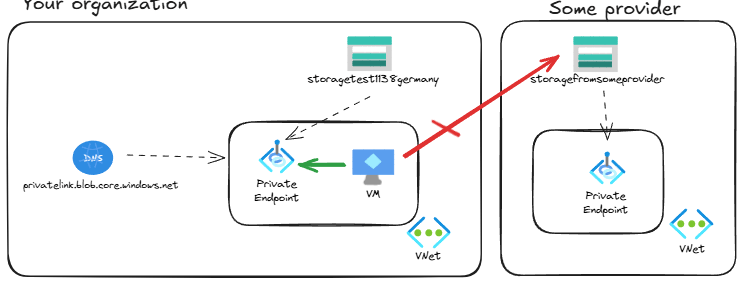
If you try to access the provider’s storage account now from your organization, it will not work any more:
jose@hubvm:~$ curl https://storagefromsomeprovider.blob.core.windows.net/test/helloworld.txt
curl: (6) Could not resolve host: storagefromsomeprovider.blob.core.windows.net
Using the dig utility you can find a bit more about the root cause of this problem:
jose@hubvm:~$ dig storagefromsomeprovider.blob.core.windows.net                                                                                                                                                                      [3/109]
; <> DiG 9.18.30-0ubuntu0.22.04.1-Ubuntu <> storagefromsomeprovider.blob.core.windows.net
;; global options: +cmd
;; Got answer:
;; ->>HEADER<<- opcode: QUERY, status: NXDOMAIN, id: 31475
;; flags: qr rd ra; QUERY: 1, ANSWER: 1, AUTHORITY: 1, ADDITIONAL: 1
;; OPT PSEUDOSECTION:
; EDNS: version: 0, flags:; udp: 65494
;; QUESTION SECTION:
;storagefromsomeprovider.blob.core.windows.net. IN A
;; ANSWER SECTION:
storagefromsomeprovider.blob.core.windows.net. 11 IN CNAME storagefromsomeprovider.privatelink.blob.core.windows.net.
;; AUTHORITY SECTION:
privatelink.blob.core.windows.net. 10 IN SOA    azureprivatedns.net. azureprivatedns-host.microsoft.com. 1 3600 300 2419200 10
;; Query time: 8 msec
;; SERVER: 127.0.0.53#53(127.0.0.53) (UDP)
;; WHEN: Tue Feb 11 10:03:42 UTC 2025
;; MSG SIZE  rcvd: 210
What’s going on? When the provider enabled a private endpoint for the storagefromsomeprovider, Microsoft enabled the CNAME redirection of the DNS resolution for that specific storage account. However, the local DNS zone linked to your VNet doesn’t know any private endpoint with that FQDN, so it returns a failure: NXDOMAIN or Non-eXistent Domain:
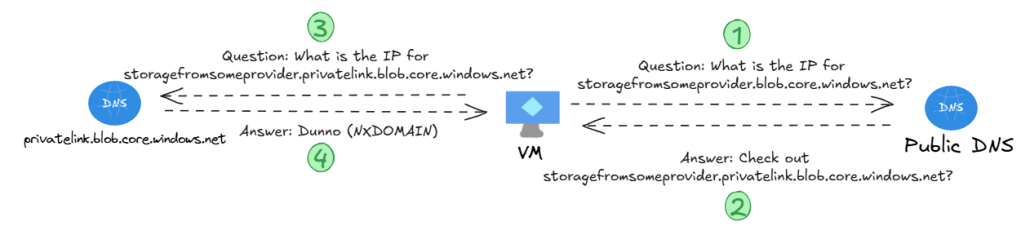
So the problem is that the VM is asking to the local private DNS zone, but this one doesn’t know that domain. The solutions so far were two:
- You implement conditional forwarding in your DNS infrastructure for that specific FQDN so that your VM doesn’t ask the local private DNS zone.
- You convince your data provider to offer the storage account via Private Link. However, we now have a cleaner approach.
Enter NXDomainRedirect
There is a new feature that can control what Azure DNS will do when the queried domain does not exist in a private DNS zone. The default behavior is what we have seen so far: since I am the authoritative owner of a given zone (privatelink.blob.core.windows.net in this example), if I can’t find it there it doesn’t exist. And by the way, this is consistent with the DNS standard behavior.
What you can do know is force Azure to deviate from the DNS standard, and send a request to the public DNS infrastructure if it cannot find an answer in a local private DNS zone. There is an attribute on each private zone link (the object connecting a private DNS zone to a VNet) called resolutionPolicy:
❯ az network private-dns link vnet show -n storage-hub -z $dns_zone_name_blob -g $rg --query resolutionPolicy -o tsv
Default
You can change this default behaivor through the portal as documented in Fallback to internet for Azure Private DNS zones, or you can do it via Azure CLI, which of course I prefer:
az network private-dns link vnet update -n storage-hub -z $dns_zone_name_blob -g $rg --resolution-policy NxDomainRedirect -o none
Let’s have a look at the DNS resolution now:
jose@hubvm:~$ dig storagefromsomeprovider.blob.core.windows.net
; <> DiG 9.18.30-0ubuntu0.22.04.1-Ubuntu <> storagefromsomeprovider.blob.core.windows.net
;; global options: +cmd
;; Got answer:
;; ->>HEADER<<- opcode: QUERY, status: NOERROR, id: 2959
;; flags: qr rd ra; QUERY: 1, ANSWER: 3, AUTHORITY: 0, ADDITIONAL: 1
;; OPT PSEUDOSECTION:
; EDNS: version: 0, flags:; udp: 65494
;; QUESTION SECTION:
;storagefromsomeprovider.blob.core.windows.net. IN A
;; ANSWER SECTION:
storagefromsomeprovider.blob.core.windows.net. 34 IN CNAME storagefromsomeprovider.privatelink.blob.core.windows.net.
storagefromsomeprovider.privatelink.blob.core.windows.net. 34 IN CNAME blob.syd27prdstr05a.store.core.windows.net.
blob.syd27prdstr05a.store.core.windows.net. 34 IN A 20.60.183.139
;; Query time: 0 msec
;; SERVER: 127.0.0.53#53(127.0.0.53) (UDP)
;; WHEN: Tue Feb 11 10:26:58 UTC 2025
;; MSG SIZE  rcvd: 180
The state is now NOERROR, and you can see that the chain of CNAME redirections gets eventually resolved to a public IP address. And sure enough, access to the storage account now works:
jose@hubvm:~$ curl https://storagefromsomeprovider.blob.core.windows.net/test/helloworld.txt
Hello from your provider data
Conclusion
So that was another Private Link reality bite, this time diving into some of the DNS intricacies and the new feature “NXDomainRedirect”, which increases the flexibility of inter-organization private link setups. Thanks for reading, and don’t to forget to check out the other articles in the Private Link Reality Bites series!
 Cloudtrooper
[…] Private Link reality bite #5: NXDomainRedirect (forwarding failed DNS requests to the Internet) […]
LikeLike
[…] Private Link reality bite #5: NXDomainRedirect (forwarding failed DNS requests to the Internet) […]
LikeLike
[…] Private Link reality bite #5: NXDomainRedirect (forwarding failed DNS requests to the Internet) […]
LikeLike
[…] Private Link reality bite #5: NXDomainRedirect (forwarding failed DNS requests to the Internet) […]
LikeLike
[…] Private Link reality bite #5: NXDomainRedirect (forwarding failed DNS requests to the Internet) […]
LikeLike