
Welcome to the fourth post in the Private Link Reality Bites series! Before we begin, let me recap the existing episodes of the series:
- Private Link reality bite #1: endpoints are an illusion (control plane vs data plane)
- Private Link reality bite #2: your routes might be lying (routing in virtual network gateways)
- Private Link reality bite #3: what’s my source IP (NAT)
- Private Link reality bite #4: Azure Firewall application rules
- Private Link reality bite #5: NXDomainRedirect (forwarding failed DNS requests to the Internet)
- Private Link reality bite #6: service endpoints vs private link
After the last post on Network Address Translation (NAT) for private endpoints, in this one we are going to dive into how to do the same with Azure Firewall proxy technology: application rules. Some of you might already have heard me being unbearably pedantic about the difference between NAT and proxy operations, so I will be writing these lines as an act of self redemption.
As in the previous post, this is the topology that we will be working on:

IMPORTANT: the previous design doesn’t reflect best practices, but it is just a test bed designed to expose certain behaviors of the Private Link technology in Azure.
Azure Firewall application rules
The first thing I will do is removing the network rule in my Azure Firewall policy from previous tests, and create a simple application rule that allows traffic to all Azure storage accounts:

The network rule needed to be removed because as soon as traffic matches a network rule, it will never proceed to verify the application rules, check Azure Firewall rule processing logic for more details.
I will do one more thing: I will remove the link between the private DNS zone and the hub virtual network where the firewall is deployed to see what happens, please bear with me on this one.
Traffic to the endpoint going public
Let’s do our first test of the day and try to reach the storage accounts from the on-premises VM:
jose@onpremvm:~$ curl https://storagetest1138australia.blob.core.windows.net/test/helloworld.txtAuthorizationFailureThis request is not authorized to perform this operation. RequestId:c124206c-a01e-0078-7aba-6ad074000000 Time:2025-01-19T21:35:32.9150125Z jose@onpremvm:~$ curl https://storagetest1138germany.blob.core.windows.net/test/helloworld.txtAuthorizationFailureThis request is not authorized to perform this operation. RequestId:d524ca27-401e-001f-3ebb-6a1905000000 Time:2025-01-19T21:43:04.4081481Z
Oh, oh… What is going on here? There seems to be some kind of access restriction, since the storage account does send back an answer, albeit an AuthorizationFailure. Not the answer we were expecting, but an answer after all, so this doesn’t seem to be a routing problem. Looking at the firewall logs it is apparent that the firewall saw the requests from the onprem VM (192.168.0.4) to both storage accounts, and allowed them using the application rule:
❯ az monitor log-analytics query -w $logws_customerid --analytics-query $fw_query -o table
Action_s    Category             DestinationIp_s    Fqdn_s                                          SourceIP     TableName      TimeGenerated
----------  -------------------  -----------------  ----------------------------------------------  -----------  -------------  ---------------------------
Allow       AZFWApplicationRule                     storagetest1138germany.blob.core.windows.net    192.168.0.4  PrimaryResult  2025-02-10T08:18:10.998108Z
Allow       AZFWApplicationRule                     storagetest1138australia.blob.core.windows.net  192.168.0.4  PrimaryResult  2025-02-10T08:17:50.547143Z
Let’s check the storage account logs, to see if they did indeed receive the traffic:
❯ az monitor log-analytics query -w $logws_customerid --analytics-query $blob_query -o table
AccountName               CallerIpAddress      StatusText            TableName      TimeGenerated
------------------------  -------------------  --------------------  -------------  ----------------------------
storagetest1138australia  10.13.76.72:50464    AuthorizationFailure  PrimaryResult  2025-02-10T08:17:50.5563365Z
storagetest1138germany    40.126.229.185:3520  AuthorizationFailure  PrimaryResult  2025-02-10T08:18:11.8709947Z
Interesting! You can see that the storage accounts logs different IP addresses for each storage account:
- For the storage account in Germany, the public IP address of the Azure Firewall (
40.126.229.185) is logged. - However, for the storage account in Australia (in the same region as the Azure Firewall), the private IP address of one the Azure Firewall instances is logged (
10.13.76.72).
Let’s investigate further…
Azure Storage firewall
So the traffic is arriving to the storage account, and the storage account answers with an AuthorizationFailure error. I will add my Azure Firewall’s IP address (40.126.229.185) to the list of allowed public IP addresses to both storage accounts in the network rules:

Now access to the German account works just fine, but the Australian account is not working yet:
jose@onpremvm:~$ curl https://storagetest1138germany.blob.core.windows.net/test/helloworld.txt
Good evening from Germany
jose@onpremvm:~$ curl https://storagetest1138australia.blob.core.windows.net/test/helloworld.txt
AuthorizationFailureThis request is not authorized to perform this operation.
RequestId:0a065ce0-501e-001e-5996-7b9f54000000
Time:2025-02-10T08:31:56.6154650Z
What is going on here? I thought we were using private endpoints, why did I have to allow the public IP address of the Azure Firewall? And why this only worked for the German account, and not for the Australian one?
Application rules as proxy
The issue here is that Azure Firewall is proxying the connection: it terminates the TCP connection from the client, buffering enough packets to be able to extract from TLS the SNI (Server Name Indication) header, which contains the destination host that the client is trying to reach. It will then resolve this destination host to an IP address, and build a second TCP connection to the target:
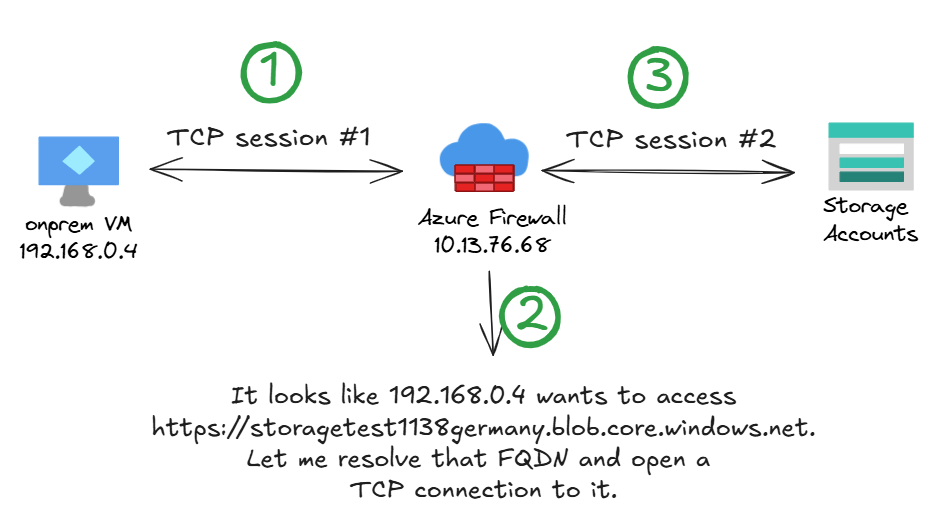
However, if the private DNS zone is not linked to the hub virtual network, the Azure Firewall will resolve the storage account’s FQDN to its public IP address, ignoring the private endpoint. This is why you always need to link the private DNS zone to the Azure Firewall’s VNet when using application rules.
Why does the Australian account not work yet?
But when using the public IP address, why did the Australian account still not work when the Azure Firewall’s public IP was added to the allowed IP addresses in the storage account? This has more to do with Azure Storage’s implementation: when accessing an storage account from a client in its same region, the source IP address used is not the public IP address of the client as you would expect, but the private one, and that is what we saw earlier in the logs of the storage accounts. The Azure Firewall will use its private IP address to access the storage account in its same region (Australia), but its public IP address to access the storage account in a different region (Germany).
❯ az monitor log-analytics query -w $logws_customerid --analytics-query $blob_query -o table
AccountName               CallerIpAddress      StatusText            TableName      TimeGenerated
------------------------  -------------------  --------------------  -------------  ----------------------------
storagetest1138australia  10.13.76.72:6176     AuthorizationFailure  PrimaryResult  2025-02-10T08:31:56.6159619Z
storagetest1138germany    40.126.229.185:3520  Success               PrimaryResult  2025-02-10T08:32:13.2690387Z
This is briefly mentioned in the official documentation Configure Azure Storage firewalls and virtual networks, where it is explicitly stated that Azure Storage network rules will not work if the request is originating from a virtual machine in the same Azure region as the storage account.
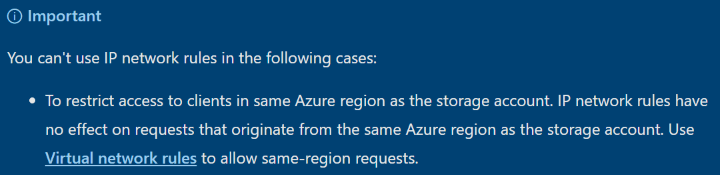
In our example, both the Azure Firewall and the Storage Account are in Australia East, hence access via the public IP address of the storage account will not work.
You could think about adding the Azure Firewall’s private IP addresses to the allowed IP addresses, but that will not work:
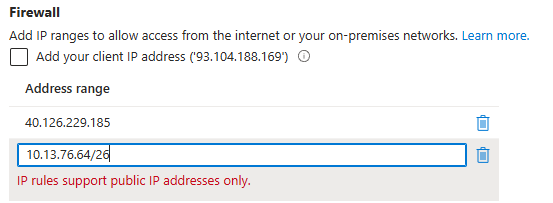
DNS resolution fixed
But let’s stop this digression about storage account shenanigans and go back to our main business: after linking the private DNS zone to the hub virtual network again, everything looks much better:
jose@onpremvm:~$ curl https://storagetest1138germany.blob.core.windows.net/test/helloworld.txt
Good evening from Germany
jose@onpremvm:~$ curl https://storagetest1138australia.blob.core.windows.net/test/helloworld.txt
Good morning from Australia
The storage account logs will show the Azure Firewall instances as source IP address of the read operations for both regions:
❯ az monitor log-analytics query -w $logws_customerid --analytics-query $blob_query -o table
AccountName               CallerIpAddress    TableName      TimeGenerated
------------------------  -----------------  -------------  ----------------------------
storagetest1138germany    10.13.76.70:31142  PrimaryResult  2025-01-19T21:47:56.948151Z
storagetest1138australia  10.13.76.70:5942   PrimaryResult  2025-01-19T21:48:01.4999099Z
How does this proxy work?
Forward proxies can at the TCP level or at the application level. To find out what kind of proxy operation does Azure Firewall implement, but we can try to reverse-engineer it from a traceroute (mtr) output from a virtual machine in Australia to the storage account in Germany:
                                              My traceroute  [v0.95]
onpremvm (192.168.0.4) -> storagetest1138germany.blob.core.windows.net (10.13.77.5)      2025-01-19T22:01:43+0000
Keys:  Help   Display mode   Restart statistics   Order of fields   quit
                                                                         Packets               Pings
 Host                                                                  Loss%   Snt   Last   Avg  Best  Wrst StDev
 1. 10.13.77.5                                                          0.0%    20    9.4   4.8   2.6  11.0   2.9
There are two interesting things here. Firstly, the firewall doesn’t appear as hop: once a packet arrives to the firewall, even if its Time-To-Live (TTL) is zero, the firewall will take it and process it instead of sending out a TTL-expired-in-transit ICMP message. After all, the packet is not in transit any more, it arrived at its destination.
The second hint is the latency, around 5 milliseconds. How can it be physically possible, getting from Australia to Germany in that time? The answer is that you don’t: Azure Firewall answers to the first TCP packets pretending to be the destination (that is, it proxies the connection). Consequently, what you are seeing here is the latency to the firewall, not to the end server.
These two facts seem to indicate that the Azure Firewall proxy is operating at least at the TCP level.
But how does the Azure Firewall know at which target IP address to go? I have already spoiled the answer, but you might not believe me. My thesis is that the Azure Firewall looks at the SNI header to establish the target host, but you might think that it actually takes the destination IP address from the incoming packet.
Let’s do another quick test to verify that it doesn’t matter what the actual destination of the packets is, with the --resolve option of curl which overrides DNS resolution for the target host to a specific IP address:
jose@onpremvm:~$ curl --resolve storagetest1138australia.blob.core.windows.net:443:10.13.76.68  https://storagetest1138australia.blob.core.windows.net/test/helloworld.txt
Good morning from Australia

jose@onpremvm:~$ curl --resolve storagetest1138australia.blob.core.windows.net:443:10.13.77.8  https://storagetest1138australia.blob.core.windows.net/test/helloworld.txt
Good morning from Australia
In the first test I use the --resolve flag of curl to send packets to the firewall’s private IP, instead of to the IP address of the storage account’s private endpoint. In the second one I use a non-existent private IP address that is routed to the firewall by my Azure route table in the GatewaySubnet.
Both tests work: as long as the packets end up in the Azure Firewall and there is an application rule configured to allow the traffic, the Azure Firewall will proxy the connection and reach out to the FQDN specified in the TLS SNI (Server Name Indication) header.
Note that this test has been performed in the Standard version of Azure Firewall, but when you enable Intrusion Detection and Prevention (IDPS), the destination IP not matching the FQDN in the SNI header of TLS is considered as a security violation. Besides, if you are thinking about using Azure Firewall as a proxy, leveraging the Azure Firewall explicit proxy feature would be the right way to go. Still, this is an interesting fact, and I have occasionally found this little feature of Azure Firewall Standard really handy.
Conclusion
In this blog post we have cover a few things mostly related to Azure Firewall application rules:
- Azure Firewall application rules proxy HTTP(S) connections (not just SNAT).
- Consequently, the private DNS zone for Private Link needs to be linked to the Azure Firewall’s VNet, so that Azure Firewall can resolve the IP address of the private endpoint.
- Otherwise, the firewall will resolve the FQDN to the public IP address of the Azure service, which in case of Azure Storage accounts can lead to all sorts of fun, especially if the Azure Firewall and the Storage Account are in the same Azure region.
Even if this post was more about Azure Firewall than about Private Link, I hope you learnt something. Thanks for reading!
 Cloudtrooper
[…] Private Link reality bite #4: Azure Firewall application rules […]
LikeLike
[…] Private Link reality bite #4: Azure Firewall application rules […]
LikeLike
[…] Private Link reality bite #4: Azure Firewall application rules […]
LikeLike
[…] Private Link reality bite #4: Azure Firewall application rules […]
LikeLike
[…] Private Link reality bite #4: Azure Firewall application rules […]
LikeLike
Hi again Jose
You mentioned in that post that private DNS zones would have to be linked to Azure FW VNet. That is an issue when the scenario is about secured vhub, as I don’t think it is possible to link a PDNS zone to vhub managed vnet.
Is setting Azure firewall DNS to a custom DNS server (or PDNS resolver inbound endpoint) with the capabilities to resolve PDNS zone entries a working solution in your opinion please?
Thanks
LikeLike
Yes, there is an article in the Architecture Center about that pattern: https://learn.microsoft.com/en-us/azure/architecture/networking/guide/private-link-virtual-wan-dns-virtual-hub-extension-pattern
LikeLike