
Welcome to this new series of blog posts in which I will be explaining some not-so-well-known facts about Azure Private Link and some associated technologies! This idea is born from the fact that I have been helping some colleagues and customers lately with some questions around Private Link, and that has made me realize that the technology is not as intuitive as it might look like.
I was tempted to write a huge post containing all of the items, but then I decided that it would be too long and boring, so instead I will bring bite-sized posts so that they are easier to consume, and I named the series Private Link Reality Bites. Here the episodes published so far:
- Private Link reality bite #1: endpoints are an illusion (control plane vs data plane)
- Private Link reality bite #2: your routes might be lying (routing in virtual network gateways)
- Private Link reality bite #3: what’s my source IP (NAT)
- Private Link reality bite #4: Azure Firewall application rules
- Private Link reality bite #5: NXDomainRedirect (forwarding failed DNS requests to the Internet)
- Private Link reality bite #6: service endpoints vs private link
Enough introduction, let’s start with the topic at hand. To bring everybody to the same page, what was that Azure Private Link thing again? Glad you ask: it is a way of creating a representation of a Platform-as-a-Service (PaaS) resource inside of an Azure virtual network. For example, you could access an Azure Storage account using a private IP address instead of a public IP address like this:

There is much more to Private Link as the image above, such as DNS integration, using it with other virtual machines as destination and not with a PaaS service, and more. However, this oversimplified explanation is enough to understand the rest of this post.
The test bed
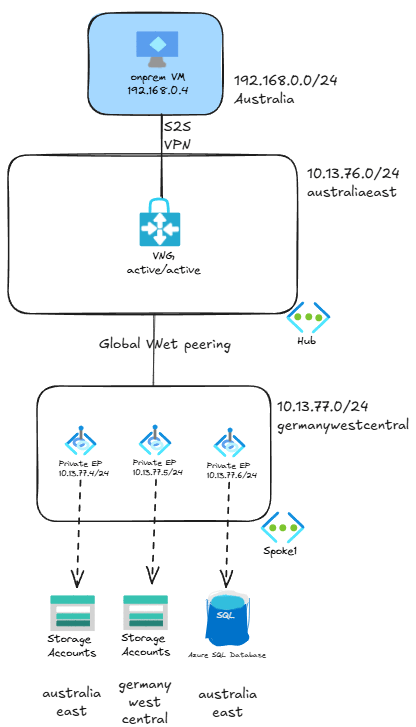
The topology we will be testing is a bit more complex that the previous picture. Not too much though: the client is not in Azure, but in a remote site connected via site-to-site (S2S) VPN to Azure using an active/active Virtual Network Gateway (VNG). Additionally, the private endpoints have been deployed in a spoke VNet peered to the hub:
NOTE: this test bed does not reflect Azure best practices, it has been built this way to show some of the particularities of the Azure Private Link technology.
I have a couple of different endpoints: two storage accounts and one SQL database, although for this post we will only focus on the storage accounts.
You might have noticed that the private endpoints do not need to be in the same region as the actual services they refer to. All of the private endpoints in this test bed are in Germany West Central. Regarding the storage accounts themselves, one of them is in Germany too, while the other one is in Australia.
Looking at the latencies
Let’s look at the latency between the client (in Australia), and the German storage account. This is the topology:
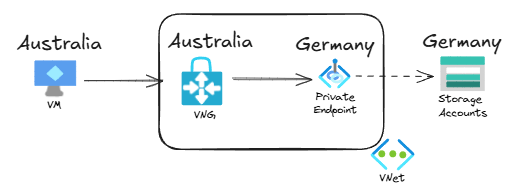
As you would expect, if we test with a tool such as mtr (you could use others like tcping, but I love the way mtr is a combination of ping, traceroute and tcping) you will see that the latency is over 200ms, since you have to travel around the globe from Australia to Germany:
jose@onpremvm:~$ mtr -T -P 443 storagetest1138germany.blob.core.windows.net
                                              My traceroute  [v0.95]
onpremvm (192.168.0.4) -> storagetest1138germany.blob.core.windows.net (10.13.77.5)      2025-01-19T17:59:44+0000
Keys:  Help   Display mode   Restart statistics   Order of fields   quit
                                                                         Packets               Pings
 Host                                                                  Loss%   Snt   Last   Avg  Best  Wrst StDev
 1. (waiting for reply)
 2. 10.13.77.5                                                          0.0%     8  248.6 247.5 246.5 249.7   1.1
Alright, let’s move on to the more interesting test. What would you say the latency will be for the Australian storage account? Let’s have a look at the topology for this flow:
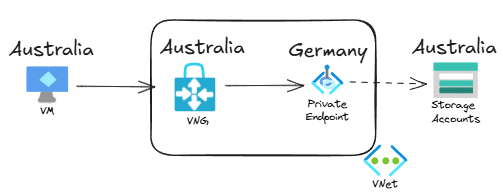
It seems that the traffic would have to go from Australia to Germany and then back again, right? So we would have more or less double the latency than before, close to half a second. Let’s verify it:
jose@onpremvm:~$ mtr -T -P 443 storagetest1138australia.blob.core.windows.net
                                              My traceroute  [v0.95]
onpremvm (192.168.0.4) -> storagetest1138australia.blob.core.windows.net (10.13.77.4)    2025-01-19T17:59:08+0000
Keys:  Help   Display mode   Restart statistics   Order of fields   quit
                                                                         Packets               Pings
 Host                                                                  Loss%   Snt   Last   Avg  Best  Wrst StDev
 1. (waiting for reply)
 2. 10.13.77.4                                                          0.0%    12    2.4   2.7   2.1   3.7   0.5
What? Less than 3 milliseconds to go around the globe? What is happening?
Private Endpoints are a control plane element
The reason is that the traffic is not actually going from the Virtual Network Gateway to the private endpoint. The private endpoint is just a representation in Azure, and it actually only has a control plane role: it programs a special route in the virtual machines’ NICs in its own virtual network and the directly peered ones, so that they can access the storage account directly on a private IP address.
OK, now in English: this topology is actually closer to the reality:
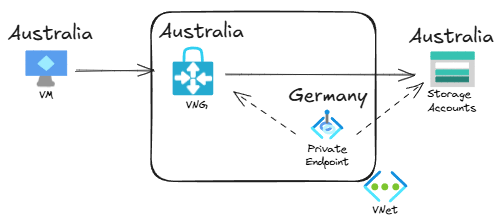
The previous picture represents a private endpoint inside the virtual network, but the traffic actually flows directly from the VPN virtual network gateway to the storage account, without having to go to Germany through the endpoint.
Conclusion
Understanding that the endpoint is merely a control plane element is important when troubleshooting Private Link traffic, especially when multiple regions and on-prem connectivity is involved.
In the next post we will go over an interesting fun fact that might make your private link traffic bypass the firewall.
 Cloudtrooper
Amazing it is for sure and new learning for me, thank you Jose! for taking the time to write this article. May be I am jumping guns and now excited about the new bite size article coming out on this topic but wanted to check if there was a firewall involved here i.e. traffic from VM getting routed to hub firewall and then to the private IP of the PE of storage account would things be different? Meaning the special route you mentioned would still exists but just with next hop as the NVA and really wouldnt have much of an effect on latency, correct?
LikeLike
Yes, that is going to be the next one, and I think I might have a surprise for many readers 🙂
LikeLike
topic request: managed private endpoint. How does it work and is it possible to monitor traffic? My CISO is in paranoid mode for that one.
LikeLike
Good suggestion, thanks! A managed endpoint is just a private endpoint created by Microsoft in a Microsoft-managed subscription. Still a good suggestion, thx!
LikeLike
That’s one case yes, but you can also have managed private endpoints in your own environment. For example, Data Explorer and Event Grid. This capability seems to be expanding. It seems to be part of a strategic direction by Microsoft.
LikeLike
I am not sure I follow: managed endpoints can only be created in VNets managed by Microsoft, including ADX. If an endpoint is created in a VNet managed by you, it is not ‘managed’.
BTW I have not been able to find docs for Event Grid managed endpoints.
LikeLike
(I cannot reply to a reply, apologies)
So I am looking at it right now: Azure Data Explorer managed endpoint to an Event Hub (not grid, sorry) that is also owned by us.
LikeLike
Yeah, but the managed endpoint for ADX is created in the VNet managed by Microsoft, where the internal components of the ADX cluster live. Managed endpoints are never created in your own VNets. Does that make sense?
LikeLike
Yes the VNET part makes sense, and was understood. I guess the point I was trying to make is that this goes to one of our OWN subscriptions, not one managed by Microsoft. Apologies for the misunderstanding.
Anyway, my CISO’s main concern is about the “invisible” data streams. If you could take that along, that would be great!
LikeLike
Thanks, that makes sense!
LikeLike
[…] in the Private Link Reality Bites series! After the first post where we went over the concept of private endpoints as control plane elements, in this one I am going to explore something that silently has started to work in a different way […]
LikeLike
Very interesting, thank you for sharing!
I replicated the same two latencies without using S2S VPN and VNG by placing an Azure VM (instead of the on-prem VM) in a client VNET in Australia and peering it with the VNET in Germany that hosts the two Private Endpoints.
LikeLiked by 1 person
Yepp, I have the VPN only because it is going to play a role in the next reality bite. Thanks for checking!
LikeLiked by 1 person
As always crystal clear and easy to understand articles, not bloated, clear to the point and with nice diagrams!
Thank you Jose!
LikeLike
Thanks Mihai, so glad you liked it!
LikeLike
Thank you for sharing! While I agree it’s a bit of an illusion I prefer Azure’s approach of letting the underlying resource dictate the effective route rather than the other way around
LikeLike
Thanks Andrew! You mean as compared to AWS?
LikeLike
Nope general comparison against the inverse approach. Do you know if AWS or GCP implement it differently? Now I’m curious 🙂
LikeLike
I know more AWS, where you need to configure manually routing to the endpoint. However, others might be able to give more details?
LikeLike
This very interesting thank you for sharing. In this case the route is on the NIC of the VM. What if you have a non-azure VM on the s2s VPN. Let’s say it is an onprem office and I try to tcping from a laptop. Will the route to the storage account be on the VNG so it won’t have to go to Germany before coming back to Australia?
LikeLike
Yes, check the episode #2: https://blog.cloudtrooper.net/2025/01/22/private-link-reality-bites-your-routes-could-be-lying/
LikeLike
[…] Private Link reality bite #1: endpoints are an illusion (control plane vs data plane) […]
LikeLike
Brilliant! Thank you
LikeLike
[…] Private Link reality bite #1: endpoints are an illusion (control plane vs data plane) […]
LikeLike
[…] Private Link reality bite #1: endpoints are an illusion (control plane vs data plane) […]
LikeLike
[…] Private Link reality bite #1: endpoints are an illusion (control plane vs data plane) […]
LikeLike
[…] Private Link reality bite #1: endpoints are an illusion (control plane vs data plane) […]
LikeLike
Very interesting article indeed.
According to your description, private endpoint location does not matter in terms of latency as traffic is reaching target service directly.
Azure Front Door Premium supports reaching origins via Private Link and in the documentation there is a guidance regarding managed Private Endpoint placing saying that you should select location that is closest to your origin as it is best for latency (https://learn.microsoft.com/en-us/azure/frontdoor/private-link#region-availability):
How does it relate to behavior you described in article? Is there a bit of oversimplification in the documentation?
LikeLike
Hey Vini, good catch! I am not sure why they would write that, I don’t think there is any difference in latency whatsoever.
I would say though that from a resiliency perspective it would make sense to place the endpoint in the **same** region as the origin, so that you don’t have a dependency on two different regions.
LikeLike
Thanks Jose, amazing content as usual!
In the latency diagrams you do not explicitly show the two separate VNets in different regions and the global peering linking them, so the VNG and the PEs appear to be part of the same VNet … my understanding is that traffic from the VNG to the storage account (regardless of the region it belongs to) is actually not crossing the global peering at all, but still needed to program the /32 route in the VNG subnet … is that correct?
LikeLike
Hey Jay, glad you liked it! Well spotted! I tried to simplify the diagrams in the latency section to avoid confusion, but maybe I achieved the opposite 😀
What you are saying is completely correct. If the private endpoint itself is only control plane, and traffic goes straight from the client (the VNG in this case) to the PaaS service, the consequence is that the VNet peering does not need to be traversed at all.
Hope that makes sense?
LikeLike
It does, thanks!
Along the same lines, in a simple Hub & Spoke scenario, a VM in Spoke1 trying to reach Private Endpoint in Spoke2 across Azure Firewall in the Hub, traffic will cross Spoke1<->Hub peering to reach the firewall, and then firewall will go straight into the PE without crossing Spoke2<->Hub peering because it knows about the /32 route, right?
LikeLike
100% correct! That’s why for this traffic you only pay for the 1st peering, not the second.
LikeLike
[…] edelleen. Nehali Neogi esittää miten palomuuri asettuu endpointien väliin VWAN-skenaariossa ja Jose Moreno jatkaa Private Linkin käyttäytymisen tutkimista. Koko Azuren virtuaaliverkko on illuusio, toteaa Aidan […]
LikeLike
[…] 🔝 Private endpoints are an illusion […]
LikeLike