
I know, I know, this was the question you had in your head when you woke up this morning. If that wasn’t the case, let me try to explain what I am talking about: up to 90% cheaper prices on your Azure ExpressRoute circuits. Interested? Keep reading!
Caution: this blog post is going to explore designs that imply a deviation from Microsoft best practices. Deploy at your own risk.
Let’s introduce the base challenge at its essence: when you connect two networks to each other, you typically have two options, either building triangles or building squares. The simplest design is the square: you have two routers on each network for higher resiliency, and you connect each of the routers in one network to another router in the other one:
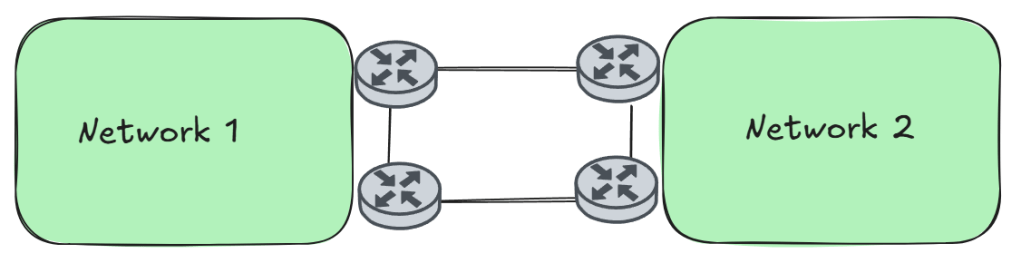
The square design is usually the cheapest topology because it only requires two connections between the two networks. If they are far apart, these connections might be rather expensive. However, it adds complexity into the routing of each network. To understand this you need to think about a failure scenario, for example if one of the routers or the links breaks:
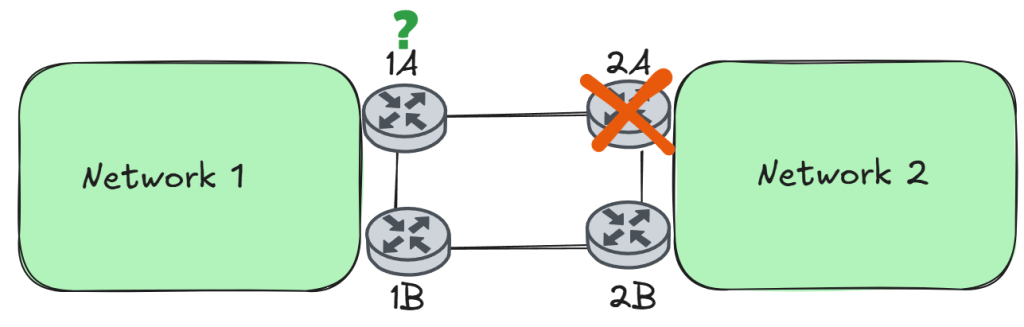
In the failure case above, router 2A is gone. Consequently, router 1A doesn’t receive routes for Network 2 from 2A any more. You usually have two options:
- You can have routers 1A and 1B exchange routing information with each other, so that 1A can still reach Network 2 via 1B. This is the solution that most network designs implement.
- Have router 1A to withdraw itself from Network 1, so that all traffic from Network 1 to Network 2 flows only over 1B, for example stopping redistributing Network 2 prefixes into its IGP (OSPF, iBGP, or whatever routing protocol network 1 runs internally). Depending on the network design this could either be trivial or represent a rather complex task.
However, there is another way to solve the previous problem: to change the underlying topology from a square to triangles, as the following figure shows:
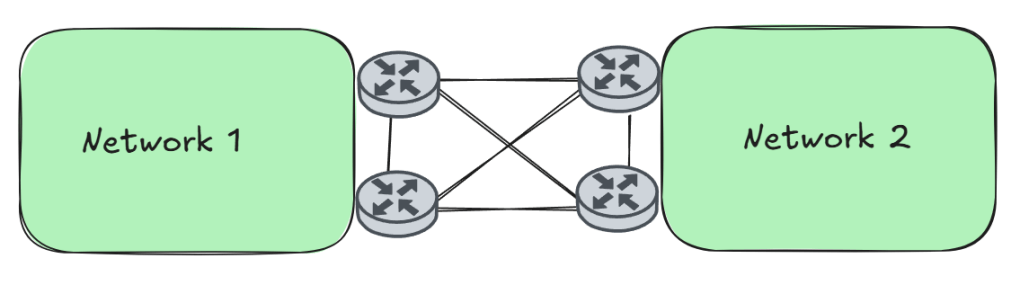
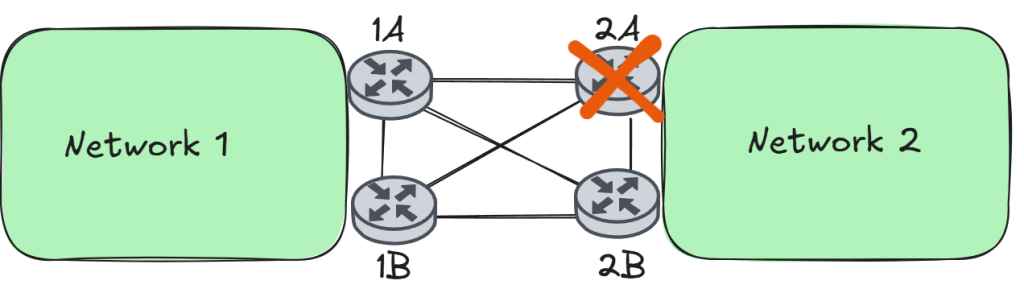
I call it triangles, but you can call it “fully-meshed”, “cross-links”, “bow-tie”, or any other fancy term as long as you and your peers understand each other. The goal here is that if any router in Network 2 fails, this is transparent for everybody in network 1 (of course, except to the peer of the failed router). In the same failure scenario as above when router 2A fails, both routers 1A and 1B still have their routing to network 2, so although some routes are gone, nothing else has changed:
Can you translate into Azure?
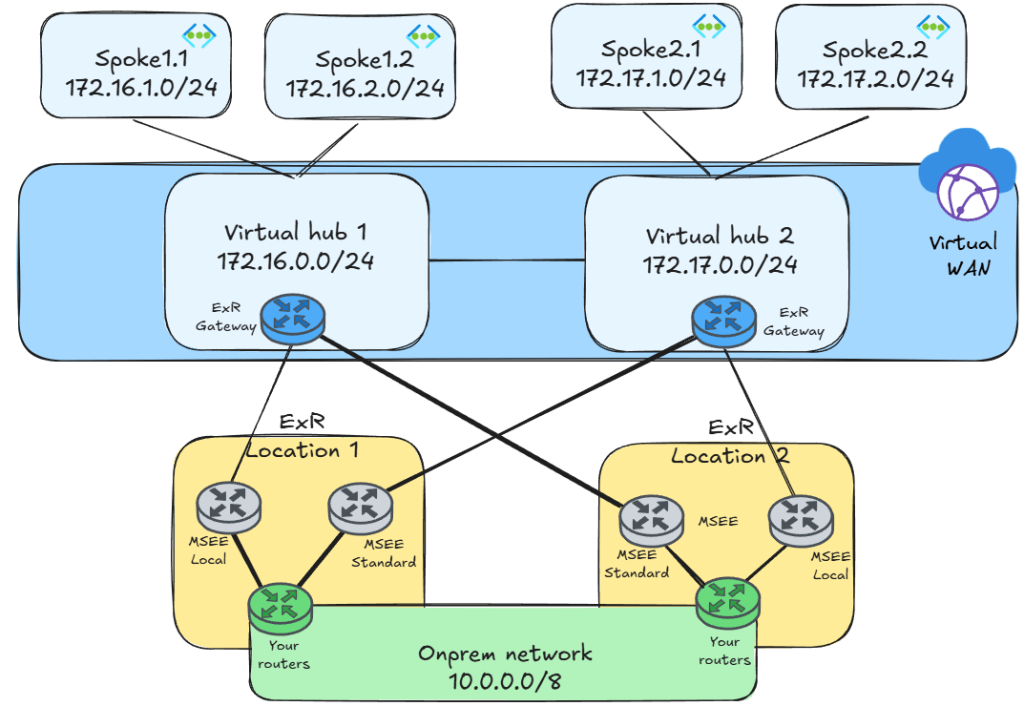
Yes, I was coming to that now, thanks for keeping me in track. You will confront the same question as we discussed above when connecting two Azure regions to two ExpressRoute circuits. Have a look at the following topology:
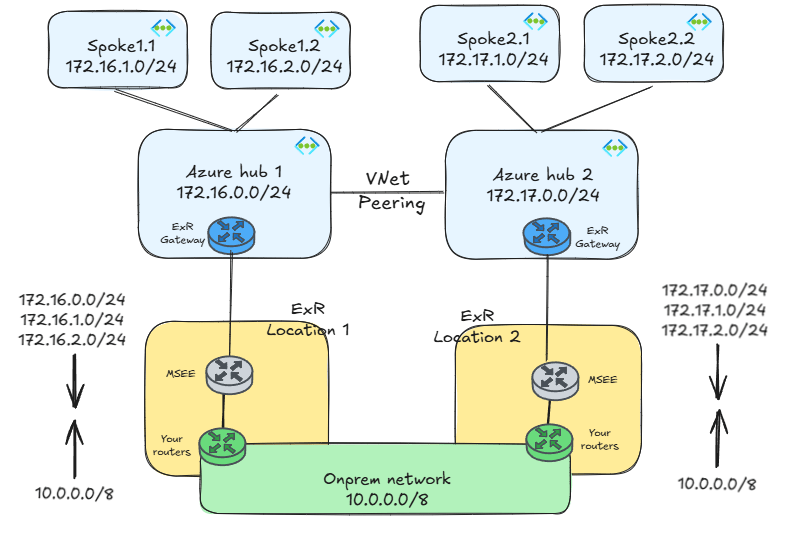
This design implements the square design between the ExpressRoute gateways and the MSEE routers. Our network 1 is the Azure side (the virtual networks in blue background), and our network 2 your on-premises backbone, where the routers implementing the connectivity are the ExpressRoute gateways at the top and the Microsoft Edge Enterprise (MSEE) routers at the bottom.
The main advantage of this square design is that you can use the Local SKU for your ExpressRoute circuit, if you create the circuit in the right ExpressRoute location (check out here to which Azure region each ExpressRoute location can connect via local circuits). Is that a good thing?
Let’s see with an example: considering published ExpressRoute pricing (see here), an ExpressRoute Standard circuit costs $3,400 per month plus bandwidth. Let’s assume that your circuit is in average loaded at 10%. That means that per month you will transfer around 324 TB, which at $0.025 per GB means around extra $8,100 for your bandwidth. So you are at a total of $11,400 per month. If your circuit average load is not 10% but 30%, your monthly cost per circuit goes up to $27,700. If you ran your circuit at around 60% average load, it would be better going for the unmetered ExpressRoute plan at $51,300 per month (as a corollary of this paragraph, if you are on the metered plan and have high utilization rates you should always check whether the unlimited plan would be more convenient).
What if you could use ExpressRoute Local? Well, your price per month is now $5,500 with one significant difference: it includes bandwidth. So you pay that price regardless if your circuit is used at 10%, 20% or 100%. Compared to the unlimited plan for Standard circuits, you are around 90% cheaper (not to mention Premium, if your two regions happened to be in different continents). Well, this seems to be a compelling reason!
Why would the square design be a bad idea?
First of all, the square design with ExpressRoute only makes sense if you are going to use the ExpressRoute Local SKU to save costs. One significant drawback of ExpressRoute Local is that it doesn’t support ExpressRoute Global Reach. If you need this feature to connect your on-premises sites to each other, or to provide connectivity to Azure VMware Solution from your local data center without going through an Azure region, you will have to go to the ExpressRoute Standard SKU.
Another important reason is resiliency. What happens if one of the ExpressRoute locations went off the grid? I’ll give you a hint: it is not pretty:
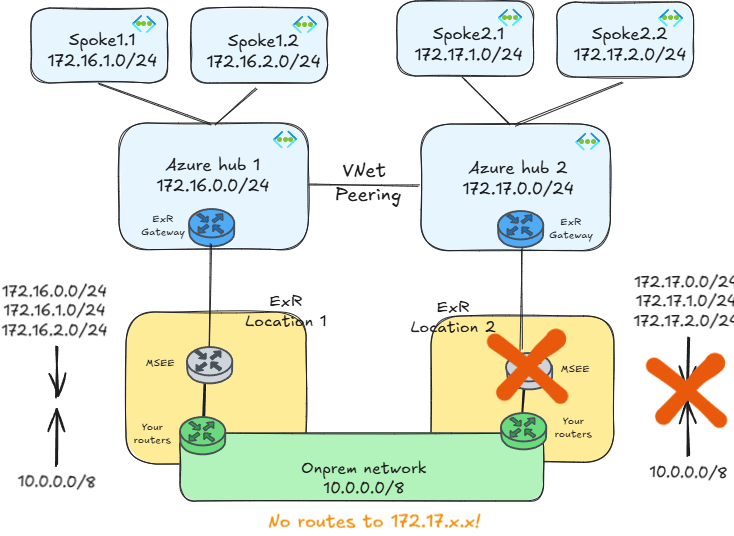
In a self-managed hub-and-spoke design, ExpressRoute gateways only advertise local networks. For example, the gateway in hub1 will only advertise 172.16.x.x networks, and the gateway in hub2 only 172.17.x.x ones. If the routers in the ExpressRoute location 2 failed at the same time, that would mean that on-premises would stop receiving the 172.17.x.x prefixes altogether, and on-premises would lose connectivity to all workloads connected to the Azure hub 2.
That is why Microsoft’s recommendation is using the triangles design, where every MSEE (the Microsoft edge router peered to your own routers) will learn the prefixes from all regions:
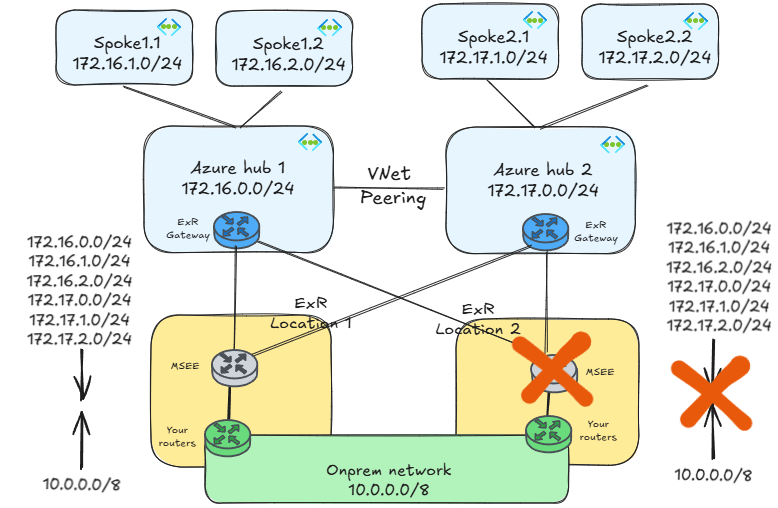
As you can see, in this design even in the case of a failure of the complete ExpressRoute Location 2, the on-prem network doesn’t lose connectivity to hub2 and its spokes.
Virtual WAN to the rescue
Coming back to the square design, that 90% price reduction sounds very attractive, could we do it with Virtual WAN? Yes! The reason is that ExpressRoute gateways in Virtual WAN advertise not only the local virtual networks, but the remote spokes too. Sticking to the same failure scenario, this fact makes communication possible in case of a failure:

Is there any issue with this design? We already discussed the lack of Global Reach support in ExpressRoute Local. Other than that, you might be introducing additional latency in some situations, since instead of going straight from the MSEEs in the ExpressRoute location 2 to the virtual hub 2, you add virtual hub 1 as extra hop.
But I have hub-and-spoke
How can you do this if you are driving a self-managed hub-and-spoke architecture? Well, the obvious answer is that you need to override the default behavior of ExpressRoute gateways and make them advertise additional prefixes. As you are probably guessing if you have read other posts of mine, Azure Route Server is the answer here (I will ignore “dummy VNets” in this writeup). For example, you could be looking at a design such as this one:

As you can see in the picture, a Network Virtual Appliance (NVA) is required in the hub to advertise the additional prefixes that you need toward Azure Route Server. Yes, this is needed because today the only way of generating new routes via Route Server is with BGP.
Depending on your IP addressing strategy you could advertise a big summary that contains all of your Azure regions. The organization of this example is using the 10.0.0.0/8 space for on-premises and the 172.16.0.0/12 range for Azure, so you could advertise that one.
Under normal circumstances, the more specific routes would take precedence over the summary: every region would be reachable over its respective ExpressRoute circuit. However, in the case of the failure the summary would attract traffic to the remaining circuit:
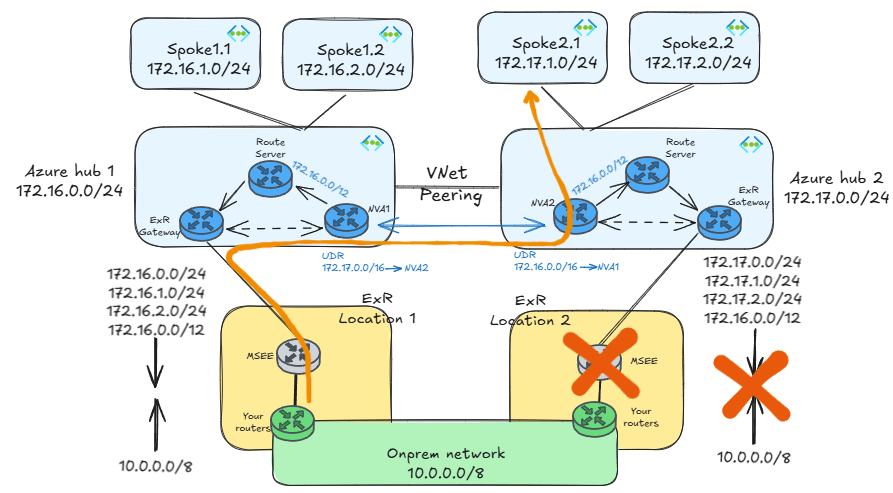
You would need a couple of extra elements in the design:
- A route table in the
GatewaySubnetin hub 1 would redirect traffic going to spokes in region 2 to NVA1. - A route table in NVA1’s subnet would redirect traffic going to spokes in region 2 to NVA2.
If you can’t summarize as cleanly as this you need to be very careful with asymmetric routing, since you need to make sure that traffic in both directions (Azure to on-prem, on-prem to Azure) takes the most optimal path.
ExpressRoute Direct: the best of both worlds
An interesting alternative is having two different sets of circuits: local circuits to connect Azure regions to their closest ExpressRoute location, and standard (or premium) circuits to connect them to remote ones. Something like this:
This is especially interesting if using ExpressRoute Direct, although you can certainly implement this with non-Direct ports. Pricing here can be a bit complex (see here), but one fact is important: when you create Local or Standard circuits on ExpressRoute Direct ports, the actual cost of the circuit is $0, and you only pay for the bandwidth.
But we already said that Local circuits include unlimited bandwidth right? This means that if you already have ExpressRoute Direct, Local circuits including unlimited bandwidth are essentially free, so this design becomes quite cost-effective.
You still need to customize your BGP routing to make sure that traffic only goes over the standard circuits in an outage situation, but I’ll leave that for another post.
Conclusion
Is this loss of functionality (Global Reach), increased latency and additional complexity (especially in the case of self-managed hub-and-spoke designs) worth the money you save downgrading your circuits from Standard to Local? That is a question that only you can answer. However, hopefully this post gave you enough information to take an informed decision.
And something else: whatever you do, be sure to test every failure scenario you can think of before putting anything into production.
 Cloudtrooper
[…] In the case of IPsec VPNs, creating a couple of additional tunnels has very little impact to the total cost of the solution, and can greatly simplify the spoke-to-branch routing design. If you are using ExpressRoute, adding those cross-connections might have a higher impact, since it means using Standard circuits (see my post about this ExpressRoute multi-region: triangles or squares?). […]
LikeLike
Hello Jose.
Good post as always.
But just to confirm, we could use 2 express route circuits (one for local and another for standard which would be used for resiliency) from Direct rather than creating multiple connections on the same Standard express route circuit(bow-tie)? In that case, i assume we also end up using additional bandwidth from Direct ?
LikeLike
Hey Naresh, if you have ER Direct, the optimum setup is creating 2 circuits on the same ports: a local one to connect to the main region and a standard circuit to connect to the remote region.
LikeLike
Thanks Jose. So for example, if ER Direct is 10 Gbps, then i would be creating 1 Gbps local circuit to main region and another 1 Gbps standard circuit to connect to remote region, which would essentially be from same ER Direct ports.
LikeLike
Yes. Additionally, you can oversubscribe up to 2x: on a 10 Gbps ER Direct you could create two circuits of 10 Gbps each.
LikeLike
Hello Jose
Thanks for the blog post.
Is there a limitation in terms of bandwidth available for ER Local SKU please?
This page https://learn.microsoft.com/en-us/azure/expressroute/expressroute-faqs#virtual-networks-links-allowed-for-each-expressroute-circuit-limit makes me believe one can go as low as 50Mb/s for local SKU.
But the Azure pricing calculator bumps to 1Gb/s as minimum BW when I select local SKU for zone 1.
Thanks !
LikeLike
Hey there!
Yes, as far as I have tested a minimum of 1Gbps is required. Otherwise the API errors out with ‘bandwidth 500 is not allowed for Basic sku’ (I assume with ‘basic’ it means ‘local’)
LikeLiked by 1 person
Thanks Jose. So, to me, that also limits the usage of ER Local to projects requiring high bandwidth.
LikeLike
You certainly have a point. Consider though that ExpressRoute Local at 1Gbps has a similar pricing point than ExpressRoute Standard at 200Mbps (with the unlimited plan). If you are looking at speeds of around 50 Mbps I fully agree with you, ER Local would be an overkill.
LikeLike
Good point, thanks !
LikeLike