
Some weeks ago, Microsoft released documentation about the Virtual Network Routing Appliance (VNRA) without a lot of context, what generated a healthy confusion in the Azure Networking practitioner community. In the Azure updates page, the following was written:
Azure Virtual Network routing appliance offers private connectivity for workloads across virtual networks. Using specialized hardware, it delivers low latency and high throughput, and optimal performance compared to virtual machines.
Deployed into private subnet, where it acts as a managed forwarding router. Traffic can be routed using User Defined Routes (UDR) enabling spoke to spoke communication in traditional Hub & Spoke topologies.
Configured as Azure resource, integrates seamlessly with Azure’s management and governance model.
What is this service? What problem does it solve? When would you want to use it? In this blog post I am going to test VNRA and give you my best take about when you should be looking at it for your Azure environment.
The benefits of a centralized appliance
As we will explore later in this post, a full mesh of direct peerings can already give you excellent throughput and latency between spoke workloads, but deploying a centralized network policy controlled from the connectivity subscription can be tricky. For example, if you go for a full mesh of VNet peerings between spokes, you would have to rely on each application team setting up their NSGs in the right way to guarantee a correct security posture. You can leverage AVNM security admin rules for some globally applicable policies, but in general you would still have a significant reliance on NSGs.
When sending all traffic through a centralized appliance such as VNRA, you can however enforce NSGs applied to the VNRA subnet to control traffic in a centralized manner. The main question is of course whether you are introducing a choke point in your architecture. In my test lab (all details in https://github.com/erjosito/vnra), I deploy a rule in the VNRA’s NSG to drop TCP port 80. The “s2s_ping” test set also sends HTTP traffic between the spokes, and you can see that this traffic is dropped when the VNRA is in the data path. But don’t let me spoil you the rest of this post.
In the preview version that is available at this time, VNRA is not particularly feature-rich: other than NSGs, there is not any other network policy that you can configure. However, this is already providing the benefit of a centralized security policy.
Yet another NVA?
I would like to clear up some confusion that I have seen on the Internet about VNRA, starting with the misconception that this is just a managed Network Virtual Appliance (NVA) under the covers.
If you look at the definition of VNRA that I quoted earlier, there are a couple of interesting points I would like to bring your attention to. The first one would be “specialized hardware”: I briefly discussed in other posts about Microsoft’s quest to disaggregate Software Defined Networking (SDN) functionality away from the hypervisor into what Microsoft calls “SDN appliances” (formerly known as “Sirius appliances”, as you can see in some of the references below).
You might want to have a look at this short YouTube video for more context, or at the DASH (Disaggregated API for SONiC Hosts, I guess there are some serious Sega fans out there) project high-level design document in https://github.com/sonic-net/DASH/blob/main/documentation/general/dash-high-level-design.md if you need more details. Another interesting source of information is this presentation by Gerald de Grace. Gerald is already retired according to his LinkedIn profile, but his title “PM head for Azure Sirius technologies and DASH open source” speaks for his credibility. Gerald shows in his slides the main difference between the way in which Azure SDN works with and without the SDN appliance:
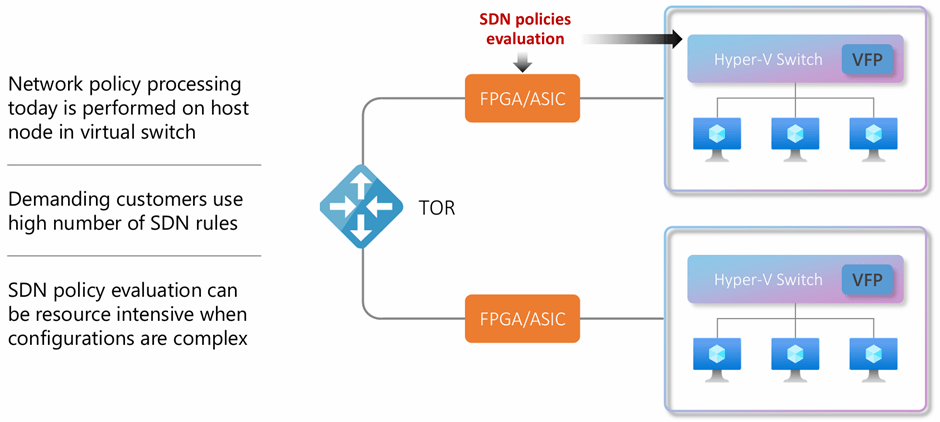
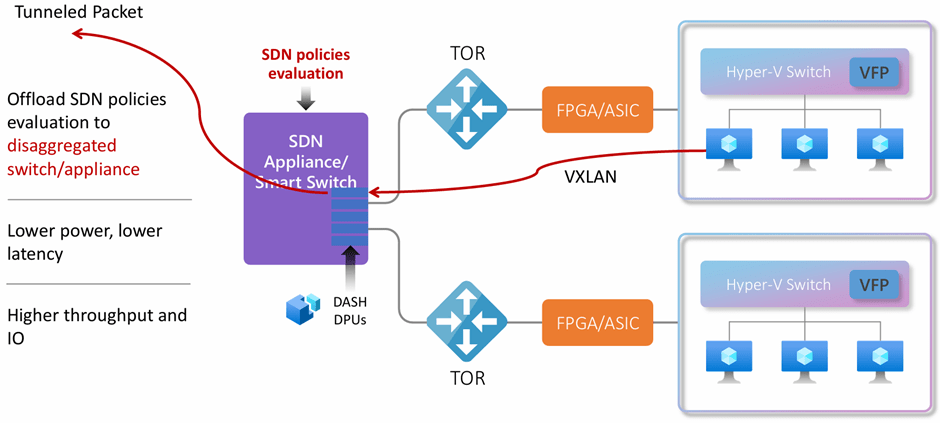
If you want to go even deeper in the SDN appliance architecture, I would suggest reading this paper that the Microsoft and AMD teams published in USENIX in 2023. To stir your appetite, I will put here one of the pictures in that document:
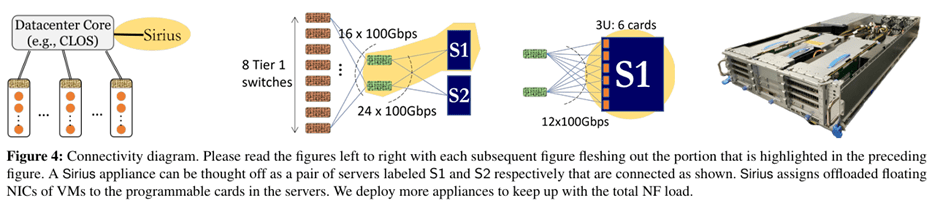
By the way, Cisco friends might recognize among the authors the name of Silvano Gai and the startup company behind the AMD DPUs used in this version of the SDN appliance. Pensando was created by the same team behind many Cisco technologies such as the Catalyst switches (Crescendo), MDS (Andiamo), UCS and Nexus 5K/2K (Nuova) and ACI (Insieme).
This brand-new SDN architecture will provide many benefits to Azure users. I already described one of them in my previous post about Private Link Service Direct Connect, VNRA is another manifestation of the Azure SDN appliance. I hope I find the time to cover others in future blog posts, such as the support for private endpoints in ExpressRoute FastPath.
Spoke-to-spoke routing
Enough talking about obscure SDN shenanigans. Now you know that VNRA is not “just an NVA”, but what can it do for you? Looking again at the definition in the announcement, it says “enabling spoke to spoke communication”. What’s the deal?
As I wrote with Alejandra Palacios in our spoke-to-spoke routing patterns article, in a hub-and-spoke network design in Azure there are fundamentally two ways of setting up communication between spokes:
- Direct peerings: You peer the spokes directly to each other, creating a full-mesh of VNet peerings. You can use your own automation or Azure Virtual Network Manager (AVNM) for this.
- NVA in the hub VNet: you route spoke-to-spoke traffic to a virtual appliance in the hub that will forward the packets to the destination spoke VNet. This appliance could be provided for you (as in Virtual WAN), you could use managed NVAs (as Azure Firewall) or third-party NVAs running on Azure virtual machines.
Direct VNet peerings across spokes give you a lot of good things, especially low latency and high throughput, since the traffic is handled directly by Azure SDN and it doesn’t need to go through the potential bottleneck of an NVA. Direct peerings are also cheaper than sending traffic through the hub, since the packets traverse a single VNet peering instead of two (in the case of single-region spoke-to-spoke) or three (in multi-region spoke-to-spoke). Remember that you get charged for every peering a packet goes through (on a per-GB basis).
However, in some cases you might not want to use direct VNet peerings between spoke VNets. There could be multiple reasons for that:
- You have too many VNets to create a single VNet peering mesh among all of them. Traditional VNet peerings have a limit of 500, AVNM increases this number to 1,000 (see AVNM limits here). This could manifest in the VNets of the same region peered to each other, and the different regions connected via appliances.
- The network team needs to enforce policies centrally, and they cannot rely on the spoke configuration because they are in a subscription controlled by the application team.
- Central traffic visibility is required, without the need for application teams having to enable VNet Flow Logs in their subscriptions.
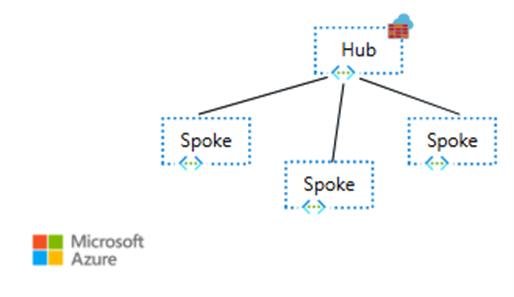
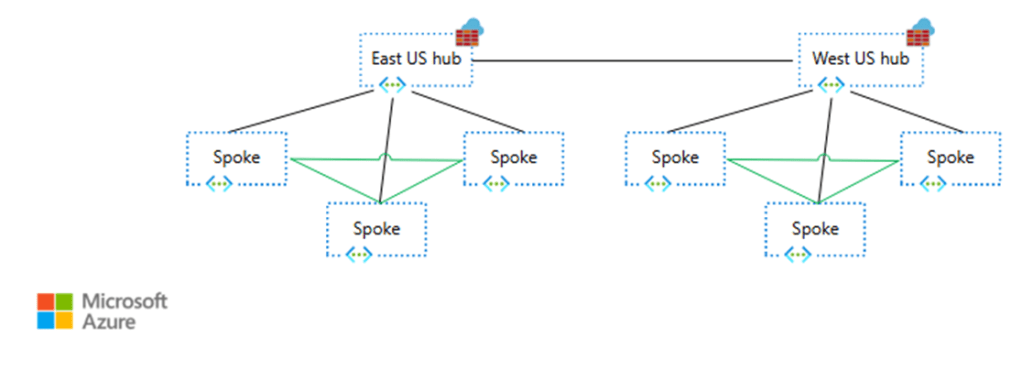
To connect two VNets that are not directly peered to each other you need to use network appliances. As briefly mentioned earlier, you could either go a Microsoft-managed appliance (either the Route Service in Virtual WAN or Azure Firewall) or with third-party NVAs such as Arista, Barracuda, Checkpoint, Cisco, Fortinet, Juniper, Palo Alto, etc, as this diagram from the spoke-to-spoke patterns documentation article shows:
In the case of Azure Firewall, it supports up to 100 Gbps (see Azure Firewall performance for more details). If you want to send all of your spoke-to-spoke traffic through an appliance that gives you deep packet inspection and advanced filtering capabilities, Azure Firewall is a great way to do it without compromising (too much) on performance. However, you might not necessarily need a stateful firewall for all your flows, and the filtering functionality of Network Security Groups (NSGs) might be enough.
Even if you choose to use direct VNet peerings between the spokes, chances are that you will end up creating full-mesh-peering “islands” that would connect to each other via appliances, so the need for high-performance appliances doesn’t completely disappear:
The test lab
Here the lab I built to test VNRA (you can find all of the code in https://github.com/erjosito/vnra). It supports multiple scenarios, the following picture shows you the multi-region design using VNRA for spoke-to-spoke communication:
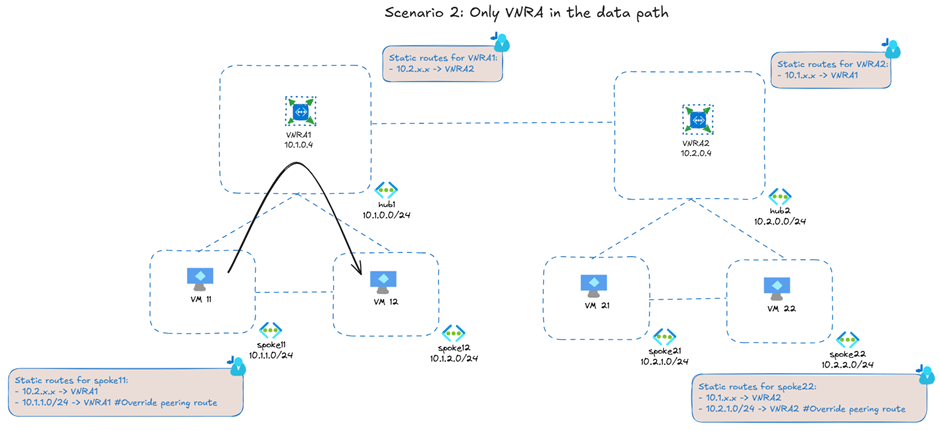
The black arrow represents the throughput and latency tests that I will describe later in the article. The direct peerings between the spokes represent the optional design of creating a full mesh of peerings between the spokes. If you do that, VNRA will only be used to send traffic that needs to go to a different hub. In my case, I am using VNRA for all spoke-to-spoke communication, even for spokes peered to the same hub (that is why the black arrow goes through the hub).
VNRA looks like a single resource in the portal whose only properties are the bandwidth it supports and its IP address:
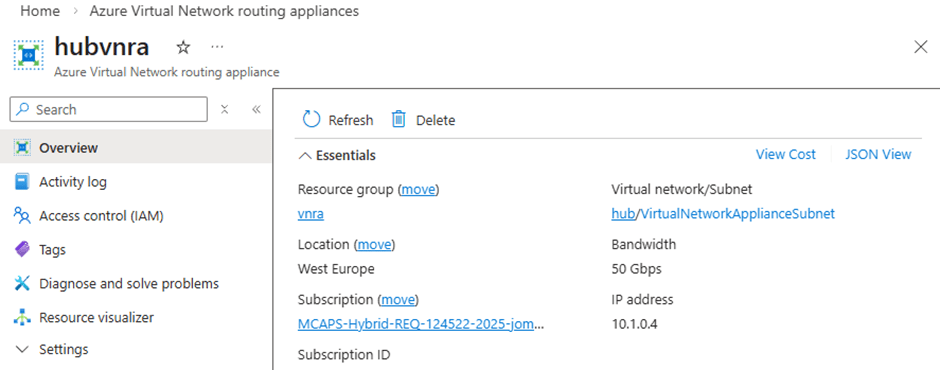
As far as I have seen, there is not Azure CLI or PowerShell support yet for VNRA, but you can use the REST API. For example, to get the private IP address of a VNRA you could use these Linux shell commands (in Windows the syntax would be similar if you install the curl and jq utilities):
$ subscription_id=$(az account show --query id -o tsv)
$ rg=vnra-test
$ vnra_name=hubvnra
$ vnra_uri="/subscriptions/${subscription_id}/resourceGroups/${rg}/providers/Microsoft.Network/virtualNetworkAppliances/${vnra_name}?api-version=2025-05-01"
$ az rest --method GET --uri "$vnra_uri" | jq -r '.properties.ipConfigurations[] | select(.properties.primary==true) | .properties.privateIPAddress'
10.1.0.4
You would send traffic to the VNRA as with any other appliance in Azure: with UDRs. For example, here you have the effective routes in the VM in the first spoke:
$ az network nic show-effective-route-table -n ${vm_name}VMNic -g $rg -o table | grep -Ei 'gateway|user|vnet|internet'
Default   Active   10.1.1.0/24        VnetLocal
Default   Invalid  10.1.2.0/24        VNetPeering
Default   Active   10.1.0.0/24        VNetPeering
Default   Active   0.0.0.0/0          Internet
User      Active   192.168.0.0/24     VirtualAppliance  10.1.0.4
User      Active   10.1.2.0/24        VirtualAppliance  10.1.0.4
User      Active   10.2.0.0/16        VirtualAppliance  10.1.0.4
User      Active   34.160.111.145/32  VirtualAppliance  10.1.0.4
Even if I have a VPN gateway in the hub (not shown in the previous scenario 2 picture), you don’t see any invalid gateway route because I have configured the VNet peerings to the hub without the Use Remote Gateways and Allow Gateway Transit settings. I can do that because I am using static routing in my VPN connection. This way, the VNRG is the only way that spokes have to reach the on-premises network.
As you can see, I have overridden the peering route to the other spoke (10.1.2.0/24) with an UDR, so that traffic between spokes is sent to the VNRA (10.1.0.4). I am also sending traffic to the spokes in hub2 (summarized through 10.2.0.0/16) through the VNRA with another UDR.
By the way, I used the last route to 34.160.111.145/32 (the web service “ifconfig.me”) to test Internet access through the VNRA. As the VNRA definition above states, VNRA “offers private connectivity”. Confirming that, sending Internet traffic in my test setup to ifconfig.me through the VNRA didn’t work.
Some numbers
Let’s try to make the VNRA sweat a bit: using F4 v7 virtual machines that can get up to 25 Gbps, I tested the throughput between spokes 11 and 12 with iperf3 and BBR congestion control with this result:
jose@spoke1-performance-vm:~$ iperf3 -c 10.1.2.5 -t 30 -P 8 -w 10M -i 10
[...]
[SUM]   0.00-30.00  sec  79.9 GBytes  22.9 Gbits/sec  376022             sender
[SUM]   0.00-30.00  sec  79.7 GBytes  22.8 Gbits/sec                  receiver
This throughput is really something, even if well below the nominal 50 Gbps of a single VNRA. Consider that we didn’t give time to the VNRA to scale up/out, we just sent this traffic and got a pretty good performance from the start. Any other scale-out, software-based NVA would have had to scale out first to be able to achieve these numbers. Even more impressive is the latency:
jose@spoke1-performance-vm:~$ qperf 10.1.2.5 tcp_lat
tcp_lat:
    latency  =  125 us
This is 125 microseconds. Not just sub-millisecond, this is one eighth of a millisecond round trip time. This level of latency can only be achieved with hardware routing. Regarding latency your mileage will surely vary: I provisioned my virtual machines without any availability zone configuration, but if you place VMs in separate AZs, Microsoft hasn’t yet invented any technology that allows going faster than the speed of light. Still, the latency increase as compared to direct VM-to-VM communication should be minimal.
The fact that VNRA is not visible in traceroutes is another hint that it is not like software-based NVAs. Using MTR in the topology above, I don’t see VNRA in the path between the two spokes:
jose@spoke1-performance-vm:~$ mtr --report -T -P 22 10.1.2.5
Start: 2026-03-03T15:57:55+0000
HOST: spoke1-performance-vm       Loss%   Snt   Last   Avg  Best  Wrst StDev
  1.|-- 10.1.2.5                   0.0%    10    1.5   6.3   1.2  24.3   7.0
Note that the performance reported by MTR is higher than the one reported by qperf (I usually trust qperf more).
UDRs work as expected
I also tested another scenario: what if you would want to send traffic to on-premises via an NVA for additional security on these flows? This might involve chaining the VNRA, the NVA and the VPN gateway like this:
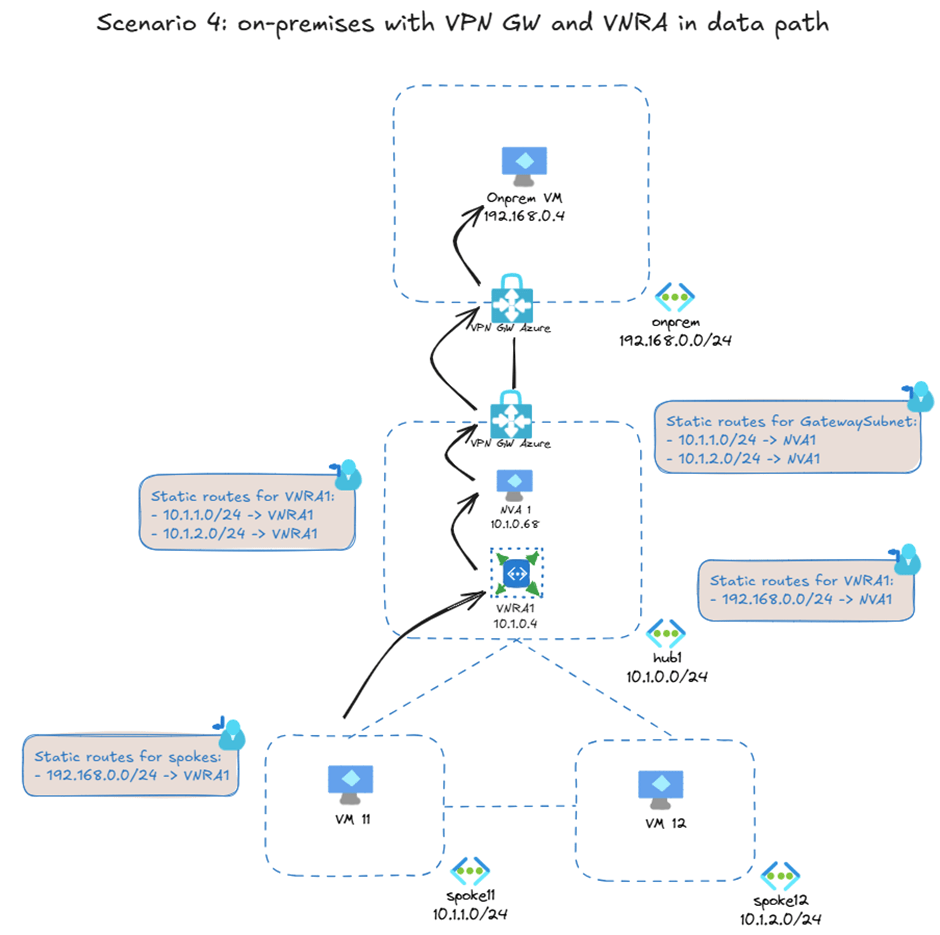
I am not sure yet why anybody would want to build this setup (other than because you can), but it demonstrates that you can chain VNRA with other appliances and gateways using UDRs as you would expect of any other VNet-integrated Azure resource.
Summary
In network designs where centralized network policy and visibility is required and the deep packet inspection provided by firewalls is not mandatory, VNRA is a new Azure service that enables high-throughput and low-latency IP forwarding between Azure virtual machines.
Today, it enables implementing a centralized network policy on spoke-to-spoke traffic with NSGs applied to the VNRA’s subnet. In the future, new functionality might bring additional policies that you can enforce in the hub VNet for all East-West traffic.
 Cloudtrooper
As I understand, this could be used for explicit Internet access for VMs as well.
This may be a cheaper option to Azure Firewall. And no need to install and maintain my own VNA.
LikeLike
The docs explicitly say “private networking”. I tested It Internet connectivity and it didn’t work, confirming the documentation. Besides, why would you use this instead of a NAT gateway?
LikeLike