
Azure Networking is already a complex enough topic, and if you add to the mix the moving parts of data analytics services the results are always interesting, to say the least. On top of that, documentation is not always created to explain in detail what is actually happening or why, adding insult to injury. Consequently, after some fun looking at a networking question about Microsoft Fabric and the new Private Link Service Direct Connect feature with my friend and colleague Victor, I decided to write a blog post to explain this specific topic.
The question of a customer that we were trying to solve is how to connect your Microsoft Fabric resources to databases located on your data centers, which are by definition isolated from the cloud:
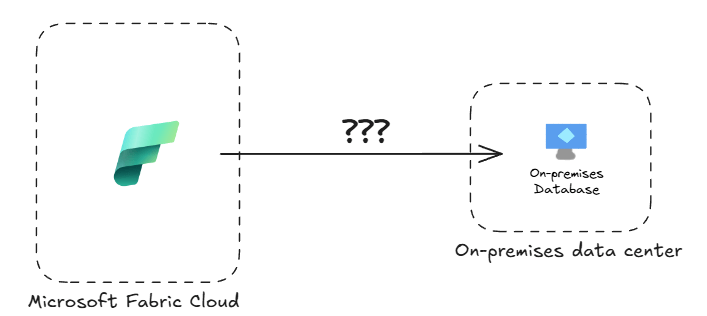
The whole premise of Microsoft Fabric is creating a single data repository that will fuel your AI-based applications, so how to integrate your protected corporate data into that? Welcome into the rabbit hole!
Fabric capacities and managed VNets
Since I always like putting things into context, let me do a bit of a digression here. A couple of options exist for Microsoft-managed services (PaaS or SaaS) to implement private outbound connections to private resources:
- VNet injection: the service is deployed in an Azure virtual network (VNet), which will be connected to the on-premises network via IPsec VPN, ExpressRoute or Software-Defined WAN (SDWAN). Services such as Azure SQL Managed Instances follow this approach.
- VNet integration: outbound traffic from the service is “magically” channeled into a specific subnet thanks to the power of Azure’s Software-Defined Network (SDN). This is how for example Azure App Services work.
- On-premises (and VNet) data gateway: this is an approach coming from the Power BI and Power Apps world, so they are great for Power BI dataset refresh operations. However, they are not supported in OneLake data ingestion or Microsoft Fabric Spark notebooks and data engineering operations. The data gateway architecture is based in Azure Relay, a technology using Azure Service Bus that enables connections to private endpoints without having to open inbound ports in your firewall, but this is a story for a different post.
- Managed private endpoints (MPE): the technology of choice in Microsoft Fabric for Spark notebooks, Spark job definitions and lakehouse ingestion, in this scenario the SaaS/PaaS resource (the Fabric capacity in our example) will be deployed in a Microsoft-managed virtual network, and “managed private endpoints” are created in that VNet to provide private traffic to either other PaaS resources or to IaaS workloads. MPEs are the right integration technology for Spark notebooks.
Microsoft data products such as Azure Data Factory, Azure Data Explorer, Azure Synapse or more recently Microsoft Fabric have traditionally followed the MPE approach for data integration. Fabric capacity pools (or just “capacities”) are sets of virtual machines deployed into a Microsoft-managed VNet (that you can’t see in your subscription), and private endpoints can be created in those managed VNets (hence the name “managed private endpoints”, since they are managed by Microsoft and not visible to you) to connect to your services.
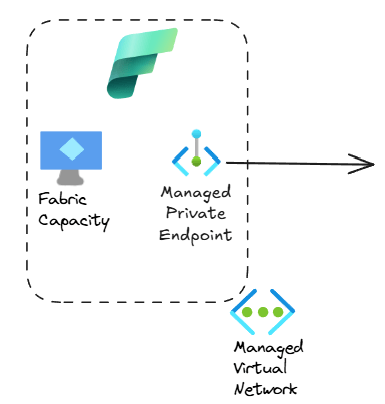
Easy, right? So where is the problem?
Private Link Service
You need to understand how Azure private endpoints work in Azure. You can find the long explanation in https://aka.ms/privatelink, so here I will give you the condensed version: Private Link is a connection from an Azure VM to another destination resource. This destination resource can be either an Azure PaaS resource such as Azure Storage or Azure SQL, or a so-called Private Link Service (PLS). This PLS in the past could only be configured on an Azure Load Balancer, that had as a backend another Azure VM:
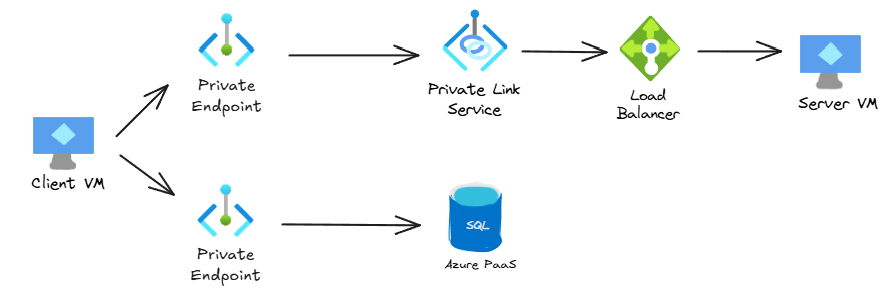
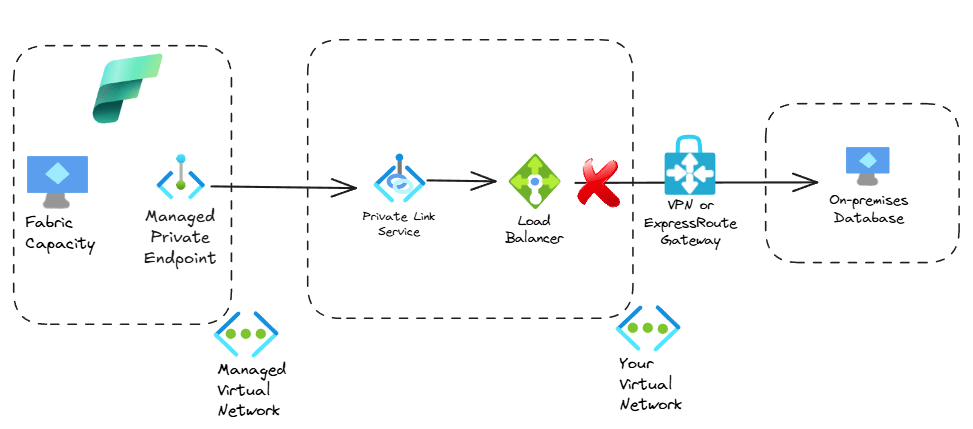
In sort, both the source and destinations needed to be Azure VMs, with an Azure Load Balancer in between. That is the reason why private link services are not supported in IP-based Azure Load Balancers, since the backends are not necessarily Azure VMs. Consequently, if your data resided in an on-premises database, you could not do this, since the destination of the Private Link connection wouldn’t be an Azure VM:
The proxy trick
Azure Data Factory also use the managed private endpoint pattern. Its documentation already described here (thanks to Stu Mace for reminding me where this doc was!) the possibility of using a couple of TCP proxies in Azure as backends of the load balancer that would provide the PLS, like this:
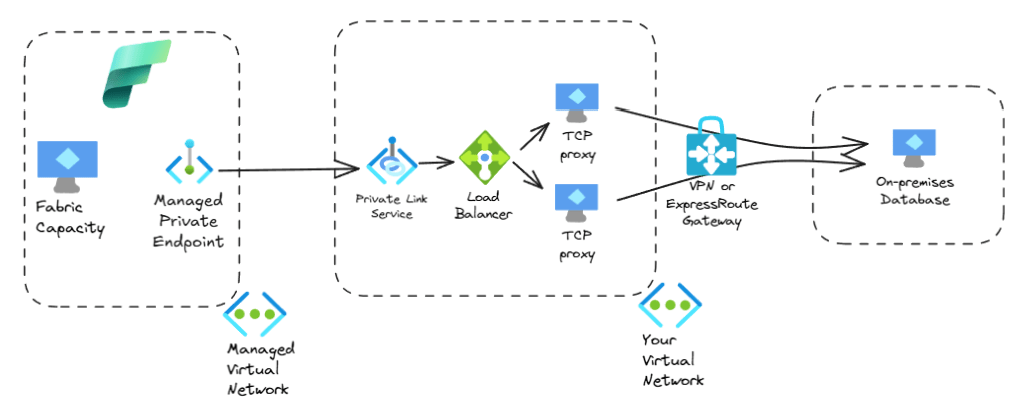
This is the “main option” described in the Fabric documentation to connect to on-premises systems via managed endpoints here. Spoiler alert: in this blog post we are going to focus on what that article calls the “alternative option”.
You can see how this architecture is not great: on one side you need to pay for these two TCP proxy VMs, but you also have to support them. You could use open source proxies such as HAproxy or Nginx, but if you need enterprise-grade support you would be looking at other options such as Kemp or Nginx Plus. Additionally, what happens when they break or need to be modified? Your data folks have enough to do already without having to troubleshoot this complexity.
Welcome to Private Link Service Direct Connect
Thankfully, Azure Private Link engineers have been busy and they have recently released a Private Link variant without the limitations described above. This is called PLS Direct Connect (dear AWS friends, sorry for the confusion but this has nothing to do with AWS Direct Connect). You can find the official docs about PLS DC here. The feature that is most interesting for our use case is that a PLS DC doesn’t need to be attached to an Azure Load Balancer any more and doesn’t need to have an Azure VM as destination, but it can forward traffic to any routable IP address.
Our architecture with PLS DC would now look much simpler, since we can get rid of the Azure load balancer and the Azure VMs:
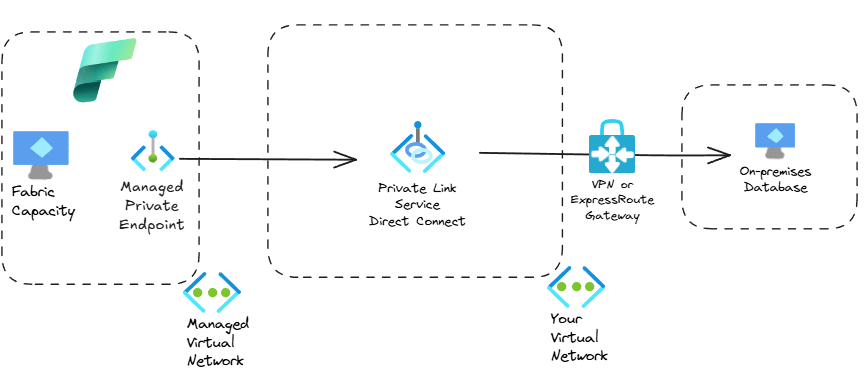
Much cleaner! For the folks reading this wondering why Microsoft didn’t do this in the first place, I have another short digression (feel free to skip this paragraph if you are not into the nitty, gritty details of Azure networking): initially, private link was a technology implemented in the Azure hypervisor, a highly customized Hyper-V: both the client side (PE) and the server side (PLS) needed to be Azure VMs, so that the SDN living in the underlying hypervisor would do its magic, in what is called the Virtual Filtering Packet (VFP) layer. However, Microsoft has recently externalized (the term that is often used is “disaggregated”) SDN functionality outside of the Azure hypervisor into dedicated, specialized SDN appliances. As a consequence, the PLS functionality can now be offloaded to these appliances, which can now forward traffic to any endpoint, regardless whether this endpoint lives on an Azure Hyper-V or not. These SDN appliances are completely transparent to you as a user, but they provide extremely useful features such as PLS Direct Connect. If you didn’t understand anything about this paragraph, don’t worry, it’s just the ramblings of a networking geek. The critical thing that you should remember is that PLS DC can greatly simplify your design.
The lab
So we rolled up our sleeves and deployed a small environment to simulate an on-premises database. We used a VM with SQL Server 2025 with the AdventureWorks sample data on Windows Server 2025 in a dedicated virtual network that would simulate on-premises, which we then connected to another virtual network where we would eventually deploy the PLS:
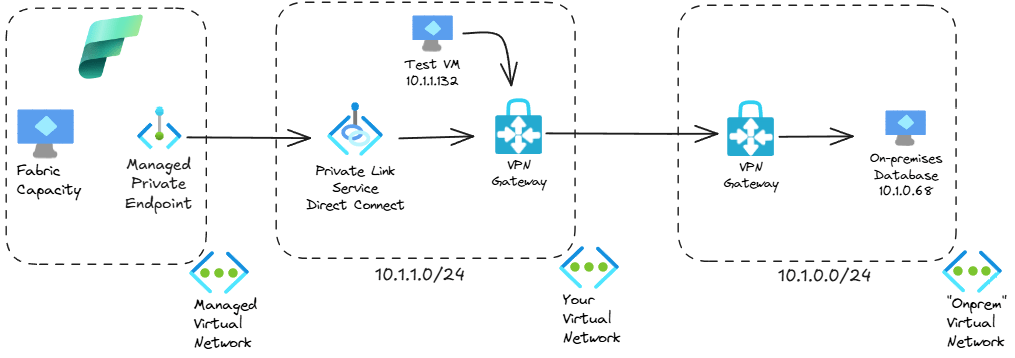
In the PLS VNet we deployed a test VM to verify that all was working fine. Although not important for the main content of this article, I always recommend testing your network step by step, so we verified that authentication and connectivity between both VNets were working. The next output shows a query using sqlcmd to get the count of all products in the database (using the -C flag to trust the server’s digital certificate):
PS C:\> sqlcmd -C -S 10.1.0.68 -U admin_local -P 'SuperSecret password' -d AdventureWorksLT2025 -Q "SELECT COUNT(*) FROM SalesLT.Product;"
-----------
        295
(1 rows affected)
Great, so our VPN works! Now to configure the PLS DC. In the official docs for Fabric you can only find a PowerShell command to do that, and in the PLS DC docs you can see that other options such as Azure CLI and Terraform are also supported. The PowerShell command that we used from the Fabric docs was as follows (only the most relevant variables here):
$destinationIP = "10.1.0.68"
New-AzPrivateLinkService `
    -Name $plsName `
    -ResourceGroupName $resourceGroupName `
    -Location $location `
    -IpConfiguration @($ipConfig1, $ipConfig2) `
    -DestinationIPAddress $destinationIP
After you create the “server side” of a Private Link connection, you need the “client side” or private endpoint. In order to create the managed private endpoint in Fabric’s managed VNet, you need to use Fabric’s REST API (not Azure). Microsoft Fabric docs don’t have a specific example with curl at the time of this writing, so here you go:
# This is Linux bash/zsh code, you need to change the variable definitions if you want to use it in Windows
# Construct URL
fabric_ws_guid="you can take your workspace's GUID from the Fabric portal URL"
url=https://api.fabric.microsoft.com/v1/workspaces/${fabric_ws_guid}/managedPrivateEndpoints
# Construct body
# Note that no subtype is required in the body when connecting to a PLS
pls_name="Your PLS's name"
rg="your Azure resource group"
subscription_id=$(az account show --query id -o tsv)
body="{
	"name": "onprem-sql-endpoint",
	"targetPrivateLinkResourceId": "/subscriptions/$subscription_id/resourceGroups/$rg/providers/Microsoft.Network/privateLinkServices/$pls_name",
	"targetFQDNs": ["sqlserver.corp.contoso.com"],
	"requestMessage": "Private connection request from Fabric to on-premises SQL"
}"
# Get Fabric API token
fabric_token=$(az account get-access-token --resource https://api.fabric.microsoft.com --query accessToken -o tsv)
# Send API request
curl -X POST $url -H "Authorization: Bearer $fabric_token" -H "Content-Type: application/json" -d $body
Note that when creating a PE to connect to a PLS DC (or to a PLS in an Azure Load Balancer) you don’t need to specify the private endpoint’s targetSubresourceType, which is present in Microsoft Fabric’s docs. Subtypes are only required when connecting to an Azure PaaS service. The target FQDN sqlserver.corp.contoso.com is also important, since we will refer to it in the next section to address the on-premises database from Fabric.
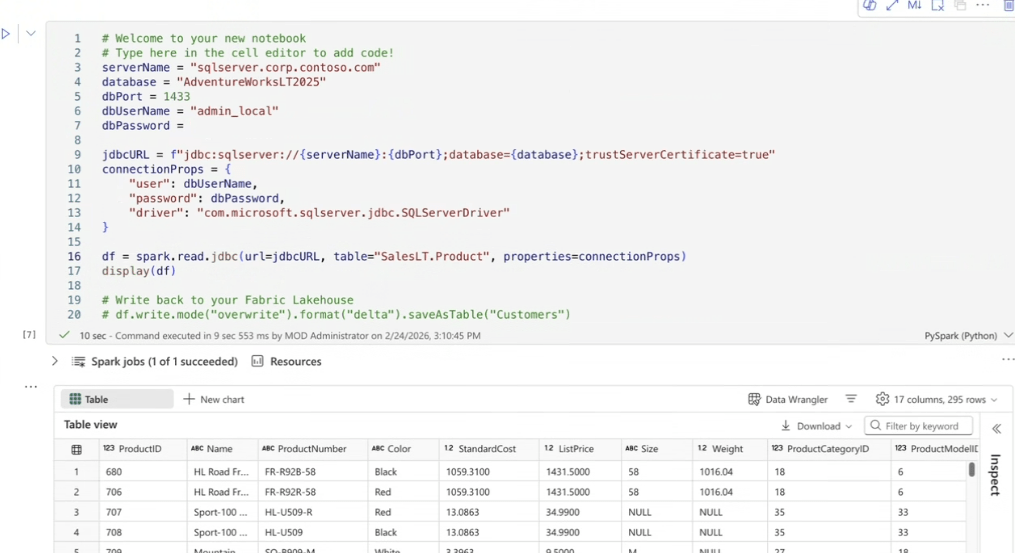
The last step is verifying our configuration from a Pyspark notebook that connects to our database and displays the products in the SalesLT.Product table. You can refer to the database using the Fully Qualified Domain Name (FQDN) used when creating the managed private endpoint, since this step also created DNS resolution. As you can see, we are able to retrieve the AdventureWorks products from the on-premises database (we use a slightly customized version of the code in here):
Conclusion
Here we described an application of Private Link Service Direct Connect (that is a mouthful) to Microsoft Fabric architectures that require access to on-premises data for Spark notebooks or OneLake ingestion. I hope I could give you an understandable explanation if you are a Fabric expert, and some extra tiny bits of knowledge if you are an Azure Networking guru. Please let me know in the comments if I forgot to mention anything, thanks for reading!
 Cloudtrooper
Hi Jose,
Here’s the documentation with the IP forwarders. I’ve had to implement it a few times for on-premises data sources of various types
https://learn.microsoft.com/en-us/azure/data-factory/tutorial-managed-virtual-network-on-premise-sql-server
Haven’t had a chance to use Private Link Direct for a customer yet but have been looking forward to it since general release 🙂
LikeLike
Thanks Chris, I updated the blog with the link!
LikeLike
As always Jose great work in going into the much needed depth of Fabric + on prem connectivity. Appreciate your efforts in putting this well written and simple to understand article.
LikeLike
[…] SDN architecture will provide many benefits to Azure users. I already described one of them in my previous post about Private Link Service Direct Connect, VNRA is another manifestation of the Azure SDN appliance. I hope I find the time to cover others […]
LikeLike
[…] Jose Moreno has a great blog on this PLS Direct Connect topic when using Fabric with a Managed VNET and Managed Private Endpoints – Check it out […]
LikeLike