
Yesterday I got an interesting question. How does subnet peering interact with ExpressRoute? A quick look into the official docs for Subnet peering checks and limitations didn’t give any answers, and Copilot wasn’t very helpful either:

So let’s dive in!
What was subnet peering again?
I wrote a blog post some time ago here, feel free to revisit. If you want the short version, it is a way of restricting a peering between two virtual networks to only specific subnets on both sides. As I explain in that article, the feature has some rough edges, but there might be use cases for which it is useful.
In this article we are going to go into one of those use cases, which is advertising only a select group of subnets via ExpressRoute. For that purpose I prepared this test bed:

The baseline: VNet peering
When the spoke VNet is peered with the hub VNet with a normal VNet peering, two things happen. Firstly, all of the subnets in the spoke will learn the routes that are being advertised from on-premises. The following output shows the effective routes in each of the spoke subnets, where you can see that both learn the routes for 1.1.1.1/32 and 2.2.2.0/24 (advertised from onprem):
❯ az network nic show-effective-route-table -n spoke2-peered-vmVMNic -g $rg -o table | grep -v None
Source                 State    Address Prefix    Next Hop Type          Next Hop IP
---------------------  -------  ----------------  ---------------------  -------------
Default                Active   10.1.2.0/24       VnetLocal
VirtualNetworkGateway  Active   2.2.2.0/24        VirtualNetworkGateway  10.2.146.34
VirtualNetworkGateway  Active   1.1.1.1/32        VirtualNetworkGateway  10.2.146.35
Default                Active   0.0.0.0/0         Internet
Default                Active   10.1.0.0/24       VNetGlobalPeering

❯ az network nic show-effective-route-table -n spoke2-nonpeered-vmVMNic -g $rg -o table | grep -v None
Source                 State    Address Prefix    Next Hop Type          Next Hop IP
---------------------  -------  ----------------  ---------------------  -------------
Default                Active   10.1.2.0/24       VnetLocal
VirtualNetworkGateway  Active   1.1.1.1/32        VirtualNetworkGateway  10.2.146.35
VirtualNetworkGateway  Active   2.2.2.0/24        VirtualNetworkGateway  10.2.146.34
Default                Active   0.0.0.0/0         Internet
Default                Active   10.1.0.0/24       VNetGlobalPeering
The second thing that happens is that Azure will advertise the ranges for both the hub and spoke VNets to on-premises. This is the routing table in the Megaport router connected to ExpressRoute, showing both routes, 10.1.0.0/24 for the hub VNet and 10.1.2.0/24 for the spoke VNet:

Please ignore the next hops for 1.1.1.1/32 and 2.2.2.0/24, I implemented those test prefixes with static routes in the Megaport connections because I was too lazy to simulate an onprem site.
What changes with subnet peering?
So if instead of peering the whole spoke VNet you only peer one of the spoke subnets, what happens? Let’s start with ExpressRoute: as you might have expected, now the VNet space is not advertised, but instead the individual subnets. In this case, only the first subnet 10.1.2.0/28 gets advertised, and the spoke VNet space (10.1.2.0/24) is not there any more:

By the way, when using subnet peering at scale you should be careful with the limit of 1,000 routes that can be advertised from Azure to on-premises over ExpressRoute. If you start using subnet peering everywhere, now every peered subnet injects its own route, making it much easier to reach that limit than before.
But what about the routes in Azure? As you would expect, the peered subnet learns the onprem routes (1.1.1.1/32 and 2.2.2.0/24):
❯ az network nic show-effective-route-table -n spoke2-peered-vmVMNic -g $rg -o table | grep -v None
Source                 State    Address Prefix    Next Hop Type          Next Hop IP
---------------------  -------  ----------------  ---------------------  -------------
Default                Active   10.1.2.0/24       VnetLocal
VirtualNetworkGateway  Active   1.1.1.1/32        VirtualNetworkGateway  10.2.146.35
VirtualNetworkGateway  Active   2.2.2.0/24        VirtualNetworkGateway  10.2.146.34
Default                Active   0.0.0.0/0         Internet
Default                Active   10.1.0.0/27       VNetGlobalPeering
I would have expected that the non-peered VNet doesn’t learn the onprem routes, but it actually does too:
❯ az network nic show-effective-route-table -n spoke2-nonpeered-vmVMNic -g $rg -o table | grep -v None
Source                 State    Address Prefix    Next Hop Type          Next Hop IP
---------------------  -------  ----------------  ---------------------  -------------
Default                Active   10.1.2.0/24       VnetLocal
VirtualNetworkGateway  Active   1.1.1.1/32        VirtualNetworkGateway  10.2.146.35
VirtualNetworkGateway  Active   2.2.2.0/24        VirtualNetworkGateway  10.2.146.34
Default                Active   0.0.0.0/0         Internet
Default                Active   10.1.0.0/27       VNetGlobalPeering
This was a bit surprising, but I guess there is a quick fix if you don’t want the VM to learn routes, like applying a route table configured to disable gateway route propagation.
Can you peer different subnets to different hubs?
The short answer is no. Subnet peering is still VNet peering with a reduced scope, but the limitation of having a single VNet peering with the setting UseRemoteGateways still applies. In this particular case, the customer wanted to send traffic from subnetA through a certain ExpressRoute circuit, and traffic from subnetB through another one, something like this:
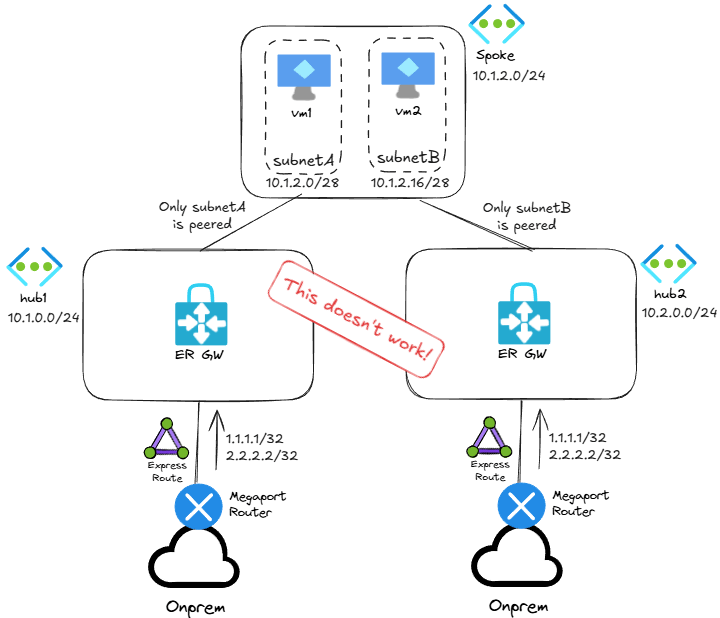
When you try to implement the above and create a second peering to a second hub, you get this error:
Code: AnotherPeeringAlreadyUsesRemoteGateways
Message: Peering spoke2-to-hub2 cannot have UseRemoteGateways flag set to true,
because another peering spoke2-to-hub already has UseRemoteGateways flag set to true.
Conclusion
Hopefully you saw that subnet peering can be useful in certain scenarios, like excluding some prefixes from being advertised to on-premises, but it is not going to be the magic wand for every scenario. What other ideas do you have with subnet peering?
 Cloudtrooper