
Welcome to the second post in the Private Link Reality Bites series! Before we begin, let me recap the existing episodes of the series:
- Private Link reality bite #1: endpoints are an illusion (control plane vs data plane)
- Private Link reality bite #2: your routes might be lying (routing in virtual network gateways)
- Private Link reality bite #3: what’s my source IP (NAT)
- Private Link reality bite #4: Azure Firewall application rules
- Private Link reality bite #5: NXDomainRedirect (forwarding failed DNS requests to the Internet)
- Private Link reality bite #6: service endpoints vs private link
In this post I am going to explore something that silently has started to work in a different way as it used to: routing in the GatewaySubnet, or how to send private link traffic from on-premises through a firewall.
For that we are going to continue using the same topology as in the first link, with one added element: an Azure Firewall. Whether you use Azure Firewall or a firewall Network Virtual Appliance from another vendor, it doesn’t matter from a routing perspective. The goal here is that traffic between the onprem systems and the private endpoints go through the firewall:
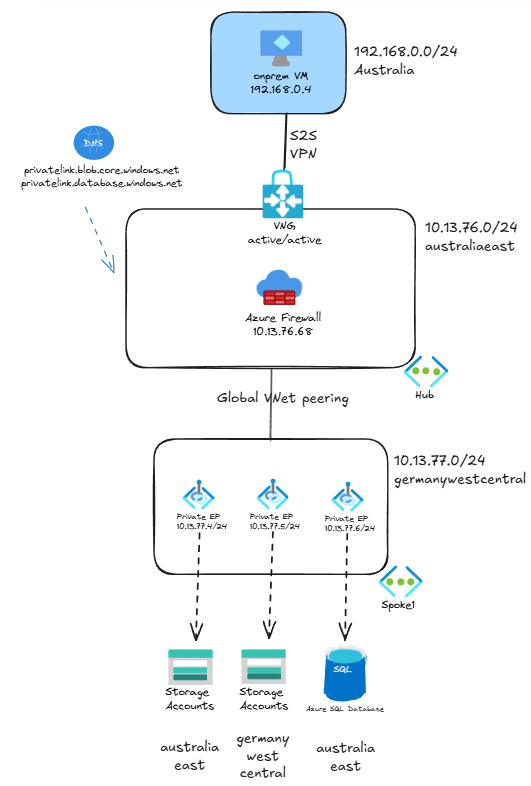
As we discussed in the first post of the series as well as in this old post from 2020, private endpoints create /32 routes in all virtual machines in the VNet where they are located and in the peered VNets. This means that the private endpoints in the spoke1 VNet will create the /32 routes in all devices located in both spoke1 and the hub, included the Virtual Network Gateways.
But what if you would like to send traffic from onprem through the firewall? Until about two years ago you only had only one possibility: using user-defined routes.
UDRs to overwrite /32 private link routes
This is the first method to redirect traffic from the GatewaySubnet to the firewall. But first of all, let’s have a look at the routes injected by Private Link. You cannot see the effective routes in the virtual network gateways, but if you create a virtual machine in the hub (which is not reflected in the test bed diagram) and associate the same route table as in the GatewaySubnet, you can inspect the effective routes for this VM’s NIC, and assume that the VPN gateways will get the same ones:
❯ az network nic show-effective-route-table -n hubvmVMNic -g $rg -o table
Source                 State    Address Prefix    Next Hop Type          Next Hop IP
---------------------  -------  ----------------  ---------------------  -------------
Default                Active   10.13.76.0/24     VnetLocal
VirtualNetworkGateway  Active   192.168.0.0/24    VirtualNetworkGateway  10.13.76.4
VirtualNetworkGateway  Active   192.168.0.0/24    VirtualNetworkGateway  10.13.76.5
Default                Active   0.0.0.0/0         Internet
[...]
Default                Active   10.13.77.0/24     VNetGlobalPeering
Default                Active   10.13.77.4/32     InterfaceEndpoint
Default                Active   10.13.77.5/32     InterfaceEndpoint
Default                Active   10.13.77.6/32     InterfaceEndpoint
In the output above some system routes that are not relevant for our discussion have been removed for simplicity. You can see at the bottom the /32 routes that each private endpoint will inject into every system in the spoke1 and hub virtual networks.
If you configure user defined routes for exactly the same prefix as the routes injected by private link, the former will override the latter. For example, in the topology above this route table is attached to the GatewaySubnet in the hub:
❯ az network route-table route list --route-table-name $rt_name -o table -g $rg
AddressPrefix    HasBgpOverride    Name           NextHopIpAddress    NextHopType       ProvisioningState    ResourceGroup
---------------  ----------------  -------------  ------------------  ----------------  -------------------  ---------------
10.13.77.4/32    False             endpoint1      10.13.76.68         VirtualAppliance  Succeeded            plink-azure
10.13.77.5/32    False             endpoint2      10.13.76.68         VirtualAppliance  Succeeded            plink-azure
10.13.77.6/32    False             endpoint3      10.13.76.68         VirtualAppliance  Succeeded            plink-azure
The routes endpoint1, endpoint2 and endpoint3 match exactly the routes injected by private link, and consequently will override them and send traffic to the Azure Firewall (whose private IP address is 10.13.76.68). After doing configuring these routes, we can traceroute, I mean mtr, from the onprem virtual machine to one of the private endpoints. Let’s take the database this time:
jose@onpremvm:~$ mtr -T -P 1433 sqltest1138australia.database.windows.net
                                              My traceroute  [v0.95]
onpremvm (192.168.0.4) -> sqltest1138australia.database.windows.net (10.13.77.6)         2025-01-19T17:56:32+0000
Keys:  Help   Display mode   Restart statistics   Order of fields   quit
                                                                         Packets               Pings
 Host                                                                  Loss%   Snt   Last   Avg  Best  Wrst StDev
 1. 10.13.77.6                                                          0.0%    38    3.2   3.3   2.3   7.9   0.9
Mmmh, not good. The firewall is nowhere to be seen! Why is that? I am positive that this configuration would have worked around two years ago, but something has changed in Azure, and these /32 routes are not enough any more in certain situations for the GatewaySubnet (active/active VPN gateway being one of them, not sure if this holds true for active/passive VPN gateways or ExpressRoute gateways).
This behavior is not documented for standalone virtual network gateways as far as I could find. In the case of Virtual WAN you do find a little note in the docs that hints at this:
Lastly, and regardless of the type of rules configured in the Azure Firewall, make sure Network Policies (at least for UDR support) are enabled in the subnet(s) where the private endpoints are deployed. This ensures traffic destined to private endpoints doesn’t bypass the Azure Firewall.
Which takes us to the next section…
Enabling network policies for private endpoints
And now is the time to look into the second way of sending traffic from the GatewaySubnet to the firewall, which became possible in August 2022. You can prevent private endpoints from injecting those /32 routes if you enable something called private endpoint policies in the subnet where the private endpoints are located:
vnet_name=spoke1
subnet_name=ep
az network vnet subnet update -n $subnet_name --vnet-name $vnet_name -g $rg --ple-network-policies RouteTableEnabled -o none
You can enable private endpoint policies for routing, for network security groups (NSGs) or for both. In this example I only need the policies for routing, which are called RouteTableEnabled (in the portal it is more intuitive). Note that this setting impacts all of the VMs with access to the private endpoint, so it is more invasive than the UDR option described in the previous section scoped to just the subnets where you apply your routing table.
Now we can simplify the routing table, we only need a single summary route:
❯ az network route-table route list --route-table-name $rt_name -o table -g $rg
AddressPrefix    HasBgpOverride    Name           NextHopIpAddress    NextHopType       ProvisioningState    ResourceGroup
---------------  ----------------  -------------  ------------------  ----------------  -------------------  ---------------
10.13.77.0/24    False             endpoint-vnet  10.13.76.68         VirtualAppliance  Succeeded            plink-azure
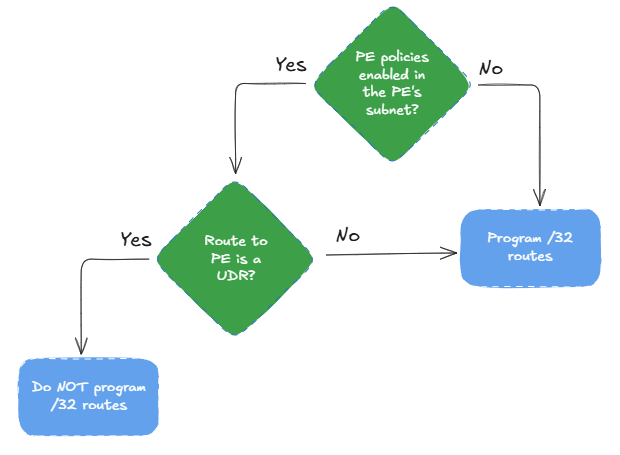
What the private endpoint policies do is essentially the following: if there is a UDR sending traffic addressed to the private endpoints, do not plumb the /32 system routes at all. If we now apply the same route table that we had in the GatewaySubnet to the subnet in the hub where our test VM is, we can now see that the /32 system routes have disappeared from the effective routes:
❯ az network nic show-effective-route-table -n hubvmVMNic -g $rg -o table
Source                 State    Address Prefix    Next Hop Type          Next Hop IP
---------------------  -------  ----------------  ---------------------  -------------
Default                Active   10.13.76.0/24     VnetLocal                                                                                                        VirtualNetworkGateway  Active   192.168.0.0/24    VirtualNetworkGateway  10.13.76.4
VirtualNetworkGateway  Active   192.168.0.0/24    VirtualNetworkGateway  10.13.76.5
Default                Active   0.0.0.0/0         Internet                                                                                                         Default                Active   10.0.0.0/8        None
[...]
User                   Active   10.13.77.0/24     VirtualAppliance       10.13.76.68
Default                Invalid  10.13.77.0/24     VNetGlobalPeering
Default                Invalid  10.13.77.4/32     InterfaceEndpoint
Default                Invalid  10.13.77.5/32     InterfaceEndpoint
Default                Invalid  10.13.77.6/32     InterfaceEndpoint
Since the active route for the endpoints is now a UDR and not the system route any more, the fact that endpoint policies are enabled invalidates the /32 routes. In other words, if you invalidate the system route to the endpoints, you invalidate the /32 endpoint routes as well. Let’s think about this, because it is not trivial to understand. You could consider this decision tree:
To show what you should not do, let’s change the route in the route table to a more generic one, and use a /8 mask instead of /24:
❯ az network route-table route list --route-table-name $rt_name -g $rg -o table
AddressPrefix    HasBgpOverride    Name           NextHopIpAddress    NextHopType       ProvisioningState    ResourceGroup
---------------  ----------------  -------------  ------------------  ----------------  -------------------  ---------------
10.0.0.0/8       False             endpoint-vnet  10.13.76.68         VirtualAppliance  Succeeded            plink-azure
And let’s look at the effective routes:
❯ az network nic show-effective-route-table -n hubvmVMNic -g $rg -o table
Source                 State    Address Prefix    Next Hop Type          Next Hop IP
---------------------  -------  ----------------  ---------------------  -------------
Default                Active   10.13.76.0/24     VnetLocal
VirtualNetworkGateway  Active   192.168.0.0/24    VirtualNetworkGateway  10.13.76.4
VirtualNetworkGateway  Active   192.168.0.0/24    VirtualNetworkGateway  10.13.76.5
Default                Active   0.0.0.0/0         Internet
[...]
User                   Active   10.0.0.0/8        VirtualAppliance       10.13.76.68
Default                Active   10.13.77.0/24     VNetGlobalPeering
Default                Active   10.13.77.4/32     InterfaceEndpoint
Default                Active   10.13.77.5/32     InterfaceEndpoint
Default                Active   10.13.77.6/32     InterfaceEndpoint
As you can see, now the best route to the private endpoints is not the UDR for 10.0.0.0/8, but the VNet peering system route for 10.13.77.0/24 (since it is more specific). Due to the second question in the decision tree above, since this /24 route is not a UDR, the /32 routes from the endpoints will be programmed again.
I will revert the route table to where it was before (using the exact /24 prefix), so that the /32 routes are not programmed altogether. This is much more convenient, because you don’t need to add any route every time that a new private endpoint is added to the network. After doing this, we can check the traceroute again:
jose@onpremvm:~$ mtr -T -P 1433 sqltest1138australia.database.windows.net
                                                 My traceroute  [v0.95]                                                 onpremvm (192.168.0.4) -> sqltest1138australia.database.windows.net (10.13.77.6)               2025-01-20T18:21:25+0000
Keys:  Help   Display mode   Restart statistics   Order of fields   quit
                                                                               Packets               Pings
 Host                                                                        Loss%   Snt   Last   Avg  Best  Wrst StDev
 1. 10.13.76.69                                                               0.0%    28    2.4  48.1   2.4 1051. 197.4
    10.13.76.70
 2. 10.13.77.6                                                                0.0%    27   19.2  10.2   3.1  35.7   7.5
You can see that in the traceroute there is now one hop more. Wait a minute, 10.13.76.68 was the IP address of the firewall, so what are those .69 and .70? Azure Firewall is actually made out of two or more virtual machines under the covers, and these are the IP addresses of the actual Azure Firewall instances which are serving traffic. Two is the minimum number of instances in Azure Firewall, but there could be more when it auto-scales.
Firewall logs
You can check as well the logs in the firewall to verify that the traffic is hitting one of the rules. In this case I have configured the firewall with a network rule (further posts in this series will explore application rules):
❯ fw_query='AzureDiagnostics | where TimeGenerated > ago(10m) | project TimeGenerated, Category, SourceIP, DestinationIp_s, Fqdn_s, Action_s'
❯ az monitor log-analytics query -w $logws_customerid --analytics-query $fw_query -o table
Action_s    Category         DestinationIp_s    Fqdn_s    SourceIP     TableName      TimeGenerated
----------  ---------------  -----------------  --------  -----------  -------------  ---------------------------
Allow       AZFWNetworkRule  10.13.77.6                   192.168.0.4  PrimaryResult  2025-01-20T18:18:11.925475Z
Allow       AZFWNetworkRule  10.13.77.6                   192.168.0.4  PrimaryResult  2025-01-20T18:20:59.455482Z
Allow       AZFWNetworkRule  10.13.77.6                   192.168.0.4  PrimaryResult  2025-01-20T18:20:37.432681Z
Allow       AZFWNetworkRule  10.13.77.6                   192.168.0.4  PrimaryResult  2025-01-20T18:20:59.355915Z
Allow       AZFWNetworkRule  10.13.77.6                   192.168.0.4  PrimaryResult  2025-01-20T18:21:00.30664Z
Allow       AZFWNetworkRule  10.13.77.6                   192.168.0.4  PrimaryResult  2025-01-20T18:21:01.308064Z
Allow       AZFWNetworkRule  10.13.77.6                   192.168.0.4  PrimaryResult  2025-01-20T18:21:02.310114Z
As you can see with this simple query, a network rule in the Azure Firewall is allowing the traffic between the onprem virtual machine (192.168.0.4) and the SQL Server endpoint (10.13.77.6), which proofs that traffic is now correctly being sent through the firewall.
Conclusion
There seems to have been a behavior change in the way with which user-defined routes do not overwrite any more the /32 routes injected by private link into certain gateway configurations (this post has tested active/active VPN gateways). This means that unless you have enabled private endpoint policies for routing in your endpoint subnet, traffic from on-premises networks to private endpoints in Azure might be bypassing the firewall in the hub.
If you want to make sure that all traffic goes through the firewall, you should enable routing policies in your private endpoint subnets. However, as with any other routing change, you should carefully think about the consequences, since you might be sending additional traffic unintentionally through your firewall.
In the next post we will deep dive in how to find out the source IP address that the client uses to access the private endpoint and the impact of Network Address Translation (NAT).
 Cloudtrooper
[…] the last post on this series about routing for private endpoints, in this one we are going to dive into how to troubleshoot the source IP […]
LikeLike
[…] Private Link reality bite #2: your routes might be lying (routing in virtual network gateways) […]
LikeLike
[…] Private Link reality bite #2: your routes might be lying (routing in virtual network gateways) […]
LikeLike
[…] Private Link reality bite #2: your routes might be lying (routing in virtual network gateways) […]
LikeLike
very good explanation. Thanks!
LikeLike
Happy you liked it Michał!
LikeLike
[…] Private Link reality bite #2: your routes might be lying (routing in virtual network gateways) […]
LikeLike
Hi Jose
Not sure in which post of the private link series should I put the below questions:
1/ for traffic coming from on-prem via Express Route to Private Endpoint, is there a tunnel built from ?ER VNG? to destination service ?
2/ After enabling VNet flow logs in hub VNet, I still see real src IP address for flows going to private endpoint (the set-up is private link service to a VM in another Azure tenant). Is that expected ?
3/ More surprising I see flows originated from PE IP address to on-prem IP addresses in VNet flow logs. I thought that was impossible as per PE definition (no flow initiated from PE). What did I get wrong please?
Thanks
LikeLike
Hey there!
1/ Yes, the tunnel is built from the VNG to the endpoint.
2/ So the flow is VM_in_spoke -> PE_in_hub? You would only capture this traffic in the spoke. If the flow is VM_in_spoke -> FW_in_hub -> PE_in_spoke, and you capture Flow Logs in the FW’s subnet, I think you would see both packets, before and after hitting the firewall.
3/ Yes, the PE will not initiate any flow. This might be an error in the Flow Log collection process.
LikeLike
Hey Jose
Thanks so much for your answers.
2/ The flow is VNG in hub -> PE in spoke -> Private Link service to a VM in spoke of another Azure tenant
LikeLike
Thanks for clarifying! So you are seeing traffic sourced from the original VM (unless the VNG is a VPN GW with NAT configured), and addressed to the PE’s IP, right?
LikeLike
Exactly, this is an Express Route VNG in this case so no NAT.
LikeLike
Hi Jose
I hope everything’s OK for you. One of my colleague closely following your blog posts made me realize you did not post a while.
If I may, I have a question related to PE /32 routes. As per my tests, /32 PE routes originating from spoke VNet do not appear in VWAN vhub route table effective routes. Is that the /32 routes are prevented from being advertised along the VNet connection to vhub? Or they are well propagated but are not shown in effective routes? I could not find a clear answer on the net.
Thanks
LikeLike
Hey there! Yes, all good, thanks for asking. The past few months have been rather agitated in Microsoft. The /32 are never advertised, they are programmed in the VMs. You might see those /32 entries in the effective firewall routes, if you happen to be using Routing Intent (not sure though).
LikeLike
Thanks a lot Jose for your answer and reminder /32 routes are programmed. This is SDN, not grand pa on prem network 😉
1/ Is it OK to say PE /32 route gets programmed into VM/VMSS NIC routes belonging to the same VNet as PE or to a peered VNet, when PE Network Policy is disabled or /32 not overriden?
2/ Is that why you thought peered VNet azure firewall might get these /32 route programmed?
3/ Yet in my test this is not the case, with Routing intent enabled, I don’t see the /32 route programmed in az firewall effective routes.
4/ Side question: how shall one disable inter-hub routing policy (which is another name for routing intent, right?) once activated? It is always greyed out in portal once activated, whatever private or internet trafic policy setting.
LikeLike
5/ does private endpoint network policy matter as much in a vwan environment compared to traditional hub vnet environment if the /32 routes don’t get programmed in vhub in your opinion?
I realize I’m asking a lot of questions, sorry for that
LikeLike
Thanks a lot Jose !
LikeLike
No worries! Of course network policies play a role, a Virtual WAN VNet connection is after all a VNet peering, so enabling/disabling policies should have similar effects. Check Secure traffic destined to private endpoints in Azure Virtual WAN | Microsoft Learn.
On your other questions:
1/ Is it OK to say PE /32 route gets programmed into VM/VMSS NIC routes belonging to the same VNet as PE or to a peered VNet, when PE Network Policy is disabled or /32 not overriden?
Jose> Yes, althouth it is not enough enabling PE network policies to prevent the /32 routes from being programmed, you still need an UDR.
2/ Is that why you thought peered VNet azure firewall might get these /32 route programmed?
Jose> Yepp
3/ Yet in my test this is not the case, with Routing intent enabled, I don’t see the /32 route programmed in az firewall effective routes.
Jose> Thanks for trying that. Do you see traffic hitting the firewall? You actually only need those /32 in the gateway subnet, not in the firewall subnet, so the routes might be right.
4/ Side question: how shall one disable inter-hub routing policy (which is another name for routing intent, right?) once activated? It is always greyed out in portal once activated, whatever private or internet trafic policy setting.
Jose> I believe that you just select “None” for the private and Internet policies.
LikeLike